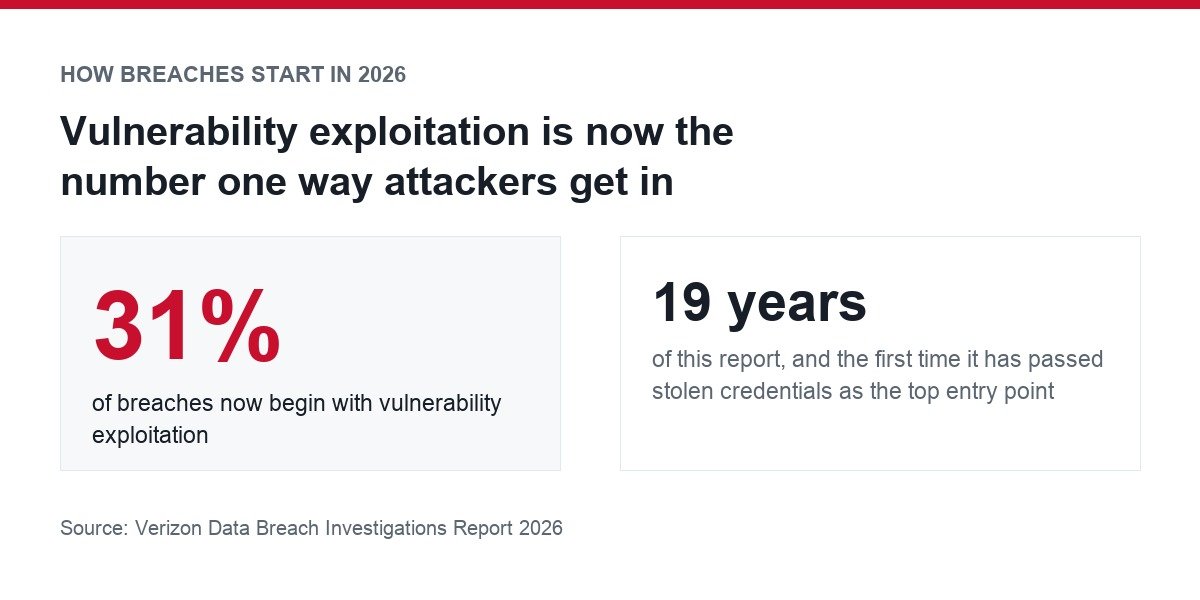
Something changed in cloud security this year, and most advice has not caught up with it. For the first time in the 19 years Verizon’s 2026 Data Breach Investigations Report has been published, attackers broke in more often through unpatched software than through stolen passwords. Vulnerability exploitation now accounts for 31 percent of breaches.
The cost moved too. IBM’s Cost of a Data Breach Report 2026 puts the global average breach at USD 4.99 million, a 12 percent rise and a record high, driven by higher detection, escalation and lost business costs.
That reframes what good practice looks like. Strong passwords still matter, but a patching schedule now matters more. This guide covers what the current data says goes wrong, who is responsible for fixing what, and the specific controls that close the gaps attackers are actually using.
What the 2026 Breach Data Shows
Four numbers from this year’s two most-cited reports set the context for everything below.
| Finding | Figure | Source |
|---|---|---|
| Breaches starting with vulnerability exploitation | 31% | Verizon DBIR 2026 |
| Global average cost of a breach | USD 4.99 million | IBM 2026 |
| Year-on-year rise in breach cost | 12%, a record high | IBM 2026 |
| Rise in AI-driven attacks | 56% | IBM 2026 |
| Rise in successful mobile social engineering | 40% | Verizon DBIR 2026 |
Two themes run through those figures. Attackers have shifted from tricking people toward exploiting systems, and AI has compressed the time between a flaw becoming public and being exploited from months to hours. A patch cycle built around a monthly maintenance window was designed for a slower threat.
Who Secures What in the Cloud
Most damaging cloud incidents are not failures of the provider. They are failures of the customer doing something the provider was never responsible for, usually because nobody checked where the line sits.
AWS calls this the shared responsibility model, and it splits neatly. The provider handles security of the cloud: the hardware, software, networking and physical facilities that run the services. You handle security in the cloud: your data, your access rules, your configuration.
The important detail is that your share is not fixed. AWS states that customer responsibility is determined by which services you select, because that decides how much configuration work falls to you. Rent a managed database and the provider patches the engine. Run your own database on a virtual machine and patching is yours.
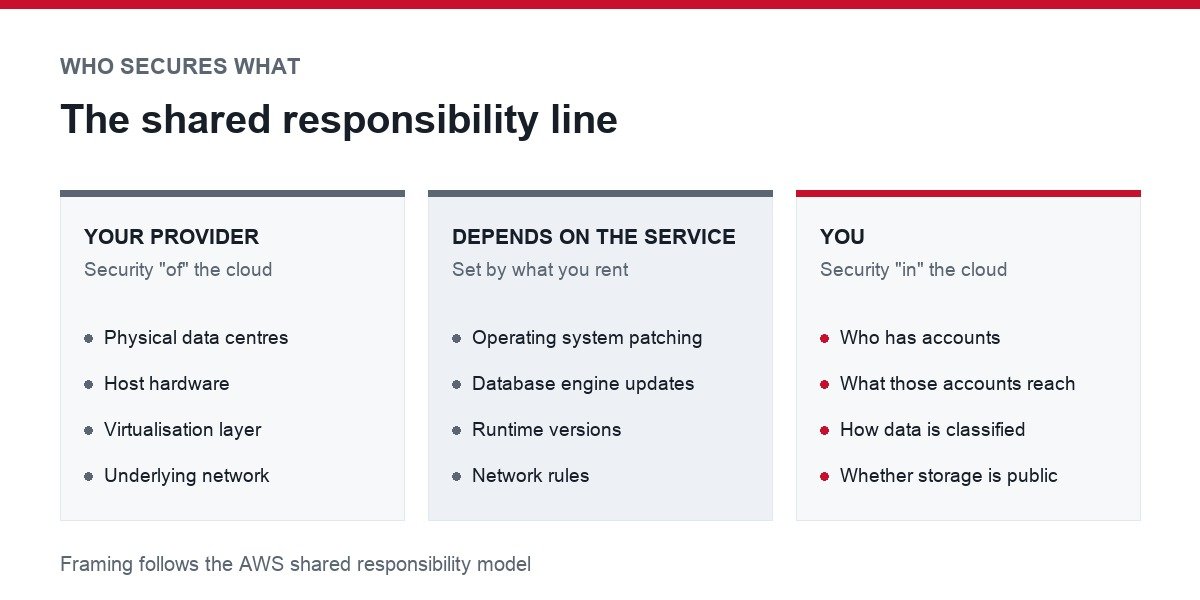
- Always the provider’s job: physical data centres, host hardware, the virtualisation layer, the underlying network.
- Always your job: who has accounts, what those accounts can reach, how data is classified, whether storage is public.
- Depends on the service: operating system patching, database engine updates, runtime versions, network rules.
Write down which of those three buckets each system falls into. That single exercise finds more real risk than any tool, because the gaps are almost always things both sides assumed the other was covering.
The Cloud Failures That Cause Real Breaches
The failure modes are consistent year to year, and none of them require a sophisticated attacker.
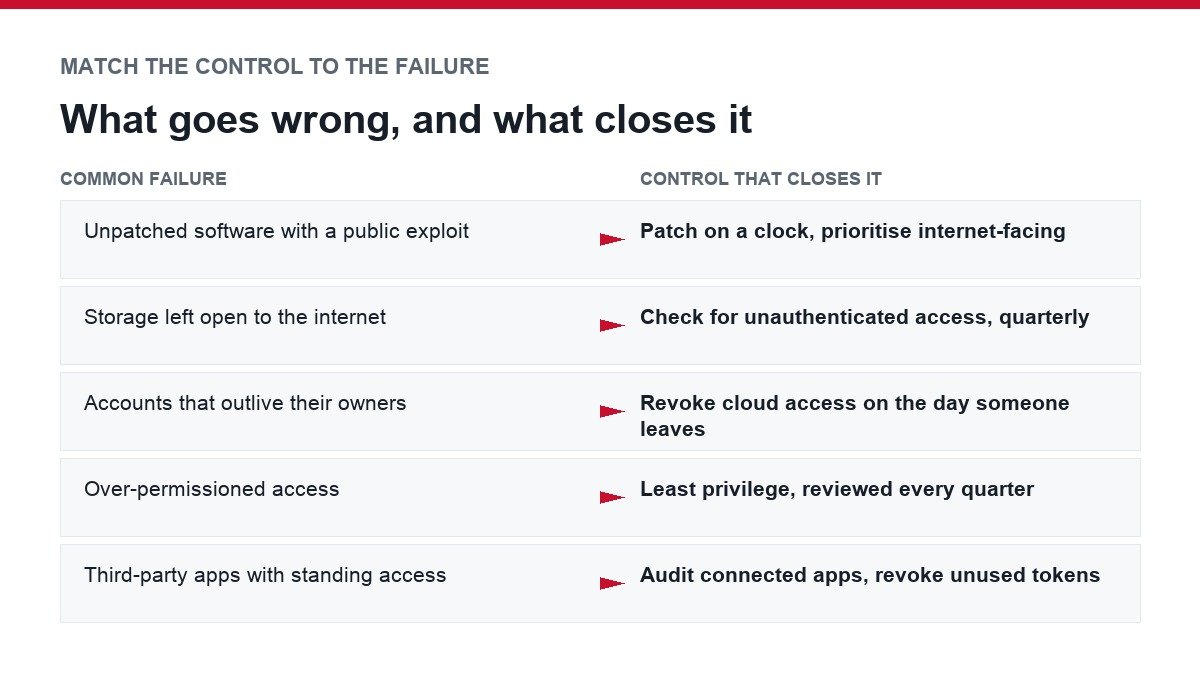
Unpatched software with a public exploit
This is now the single most common way in. Once a vulnerability is disclosed, exploit code circulates quickly, and the Verizon data shows AI has shortened that window further. Any internet-facing system running a version you have not updated is the most likely point of entry in your estate.
Storage left open to the internet
Object storage that is readable without authentication remains one of the easiest mistakes to make and one of the hardest to notice, because nothing breaks. The system works perfectly. It simply works for everyone.
Accounts that outlive the people who owned them
Leavers, contractors and service accounts accumulate. Each one is a valid credential with no one watching it. Dormant admin accounts are worth more to an attacker than a current employee’s login because nobody notices the sign-in.
Over-permissioned access
Broad permissions granted for convenience turn a single compromised account into access across the whole environment. The damage from a breach is set less by how the attacker got in than by what that first account could reach.
Third-party apps with standing access
Connected apps and OAuth integrations hold tokens into your data long after anyone uses them. A breach at a vendor becomes a breach at you, through access you granted and forgot.
Controls That Close Those Gaps
Each of these maps to a failure above. That is the point: pick controls that answer a documented failure mode rather than a vendor’s feature list.
Patch on a clock, not when convenient
Given that unpatched software is now the leading entry point, treat patching as a scheduled commitment with an owner and a deadline rather than something done between projects. Prioritise anything internet-facing, then anything holding data. Where the provider patches for you, prefer managed services precisely because it removes the task.
Use phishing-resistant multi-factor authentication
Multi-factor authentication is standard advice, but not all of it is equal. Codes sent by SMS can be intercepted or socially engineered, which matters more now that mobile-focused social engineering is succeeding 40 percent more often. App-based authenticators are better, and hardware security keys are better still because they will not authenticate to a lookalike domain.
Passwords still carry the account underneath, so the basics apply. Our guide on creating a strong password covers what actually makes one hard to break.
Grant least privilege and review it
Give each account the narrowest permissions that let the work happen, and re-check quarterly. Pay particular attention to service accounts and API keys, which are rarely reviewed and often over-permissioned because a broad grant was the quickest way to make something work.
Remove access the day someone leaves
Offboarding should revoke cloud access, not just email. Keep a list of every system a role touches so removal is a checklist rather than an act of memory.
Encrypt data and know who holds the keys
Encryption at rest and in transit is close to default across major providers now, so the meaningful question is key custody. Provider-managed keys are simpler; customer-managed keys give you the ability to revoke access independently. Choose deliberately, and record the choice.
Audit connected apps and tokens
List every third-party integration with access to your cloud data, what scope it holds, and whether anyone still uses it. Revoke the rest. This is a short job that closes an entire class of supply-chain exposure.
Make logging useful before you need it
Turn on audit logging, keep it somewhere an attacker cannot edit, and set alerts for the handful of events that matter: new admin accounts, permission changes, storage becoming public, logins from unexpected locations. Logs nobody reads are only useful after the fact.
A Cloud Security Checklist You Can Run This Week
In rough order of payoff against the current threat data:
- List everything internet-facing and confirm each item is on a patch schedule with a named owner.
- Enable multi-factor authentication on every administrative account, using an app or hardware key rather than SMS.
- Check whether any storage bucket, share or database is reachable without authentication.
- Pull a list of all accounts and disable any belonging to someone who has left.
- Review third-party app integrations and revoke every token nobody uses.
- Confirm audit logging is on and that alerts reach a person, not an unread inbox.
- Test that you can actually restore from backup, rather than assuming the backup works.
The last item is the one most often skipped and the one that decides whether a ransomware incident is a bad week or a closure. A backup you have never restored is a hypothesis.
What Changes When Attackers Use AI
IBM recorded a 56 percent increase in AI-driven attacks, and Verizon describes AI compressing the gap between disclosure and exploitation from months to hours. Neither finding introduces a new category of attack. Both make the existing ones faster and cheaper to run at scale.
The practical consequences are narrow and specific. Patch windows that assumed weeks of grace no longer have them. Phishing that used to be identifiable by clumsy writing now reads cleanly, so training people to spot bad grammar has stopped working, and the defence shifts to controls that do not depend on human judgement, such as hardware keys.
There is also a new internal risk worth naming: staff putting company data into AI tools the business has not approved. That is a data-handling question rather than a hacking one, and it is solved with a clear written policy about what may be pasted where.
Where Small Teams Should Start
Small businesses face the same attacks with none of the staffing. Three decisions carry most of the benefit:
- Prefer managed services. Every component the provider patches is one you cannot forget to patch.
- Buy hardware security keys for admin accounts. A handful of keys protects the accounts that could lose you the business.
- Write down who has access to what. A spreadsheet beats no record, and it makes offboarding and quarterly review possible at all.
Beyond that, be deliberate about which providers hold your data in the first place. Our comparison of cloud storage and file-sharing services covers what to look for, and the wider habits in our guide on protecting your privacy online apply to personal accounts that often hold business data too.
Frequently Asked Questions
What is the biggest cloud security risk right now?
Unpatched software. Verizon’s 2026 report found 31 percent of breaches begin with vulnerability exploitation, which passed stolen credentials for the first time in the report’s 19-year history.
That is a change from previous years, when credential theft led. Patching an internet-facing system is now the highest-value routine task in most environments.
Is the cloud provider responsible if my data leaks?
Usually not. Providers secure the infrastructure, which AWS describes as security of the cloud. You are responsible for security in the cloud, meaning your data, access rules and configuration.
Nearly all publicised cloud leaks trace to customer-side configuration, most often storage left open or permissions granted too broadly.
How much does a data breach actually cost?
IBM’s 2026 report puts the global average at USD 4.99 million, up 12 percent year on year and the highest figure it has recorded. The increase came from higher detection, escalation and lost business costs.
That average spans large enterprises, so the number is not a forecast for a small company. The direction is the useful part.
Is multi-factor authentication enough on its own?
No, and the type matters. SMS codes can be intercepted or talked out of a target, which is riskier now that mobile social engineering is succeeding 40 percent more often than last year.
Use an authenticator app or, for administrative accounts, a hardware security key. Then pair it with patching and least privilege, because MFA does nothing about an unpatched server.
How often should cloud access be reviewed?
Quarterly for a small team, and immediately whenever somebody leaves. The review should cover human accounts, service accounts, API keys and third-party app integrations, since the last three are the ones that quietly accumulate.