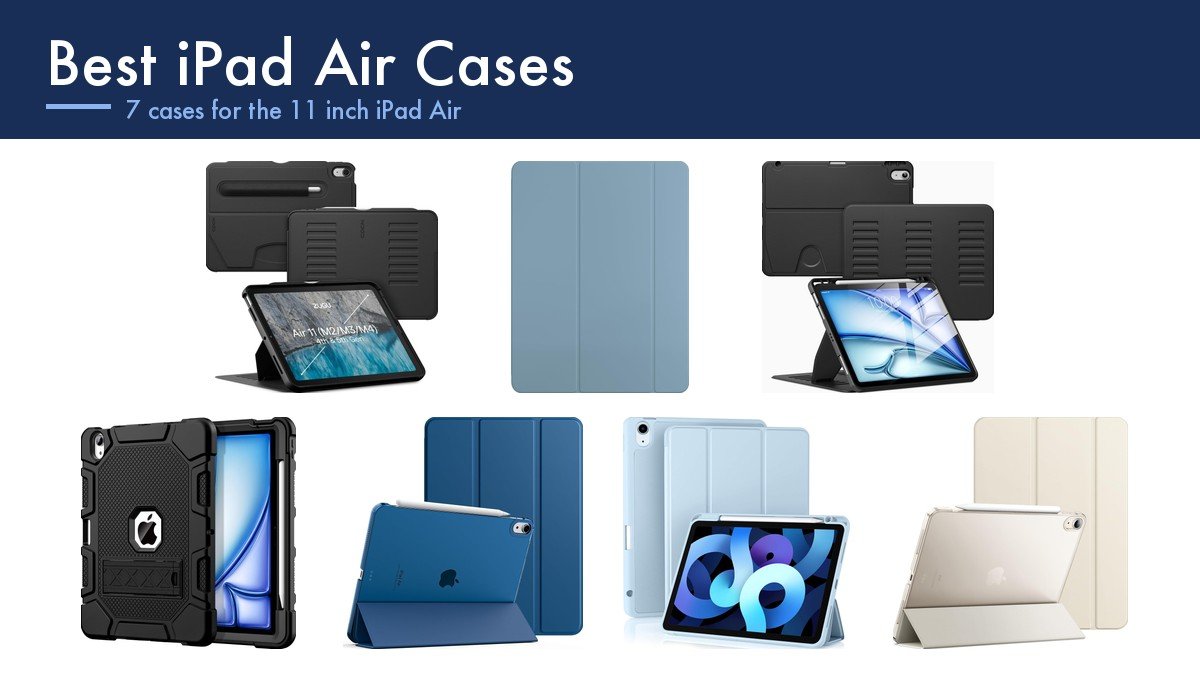
There is one mistake that ruins the best iPad Air cases for the person who buys them, and it has nothing to do with protection. The 11 inch iPad Air and the plain 11 inch iPad are almost the same size, so cases cross over on the listings, but only the Air charges an Apple Pencil magnetically on its side edge. Buy a case cut for the wrong one and the Pencil either will not sit in the groove or will not charge in it. The plain iPad is the other half of that confusion, and our guide to the best iPad cases covers it.
Past that, the useful comparison is the stand. These cases range from a single fixed viewing angle to an eight-position magnetic stand, and the number of angles decides whether the iPad is comfortable on a lap, a kitchen counter and a desk or only on one of them. Weight is the counterweight to all of it, because an iPad Air is light and most cases hand that back.
Best iPad Air Cases Compared on Stand Angles, Pencil and Protection
Read the stand column against where you actually use the iPad, then check the Pencil column before you order anything.
| Case | Stand | Pencil | Protection | Notable |
|---|---|---|---|---|
| ZUGU | 8 angle magnetic stand | Storage pocket on the back | 5 ft drop protection | 2 year warranty plus one iPad repair covered |
| Apple Smart Folio | Sliding, adjustable | Side charging unobstructed | Front and back cover | Magnetic attach, four colours |
| VIKESI | Three brackets rather than one or two | Holder built in | Soft back | Claims 0.5 lb lighter than similar cases |
| Azzsy Heavy Duty | Pop-out kickstand | Holder charges Pencil Pro and 2nd gen | Shockproof, rugged | Polycarbonate over anti-skid silicone |
| TiMOVO | Tri-fold front cover | Side charging accessible | PU front, hard PC back | Frosted translucent back |
| Akkerds | Folio stand | Holder charges Pencil Pro, USB-C and 2nd gen | PU leather over TPU | Auto sleep and wake magnetic strip |
| JETech | Two standing positions | Supports Pencil Pro and USB-C | Synthetic exterior, smooth interior | States plainly it does not fit the plain iPad |
Pencil Charging, Stand Angles and Why the Model Number Matters
The iPad Air has had the same 11 inch footprint across the M2, M3 and M4 generations and the 10.9 inch 4th and 5th generations before them, which is why every case here lists five or six model numbers. Apple publishes the identifier under Settings, General, About, Model Number, and checking it takes ten seconds against a return that takes a week.
The Apple Pencil situation is the trap. The Air supports the Pencil Pro and the USB-C Pencil, and the Pro attaches and charges magnetically on the long edge. JETech states outright on its listing that this case is not for the plain iPad because those models do not support magnetic Pencil charging, which is the clearest warning any of these sellers gives. A case for the Air leaves that edge open or cuts a channel through it; a case for the plain iPad has no reason to.
Stand angles are where the real money goes. One fixed groove is fine at a desk and useless on a lap. A magnetic multi-position stand holds the iPad at whatever angle the light and your neck require, and that is what separates the ZUGU from the rest here. If typing is the point rather than propping, our guide to the best ipad keyboards covers the folios with trackpads instead. The same is true a size down, in our guide to the best iPad mini cases.
1. ZUGU: Eight Stand Angles and a Warranty That Covers Your iPad

ZUGU does two things nothing else in this guide does. The stand is magnetic with eight separate angles rather than two or three grooves, which means it works on a desk, on a lap, flat for drawing and upright for a film, and it holds at each one rather than sagging.
The second is the warranty. ZUGU rates the case to five feet of drop protection, offers free 30 day returns and a two year warranty, and covers the fee for one iPad repair if the device is damaged while in the case. That is a company backing its own drop rating with money, which almost nobody in this category does. There is a Pencil storage pocket on the back and it supports Pencil Pro and second generation wireless charging.
What it does well
- Eight-angle magnetic stand, the most adjustable here.
- Five foot drop protection with a two year warranty.
- ZUGU covers the fee for one iPad repair.
- Pencil storage pocket on the back.
What to know before buying
- The most expensive case in this guide.
- Thicker than the slim folios.
- Pencil sits in a back pocket rather than a side channel.
2. Apple Smart Folio: The Thinnest Cover, With a Stand That Slides

Apple’s own folio is the one to buy if thinness is the whole point. It covers front and back, attaches magnetically rather than clipping on, and adds less bulk than anything else here because it is a cover rather than a shell.
The current version has a sliding design rather than fixed fold positions, so the viewing angle adjusts continuously instead of snapping to two presets. It wakes the iPad when opened and sleeps it when closed, which saves real battery over months. It comes in four colours. What it does not do is protect the corners or the edges in a drop, so it is the right case for an iPad that lives on a desk and the wrong one for a bag full of keys.
What it does well
- Thinnest option here by a clear margin.
- Sliding stand adjusts continuously rather than in steps.
- Magnetic attachment, nothing to clip over the edges.
- Automatic wake and sleep.
What to know before buying
- No corner or edge protection at all.
- No Pencil holder.
- Costs more than third-party cases that protect more.
3. Azzsy Heavy Duty: The Rugged One That Still Charges the Pencil
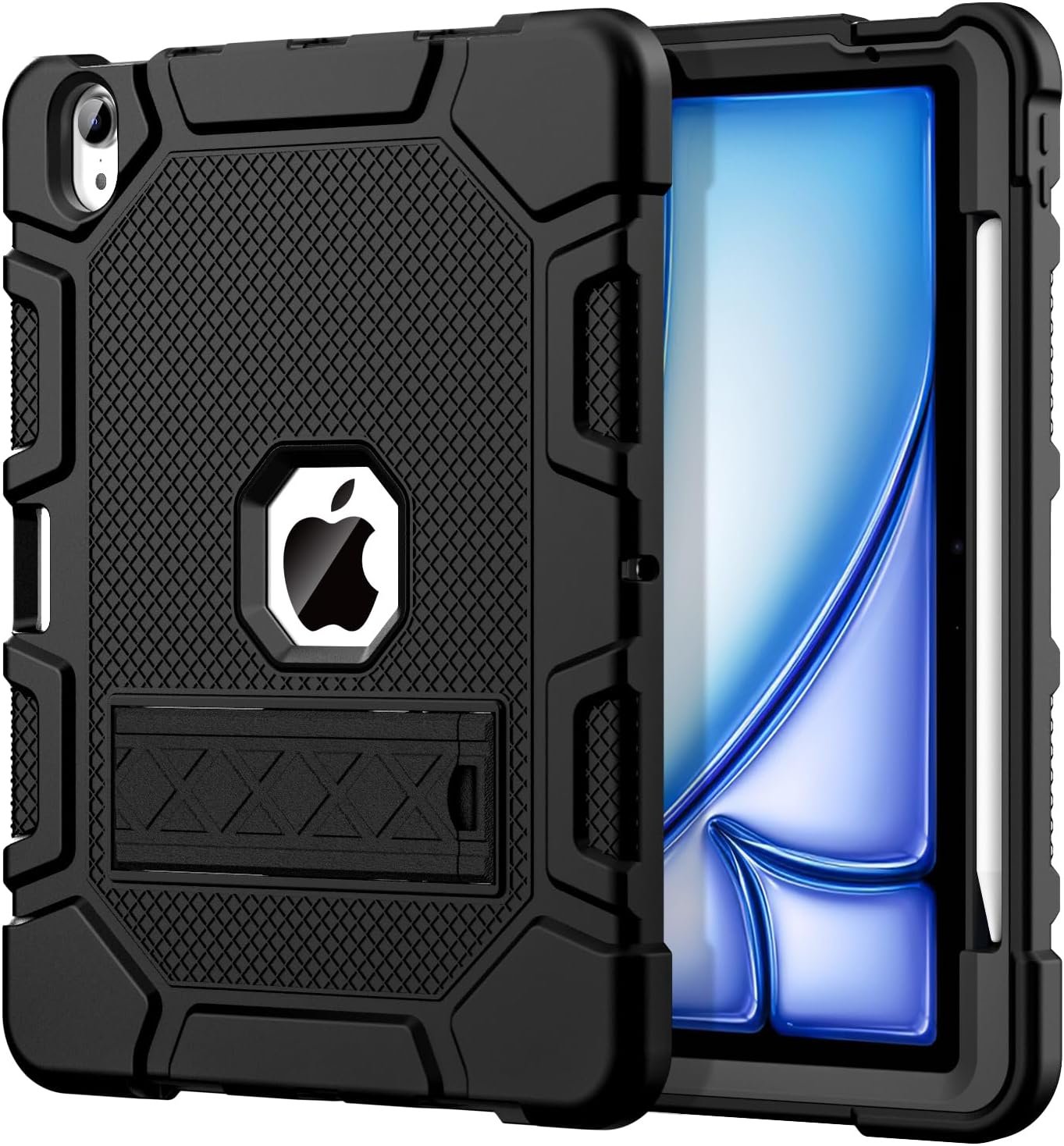
Rugged cases usually block the Pencil edge, which is why so many people with an iPad Air end up choosing between protection and a Pencil that charges. Azzsy has built a holder that lets the Pencil Pro or second generation Pencil charge while it sits stored, which solves both at once.
The shell is thermoplastic polycarbonate over anti-skidding silicone, which is the standard two-material rugged construction and genuinely shock absorbing rather than merely thick. A pop-out kickstand handles viewing. Azzsy is clear that no screen protector is included, so budget for one separately if the iPad is going anywhere rough enough to need this case in the first place.
What it does well
- Pencil charges while stored in the holder.
- Polycarbonate over anti-skid silicone.
- Pop-out kickstand for viewing.
- Genuine shockproof construction rather than a thick folio.
What to know before buying
- No screen protector included.
- Much heavier than the folios here.
- Single kickstand angle.
4. VIKESI: Three Brackets Instead of Two, and Lighter Than Most

VIKESI has gone after the specific failure of magnetic folio stands on larger iPads: a cover with one or two magnet positions flexes and slips once the tablet gets big. This one uses three brackets, which is the company’s stated reason for the design and is a sensible response to the problem.
The other claim is weight. VIKESI says the case is half a pound lighter than comparable products, achieved by making it flatter and simpler, and on a tablet as light as an iPad Air that is the difference between holding it comfortably for an hour and not. The fabrics inside and out are upgraded for durability rather than for feel, there is a pencil holder, and auto sleep and wake work as expected.
What it does well
- Three-bracket stand for stability on a larger iPad.
- Claimed half a pound lighter than comparable cases.
- Pencil holder and auto sleep and wake.
- Flat, simple construction with little added bulk.
What to know before buying
- A less established brand than ZUGU or Apple.
- Soft back rather than a hard shell.
- No drop rating published.
5. TiMOVO: The Best Balance of Slim and Protective
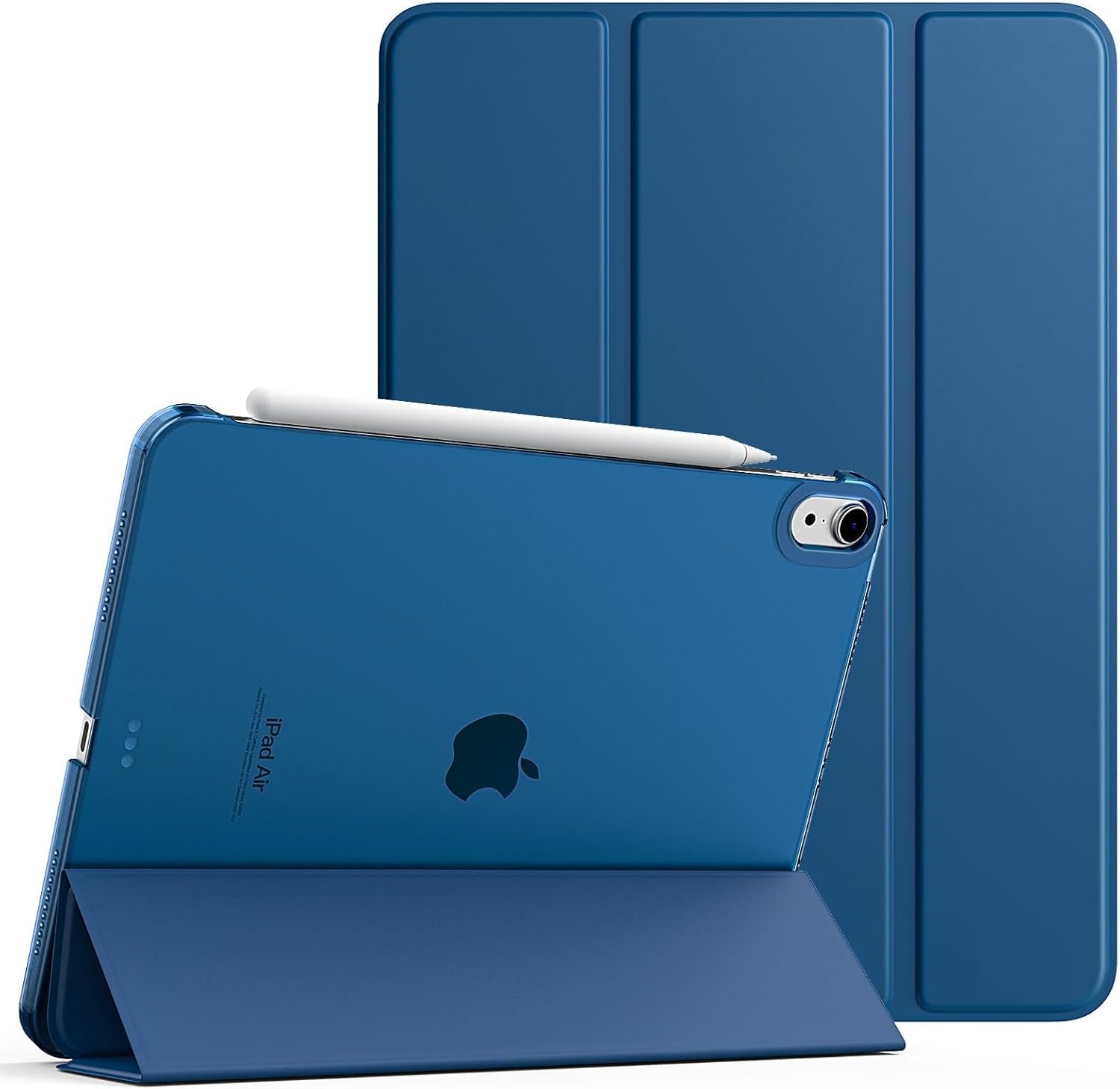
This is the sensible middle of the category. PU leather on the front for the fold-over cover and hard polycarbonate on the back for the shell, which gives you real impact protection on the side that gets dropped without the thickness of a rugged case on the side you hold.
The back is frosted and translucent, so the Apple logo shows through rather than being hidden, which some people care about and others do not. It supports auto wake and sleep, and TiMOVO has been careful with the cutouts: Touch ID works through the case and the Pencil still charges on the side edge. If you want one case that is neither a bare cover nor a brick, this is it.
What it does well
- Hard polycarbonate back with a PU leather front.
- Touch ID and side Pencil charging both unobstructed.
- Slim enough to carry without noticing it.
- Frosted translucent back shows the iPad through.
What to know before buying
- No pencil holder, only an open charging edge.
- Tri-fold stand rather than a multi-angle one.
- Hard backs crack rather than absorb in a serious drop.
6. Akkerds: The Widest Pencil Compatibility

Akkerds lists support for three Pencils in its holder: the Pencil Pro, the USB-C Pencil and the second generation, with charging available while the Pencil sits stored. If you have an older Pencil or expect to change, that is the broadest coverage of any case here.
The construction is PU leather outside over durable TPU inside, which grips the back cover and the four corners rather than only the edges, and the surface is soft rather than tacky. A built-in magnetic strip handles automatic wake and sleep. It covers every iPad Air back to the 4th generation, which is a long list of model numbers and the reason to check yours rather than assume.
What it does well
- Holder charges Pencil Pro, USB-C and 2nd generation.
- TPU inner shell grips the back and all four corners.
- Magnetic strip for automatic wake and sleep.
- Fits every iPad Air back to the 4th generation.
What to know before buying
- PU leather scuffs more than polycarbonate.
- Folio stand with limited angles.
- No published drop rating.
7. JETech: The Listing That Tells You What Not to Buy

JETech opens its listing with a warning rather than a feature, and it is the single most useful sentence in this category: this case is not for the plain 11th or 10th generation iPad, because those models do not support magnetic Pencil charging. Every buyer who confuses the two devices is saved by that line.
The case itself is straightforward and well made. A translucent frosted back in a slim, colourful design, a synthetic exterior over a smooth interior, and a magnetic smart cover with automatic sleep and wake. The tri-fold front supports two standing positions, one for viewing and one for typing. It supports the Pencil Pro and the USB-C Pencil. Nothing here is clever; everything is correct.
What it does well
- States plainly which iPads it does not fit.
- Tri-fold cover with viewing and typing positions.
- Translucent frosted back resists fingerprints.
- Supports Pencil Pro and USB-C Pencil.
What to know before buying
- Two stand positions only.
- No pencil holder, only cover compatibility.
- Minimal drop protection.
Checking Fit and Living With an iPad Air Case
Everything that goes wrong here is a compatibility problem rather than a quality problem, and it is checkable before you order.
- Find the model number under Settings, General, About before buying anything.
- Confirm the case is for the Air and not the plain iPad of the same size.
- Check whether the Pencil charges in the holder or only on an open edge.
- Count the stand angles against where you actually use the iPad.
- Confirm whether a screen protector is included, because most do not include one.
- Weigh up whether you need a drop rating at all, because a folio is far lighter.
An iPad Air with a keyboard folio and a dock becomes a workstation, and at that point the case is only part of the setup. Our guide to the best docking station covers which docks drive an external monitor from a tablet and which need a laptop, and for keeping the screen itself clean our guide to the best microfiber cleaning cloths explains what actually matters in a cloth.
Which iPad Air Case to Buy
For most people the TiMOVO is the right purchase: a hard polycarbonate back where drops happen, a PU leather cover where they do not, Touch ID and Pencil charging both working through it, and little enough bulk that the iPad still feels like an Air. Buy the ZUGU instead if you use the iPad everywhere rather than at a desk, because eight stand angles and a warranty that covers an iPad repair are worth the extra.
The Apple Smart Folio is the pick if you want the thinnest possible cover and accept no corner protection, and the Azzsy is the one if the iPad goes somewhere genuinely rough and the Pencil still has to charge. Choose VIKESI for the lightest multi-angle stand, Akkerds for the widest Pencil compatibility, and JETech if you want a plain, correct case from a listing that is honest about what it does not fit.
Frequently Asked Questions
Will an iPad Air case fit the plain iPad of the same size?
Often it physically fits and functionally does not. The 11 inch Air and the 11 inch plain iPad are close in size, but only the Air charges a Pencil magnetically on its side edge, so a case cut for one leaves the wrong edge open. One listing in this guide states the incompatibility outright. Check the model number rather than the screen size.
Does a case stop the Apple Pencil charging?
It can. The Pencil Pro charges by magnet on the long edge, so a case that wraps that edge in thick material blocks it. The cases here solve it two ways: by leaving the edge open, or by building a holder that charges the Pencil while it is stored. The second is better if the Pencil travels with the iPad.
How many stand angles do I actually need?
Two is enough at a desk, where you alternate between typing and watching. More than two starts to matter the moment the iPad is used on a lap, in bed or in a kitchen, because the right angle changes with your posture and the light. The eight-position stand here is the only one that genuinely adjusts rather than offering presets.
Is a drop rating worth paying for?
Only if the iPad leaves a desk. A rated case is thicker and heavier, and on a tablet as light as an Air that is a real cost to everyday comfort. If it travels in a bag, goes to a work site, or is used by a child, pay for it. If it moves between a desk and a sofa, a folio is the better trade.
Related Articles
- Best iPad 9th Generation Cases: 7 Compared on Stands and Straps
- Best Keyboards for Mac: 7 Compared on Layout, Switches and Pairing
- Best Power Banks: 7 Compared on Watts, Watt-Hours and Cables
As an Amazon Associate, CanyonWire earns from qualifying purchases.





