
Roblox Select is the account type for players aged 9 to 15, and Roblox Kids is the one underneath it for ages 5 to 8. The tier a player lands in decides the content ratings they can open and whether chat is switched on, so it matters more than any single setting inside the app.
Both arrived worldwide on June 16, 2026, two months after Roblox announced them on April 13. The rules below cover what each account allows, what a linked parent can change, and the points at 9, 13 and 16 where the permissions move again.
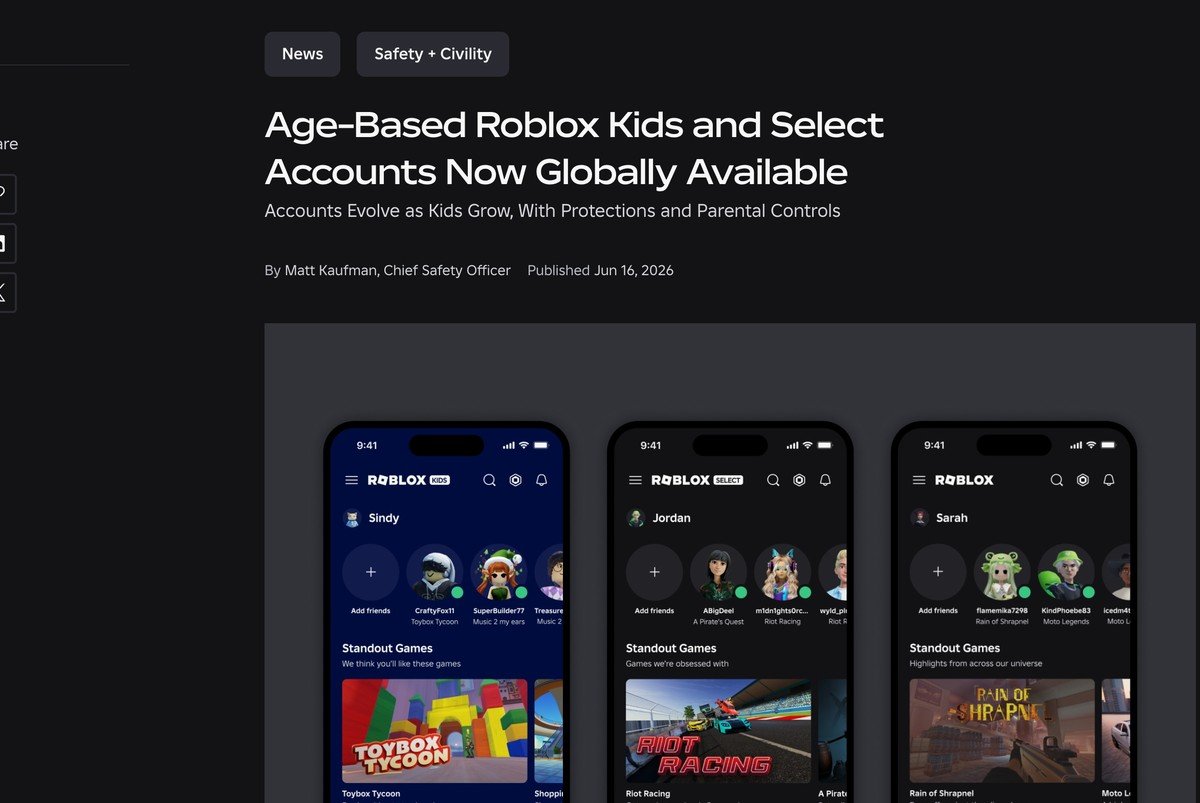
Roblox Kids vs Roblox Select: Ages, Ratings and Chat Side by Side
The three tiers differ on four things: the age band, the content ratings they reach, the state chat starts in, and how much a linked parent can still change. Everything else about the account, including the avatar, friends list and Robux balance, works the same way.
| Feature | Roblox Kids | Roblox Select | Standard Roblox |
|---|---|---|---|
| Age band | 5 to 8 | 9 to 15 | 16 and older |
| Content ratings allowed | Minimal, Mild | Minimal, Mild, Moderate | All rated content except Restricted |
| Restricted content | No | No | Age-verified players 18 and older only |
| Chat after an age check | Off, a linked parent can turn it on | Introduced gradually by age, a parent can adjust it | On where the region allows it |
| Chat with a self-declared age only | Off | Off | Not applicable |
| Who a player can talk to | People a parent approves | Similar-age players and Trusted Friends | Standard chat rules |
| Parent can allow or block a single game | Yes | Yes, through age 15 | No |
| Screen time limit | Yes | Ages 9 to 12 | No |
| How the account is assigned | Self-declared or age-checked 5 to 8 | Self-declared 9 or older, or age-checked 9 to 15 | Age-checked 16 or older |
Two lines in that table do most of the work. Content ratings decide the catalog, so a Moderate game is simply absent for a 7 year old. Chat state decides the social side, and for a self-declared age it is off in both younger tiers regardless of what the child typed in.
What a Roblox Kids Account Can Do (Ages 5 to 8)
A Roblox Kids account reaches games labelled Minimal or Mild and nothing above that. Those two labels cover occasional or repeated mild violence and unrealistic blood, which is where most obbies, tycoons and pet simulators sit. Moderate titles are not hidden behind a warning here; they are out of the catalog altogether.
Communication starts fully disabled. Once the account passes an age check, a linked parent can turn on text chat in games, and voice chat with friends stays off for every player under 13. Trusted Friend requests for an under-13 account need a parent to approve them, and that approval window lasts 24 hours before the request has to be sent again.
- Game ratings: Minimal and Mild only, drawn from a catalog that is reviewed rather than open
- Chat: off at setup, and only a linked parent can change it after an age check
- Voice chat with friends: off, with no parent override under 13
- Screen time: a daily limit a parent sets, after which Roblox closes for the day
- Excluded by default: social hangout games, free-form drawing, and games touching sensitive issues
That exclusion list catches titles a rating alone would wave through. A drawing game with a blank canvas carries no violence at all, and it is still kept out, because the risk sits in what other players draw rather than in the game itself.
What a Roblox Select Account Can Do (Ages 9 to 15)
Roblox Select adds the Moderate rating, which brings in moderate violence, light realistic blood, moderate fear-based content and unplayable gambling content. That one step opens most of the only public player counts worth reading, since the survival, horror-lite and shooter-styled games that fill the charts usually land on Moderate rather than Mild.

Chat is where Select stops being a single setting. Roblox describes it as access that increases gradually, and the detail splits the band in two.
Ages 9 to 12
The chat tab is limited to Trusted Friends, the designation reserved for people a player actually knows. Voice chat with friends is off by default and a parent can switch it on, still restricted to Trusted Friends. A parent also keeps the full control set at this age, including screen time limits, spending limits, the friends list and the ability to approve or decline each Trusted Friend request.
Ages 13 to 15
The chat tab widens to include age-appropriate friends as well as Trusted Friends, and voice chat with Trusted Friends is on by default with a parent able to turn it off. Screen time and spending limits stop applying at 13, while game blocking and direct chat settings stay in a parent’s hands through age 15.
None of that applies to an account that has only ever stated its age. A self-declared 9 or older sits in Select with chat off, and the age check is the only thing that lifts it.
Content Maturity Labels Decide Which Games Show Up
Every game on Roblox carries a maturity label generated from a questionnaire its creator fills in, and that label is what the account tiers read. A creator answers for the most extreme content a player can reach, not the average session.
| Label | What the game may contain | Who can open it |
|---|---|---|
| Minimal | Occasional mild violence and light unrealistic blood | Kids, Select and standard accounts |
| Mild | Repeated mild violence, heavy unrealistic blood, mild fear-based content, mild crude humor | Kids, Select and standard accounts |
| Moderate | Moderate violence, light realistic blood, moderate fear-based content, moderate crude humor, unplayable gambling content | Select and standard accounts |
| Content May Vary | Rating not broken out by descriptor | Age-checked players 16 and older |
| Restricted | Strong violence, heavy realistic blood, romantic themes, the presence of alcohol, strong language | Age-verified players 18 and older |

Restricted sits furthest out. It is limited to age-verified players 18 and older, and it is unplayable entirely for accounts created in or located in some countries, including Korea, Saudi Arabia and Türkiye. Roblox has also said it will move onto the International Age Rating Coalition, the scheme that hands back the ESRB rating categories in the United States and PEGI marks in Europe and the United Kingdom.
How Roblox Puts a Player Into Kids or Select
Two signals set the tier. A self-declared age places the account immediately and temporarily, and an age check confirms it and unlocks the full permissions for that band. Roblox accepts a government ID or its Facial Age Estimation check, and a verified parent can correct a child’s age.

The practical difference is chat. A self-declared 5 to 8 lands in Kids with chat off, a self-declared 9 or older lands in Select with chat off, and neither can be changed until the check is done. Age bands and default settings also vary by region, so a setting a friend has may simply not exist in another country.
Parental Controls That Come With Both Account Types
Controls only appear once a parent account is linked, and the link is started from the child’s side. The parent verifies their own age with a government ID or a credit card before the link completes, which is a heavier step than the parental controls on Fortnite.
- On the child’s account, open Settings, then Parental Controls, then Add parent.
- Enter the email address attached to the parent’s Roblox account.
- Open the email, then sign in or create an account with a government-issued ID ready.
- Verify your age with the ID or a credit card.
- Select Agree to link to the child’s account.

After that the controls thin out on a schedule rather than all at once. Everything is manageable through age 12, game blocking and direct chat settings run through age 15, and from 16 to 18 a parent keeps visibility into spending notifications, screen time and the friends list without the switches.
One control is worth knowing by name. Approved Experience lets a parent open a specific game that the child’s tier would otherwise exclude, which is the answer when a Kids account cannot see a game the rest of the family plays. It does not reach Restricted content.
What Creators Must Do to Reach Kids and Select Players
Publishing to the under-16 audience is no longer the default, and the bar is set at the account level before the game is even looked at. A creator needs an account in good standing, verification through Facial Age Estimation under 18 or a government ID at 18 and over, and two-step verification switched on, which follows how two-step verification works on a game account everywhere else.
- A completed Maturity and Compliance Questionnaire returning a Minimal, Mild or Moderate rating
- Either an active Roblox Plus or Premium subscription held for two consecutive months, or a one-time refundable publishing fee
- An evaluation phase that starts with age-checked players 16 and older only
- A threshold of 250 unique plays by highly engaged age-checked players inside a 60-day window
Roblox counts a highly engaged player using account tenure, play history and platform spend, where the spend can have happened anywhere on Roblox in the last 60 days rather than inside that game. Progress shows in the Audience Reach dashboard on the Creator Hub and is evaluated hourly.
A creator who cannot wait can pay a one-time refundable expedited review fee of 50,000 Robux per game. The ordinary publishing fee comes back 90 days after the game becomes eligible, or 90 days after payment if it never does, and is forfeited only when a game is permanently removed for breaking community standards.
Picking the Right Setup for Your Own Child
The account type is assigned, so the real decisions sit around it. Three of them change what a child can actually do in a week of play.
- Complete the age check or leave it. Skipping it keeps chat off permanently, which some families will want and others will find confusing when a 14 year old cannot message anyone.
- Link a parent account early. Nothing can be approved, blocked or limited until the link exists, and the link is the only route to the Approved Experience control.
- Decide on voice before 13, not after. Voice chat with friends is off for everyone under 13 and turns on by default with Trusted Friends at 13, so the default flips in the child’s favour on a birthday rather than on a conversation.
For a platform that opened to the public in 2006, this is the sharpest line Roblox has drawn between age groups. The practical test is simple: check which tier the account is in, then check whether the age check has been completed, because those two facts explain nearly every missing game and greyed-out chat box.
Frequently Asked Questions
Can an existing account be switched to Roblox Select?
There is no manual switch. Roblox assigns the tier from the age on the account, so a player aged 9 to 15 is placed in Select automatically, and the account moves to standard Roblox at 16.
Can Roblox Select players chat with adults?
Not in general. Where chat is available, it is limited to players in a similar age group or to Trusted Friends. For anyone under 13, a Trusted Friend request has to be approved by a linked parent.
Do parents keep control after a child turns 13?
Partly. Screen time limits apply to Kids accounts and Select players aged 9 to 12, while game blocking and direct chat settings stay manageable through age 15. Linked accounts separate automatically at 18.
Does an age check require an ID?
Not always. Roblox accepts a government ID or its Facial Age Estimation check, and the estimate is the faster of the two for most players. Creators publishing to younger audiences face a stricter bar.




