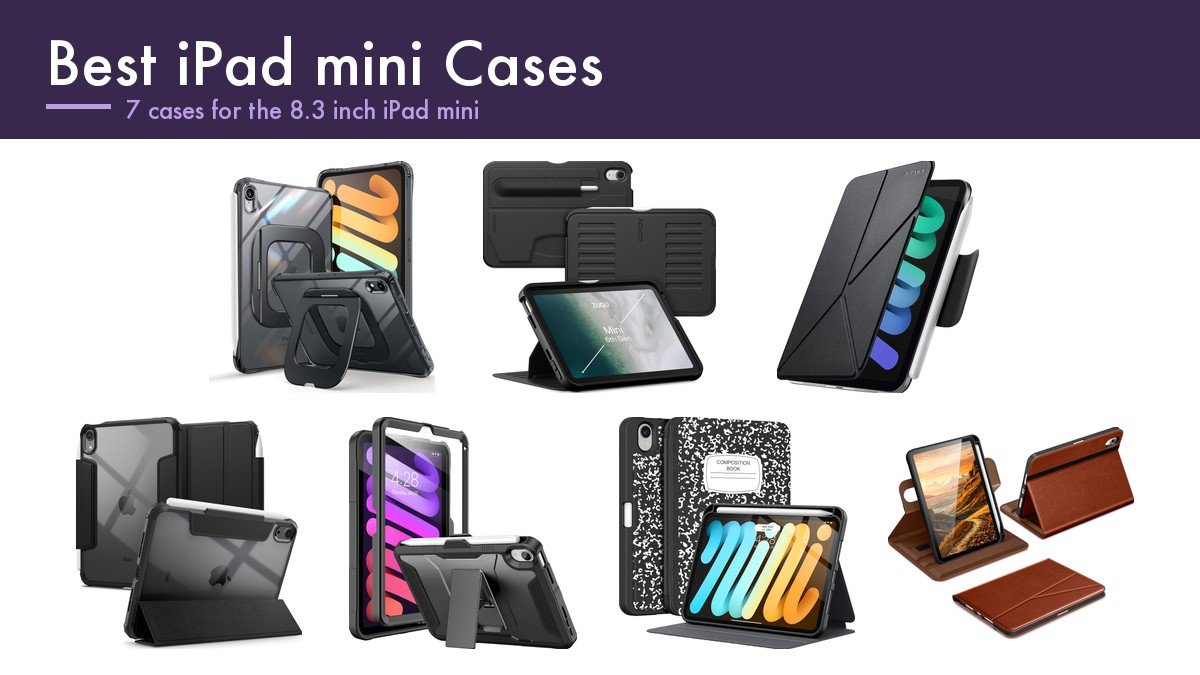
Weight is the whole argument for an iPad mini, so the best iPad mini cases are the ones that do not undo it. The tablet exists because it fits in one hand and in a coat pocket, and a case that adds a hard shell, a kickstand and a cover can easily add half the weight of the device. Two cases here publish their own figures, at 118 grams and 5.01 ounces, and those are the numbers worth comparing. The Pro inverts that and is judged on its stand, as our guide to the best iPad Pro cases explains.
The other thing that separates these is how many angles the stand actually holds, which ranges from one to seven. On a tablet this small the stand matters more than you would expect, because an iPad mini is usually propped on a kitchen counter, a treadmill or a desk beside a laptop rather than held. The seven below are sorted on that and on whether the Apple Pencil still charges with the case fitted.
Best iPad mini Cases Compared on Stand, Weight and Pencil Support
Read the stand column and the weight column together, because on this tablet they trade directly against each other.
| Case | Stand | Weight and build | Pencil | Protection |
|---|---|---|---|---|
| SUPCASE | Aluminium stand, 9 to 60 degrees landscape, 55 portrait | 118 g, 11.5 mm thick | Groove charges Pencil 2 and Pro | MIL-STD-810H, 1.22 m drops |
| ZUGU | 7 angle magnetic stand | Slim shell | Pencil 2 wireless charging | 5 ft drop, 2 year warranty, one repair covered |
| PITAKA Folio2 | 4 angles, folds two ways | 5.01 oz polyurethane leather | Magnetic clasp, charges as usual | Dust and scratch resistant |
| Spigen Ultra Hybrid Pro | Faux leather cover folds to any angle | Clear back, ridged bumper | Pencil and Pencil Pro charge with case on | Air Cushion corners, raised camera edges |
| Soke Rugged Armor | Kickstand | Hard PC over TPU bumper | None | Built-in screen protector |
| Supveco | Anti-slip front shell, not trifold | Silicone back, TPU cover | Holder supports Pencil 2 charging | Magnetic closure, auto sleep and wake |
| DTTO Leather Folio | Flexible swivel structure | Synthetic leather, microfiber lined | Holder for Pencil Pro and 2nd gen | Double card pockets |
Stand Angles, Drop Ratings and Keeping the Pencil Charged
The iPad mini takes the Apple Pencil Pro and the second generation Pencil, both of which attach and charge magnetically on the long edge. That is the opposite of the plain 11 inch iPad and it changes what a case has to do: instead of giving the Pencil a tube to live in, the case has to leave the magnetic strip working through it or cut a groove that charges. Five of the seven here manage it, and the listings say so explicitly.
Drop ratings are worth reading rather than skimming. SUPCASE cites MIL-STD-810H and survival from 1.22 metres, with corner air cushions, 1.6 mm screen bezels and 1.7 mm camera guards; ZUGU claims five feet and backs it with a two year warranty and the fee for one iPad repair. Those are different kinds of claim. One is a test standard, the other is a company putting money behind it.
Stand hardware is where the engineering actually shows. SUPCASE uses a unibody aluminium hinge rated to 3 kilograms of torque and 3,000 cycles, which is a specification you would expect on a laptop rather than a tablet case, and it is the reason that stand holds at 9 degrees for drawing as readily as at 60 for watching. A magnetic folio stand is lighter and silent but it slips under a pressing finger. Our guide to the best ipad keyboards covers the folios that add typing instead.
1. SUPCASE: An Aluminium Hinge on a Tablet Case
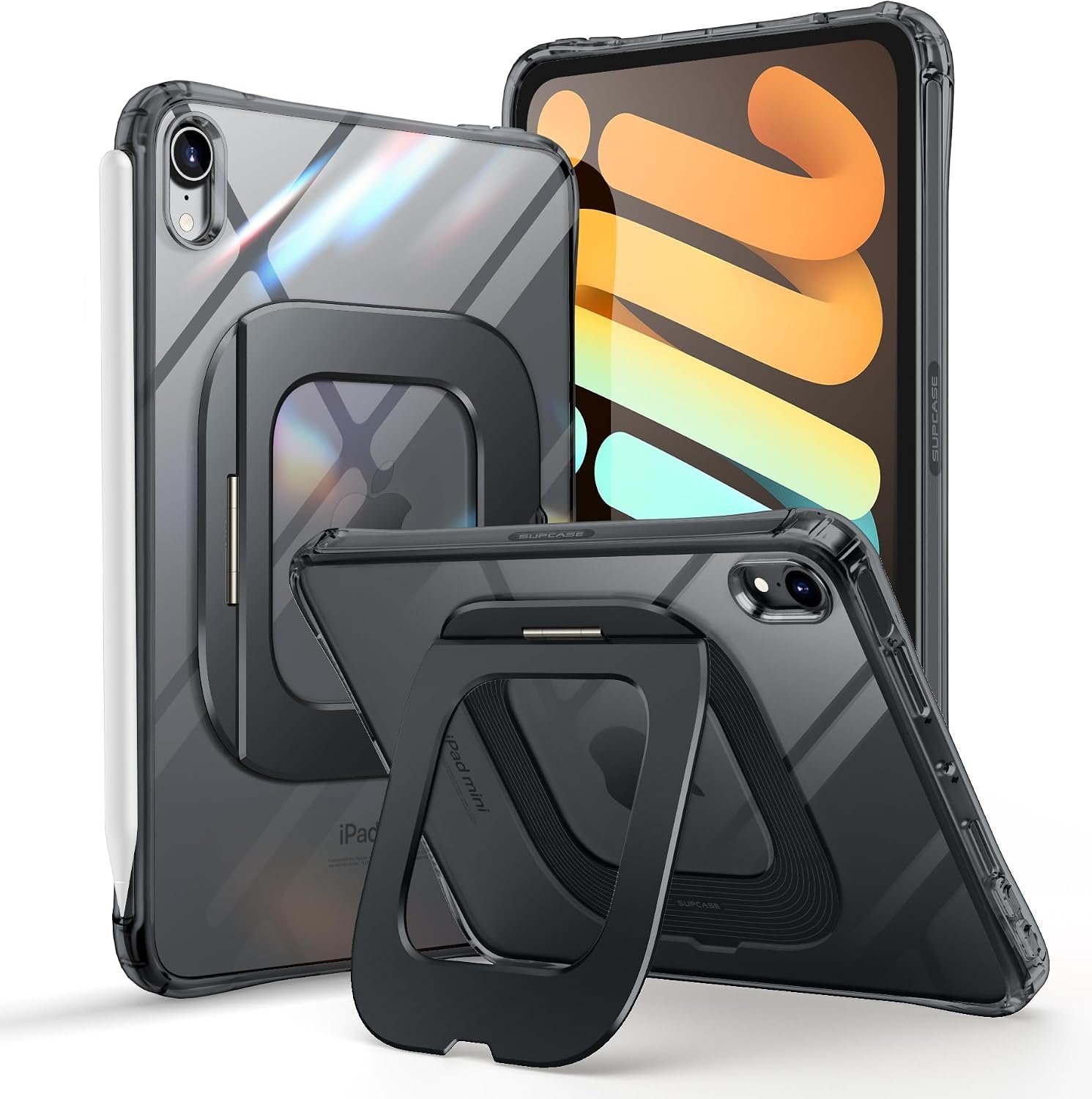
Nobody else here has built the stand out of metal. SUPCASE uses a unibody aluminium rear stand on a hinge rated to 3 kilograms of torque and 3,000 cycles, which holds anywhere from 9 to 60 degrees in landscape and 55 degrees in portrait. A 9 degree angle is a drawing angle, and almost no folio can hold one.
The protection is specified rather than claimed: TPU over polycarbonate with corner air cushions, 1.6 mm raised screen bezels, 1.7 mm camera guards, and SGS testing to MIL-STD-810H for 1.22 metre drops. Despite that it is 118 grams and 11.5 mm thick with a clear back. The pencil groove charges the Pencil 2 and Pencil Pro wirelessly, and SUPCASE notes honestly that the USB-C Pencil attaches magnetically but does not charge through the case.
What it does well
- Unibody aluminium stand holding 9 to 60 degrees.
- Hinge rated to 3 kg torque and 3,000 cycles.
- MIL-STD-810H tested for 1.22 metre drops.
- 118 g and 11.5 mm despite the metal stand.
What to know before buying
- The stand adds thickness at the back.
- USB-C Pencil attaches but does not charge through the case.
- Clear backs yellow over time on any case.
2. ZUGU: Seven Angles and a Warranty That Pays for Repairs

ZUGU sells the same proposition on the mini as on the larger iPads, scaled down to seven magnetic stand angles rather than eight. Seven positions on a tablet this small covers everything from flat-ish for reading in bed to near-vertical on a kitchen counter, and the magnets hold rather than creep.
The warranty is the part that distinguishes it from everything else in this guide. Five foot drop protection, free 30 day returns, a two year warranty, and ZUGU covering the fee for one iPad repair if the tablet is damaged while in the case. Companies do not offer that unless the case works. It supports Apple Pencil 2 wireless charging with the case on.
What it does well
- Seven magnetic stand angles.
- Five foot drop protection with a two year warranty.
- ZUGU covers the fee for one iPad repair.
- Pencil 2 charges wirelessly with the case fitted.
What to know before buying
- Among the most expensive cases here.
- Magnetic stands slip under firm pressure.
- No published weight figure.
3. PITAKA Folio2: The Lightest Case Here at Five Ounces
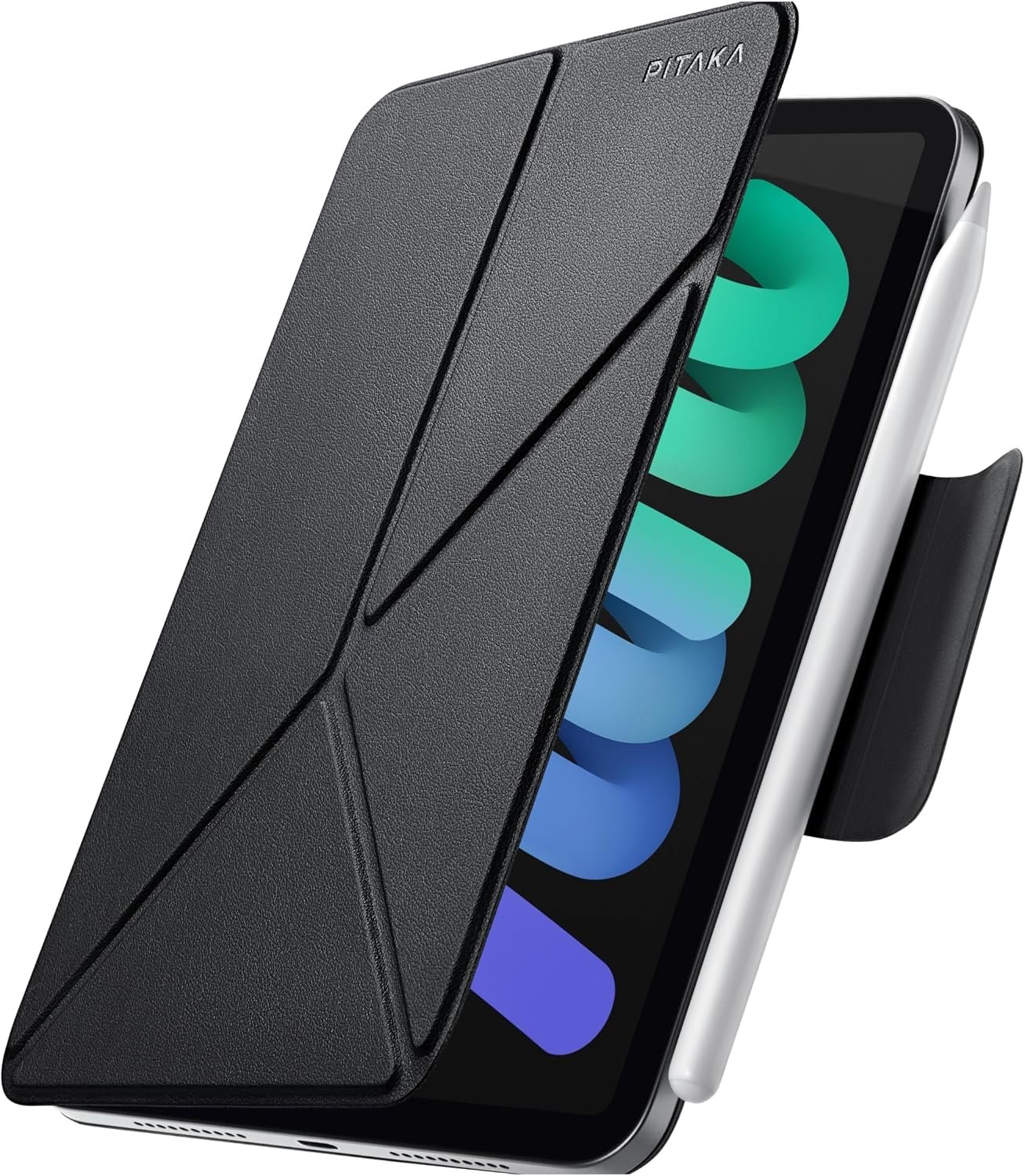
PITAKA has done the thing an iPad mini case should do: weigh almost nothing. At 5.01 ounces it is the lightest in this guide, and it still folds two different ways to give four standing angles for calls, browsing and drawing.
The structure is what makes four angles work on something this thin. A multi-fold folio forms a triangle rather than a flap leaning against itself, so it is stable in both portrait and landscape rather than only landscape, which is the usual failure of thin folios. The material is skin-friendly polyurethane leather that resists dust and scratches. A magnetic clasp holds the Pencil, or you fold it out of the way, and the Pencil 2 attaches and charges as normal.
What it does well
- 5.01 oz, the lightest case in this guide.
- Four standing angles from folding two ways.
- Triangle structure stable in portrait as well as landscape.
- Magnetic clasp for the Pencil that folds away.
What to know before buying
- Polyurethane leather rather than a protective shell.
- No drop rating published.
- Four preset angles rather than continuous adjustment.
4. Spigen Ultra Hybrid Pro: Drop Protection That Still Charges the Pencil
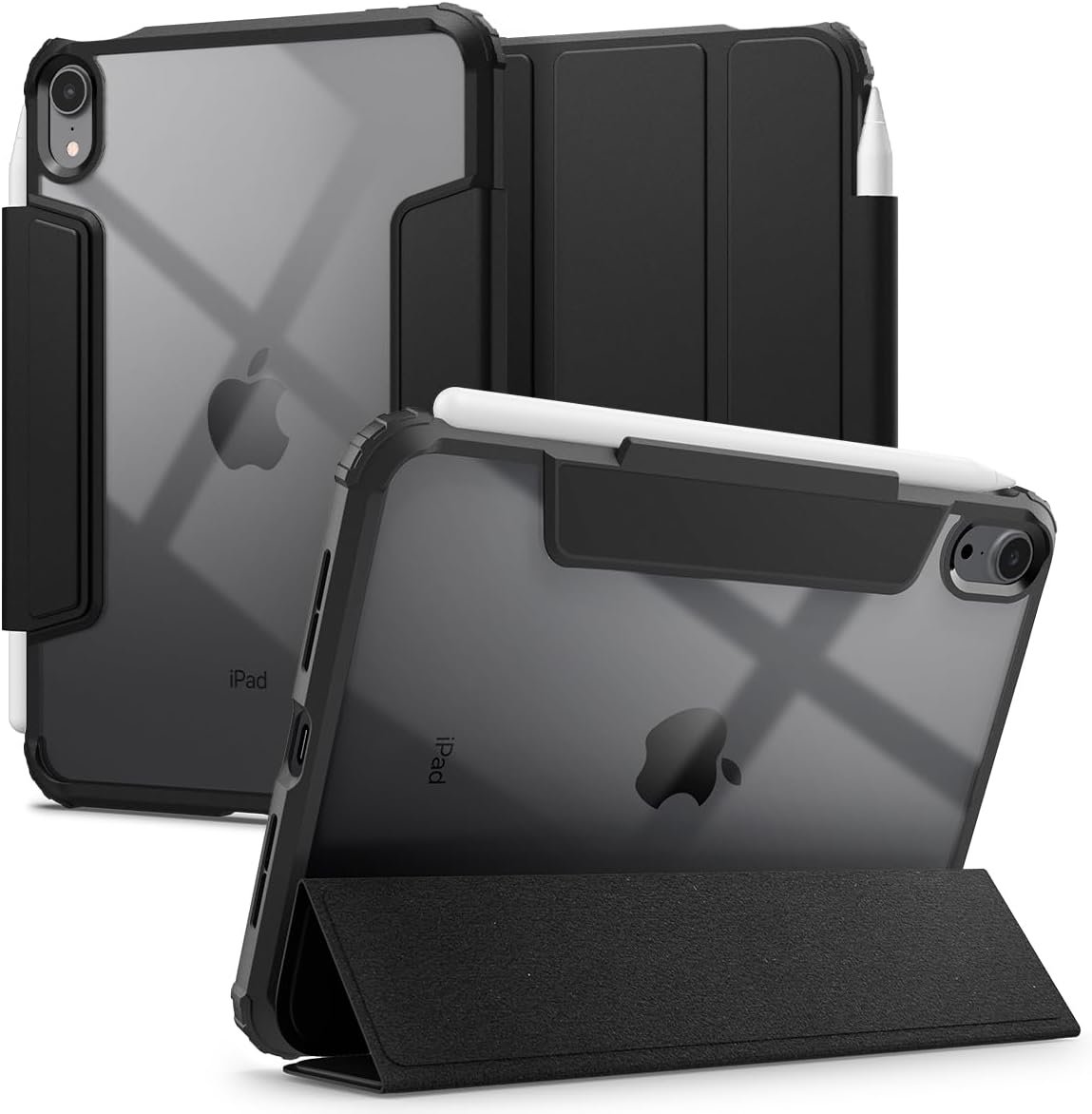
Spigen has solved the conflict most rugged cases create. Air Cushion Technology at every corner plus a ridged outer bumper and inner cushioning, raised rear edges that keep the cameras off a table, and full compatibility with Apple Pencil and Pencil Pro magnetic charging with the case left on.
The front is flexible faux leather that folds into a hands-free stand at any angle rather than two presets, with a suede-like interior that protects the screen in a bag. The back is clear so the iPad shows through. Spigen also points out that the case is designed to pair with its own screen protectors, which is worth knowing because mismatched protectors and cases are the usual reason one lifts at the edges.
What it does well
- Air Cushion corners plus a ridged outer bumper.
- Pencil and Pencil Pro charge with the case on.
- Faux leather cover folds to any angle, not presets.
- Raised rear edges keep the cameras off surfaces.
What to know before buying
- Clear backs yellow over time.
- No published drop height or standard.
- Designed around Spigen screen protectors specifically.
5. Soke Rugged Armor: The Only One With a Built-In Screen Protector
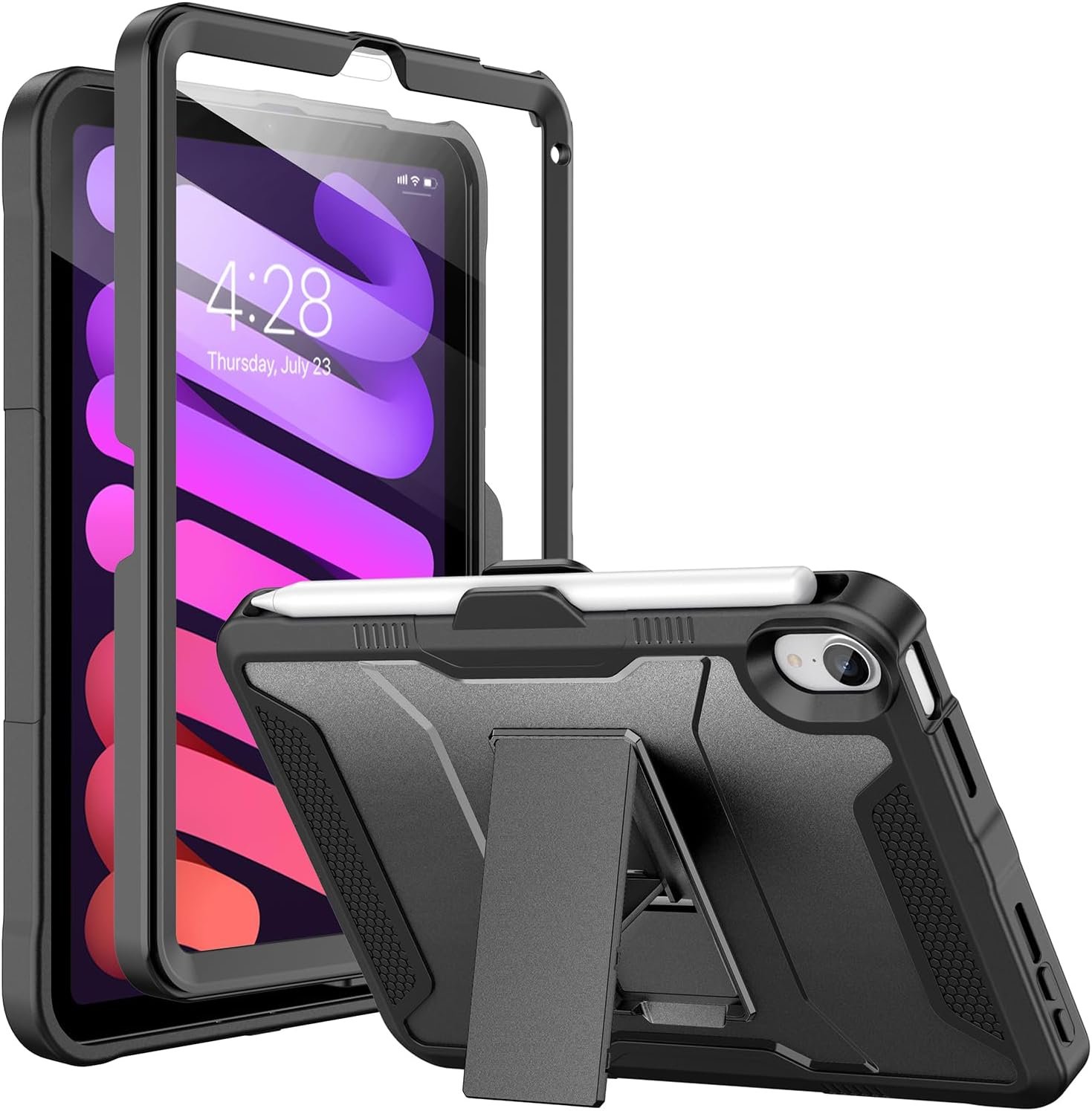
If the iPad mini is handled by a child or lives in a bag with keys, this is the practical answer. Soke is the only case in this guide with a screen protector laminated into the front frame, so there is no separate sheet to align and nothing to bubble or peel.
The shell is multi-layered hard polycarbonate over a flexible TPU bumper, which is the correct two-material construction for absorbing impact rather than merely resisting it, and Soke says the protector does not compromise touch sensitivity. Cutouts are precise enough that ports, sensors, speakers and cameras all work without removing it. It fits the mini 7 and mini 6, and the model numbers are listed on the page.
What it does well
- Built-in screen protector with nothing to apply.
- Hard polycarbonate over a flexible TPU bumper.
- Easy to install for a two-piece armour case.
- Precise cutouts for ports, sensors and cameras.
What to know before buying
- No pencil storage or charging support.
- A laminated protector cannot be replaced when scratched.
- The bulkiest case in this guide.
6. Supveco: The Composition Notebook Look, With a Stand That Grips
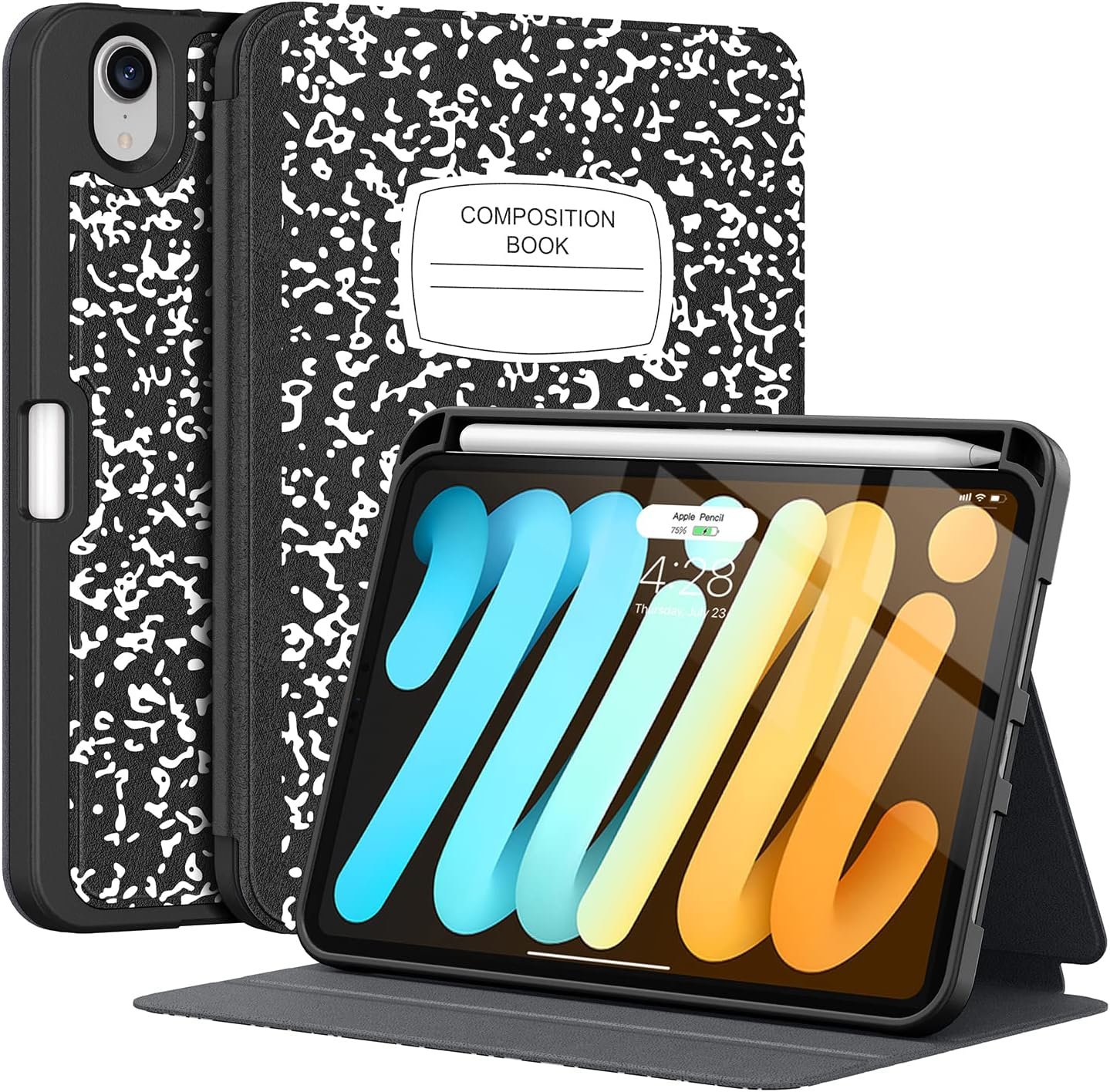
Supveco has styled this as a composition notebook, which on an 8.3 inch tablet is a reasonable joke and also useful camouflage in a bag. Underneath it is a flexible silicone back with a TPU cover, so it absorbs knocks rather than transmitting them.
The stand is the detail worth noting. It is not a trifold: the front shell has an anti-slip face that holds at several angles without creasing into fixed positions, which is a more durable arrangement than a cover folded along the same lines for a year. A magnet secures the closure and handles automatic sleep and wake, and the built-in pencil holder supports Pencil 2 wireless charging. It fits the mini 6 and mini 7 only, not the older minis.
What it does well
- Anti-slip front shell rather than a creasing trifold.
- Flexible silicone back with a TPU cover.
- Pencil holder supports Pencil 2 wireless charging.
- Magnetic closure with automatic sleep and wake.
What to know before buying
- Not compatible with iPad mini 1 through 5.
- No published drop rating.
- The notebook styling will not suit every setting.
7. DTTO Leather Folio: Card Pockets for a Tablet You Carry
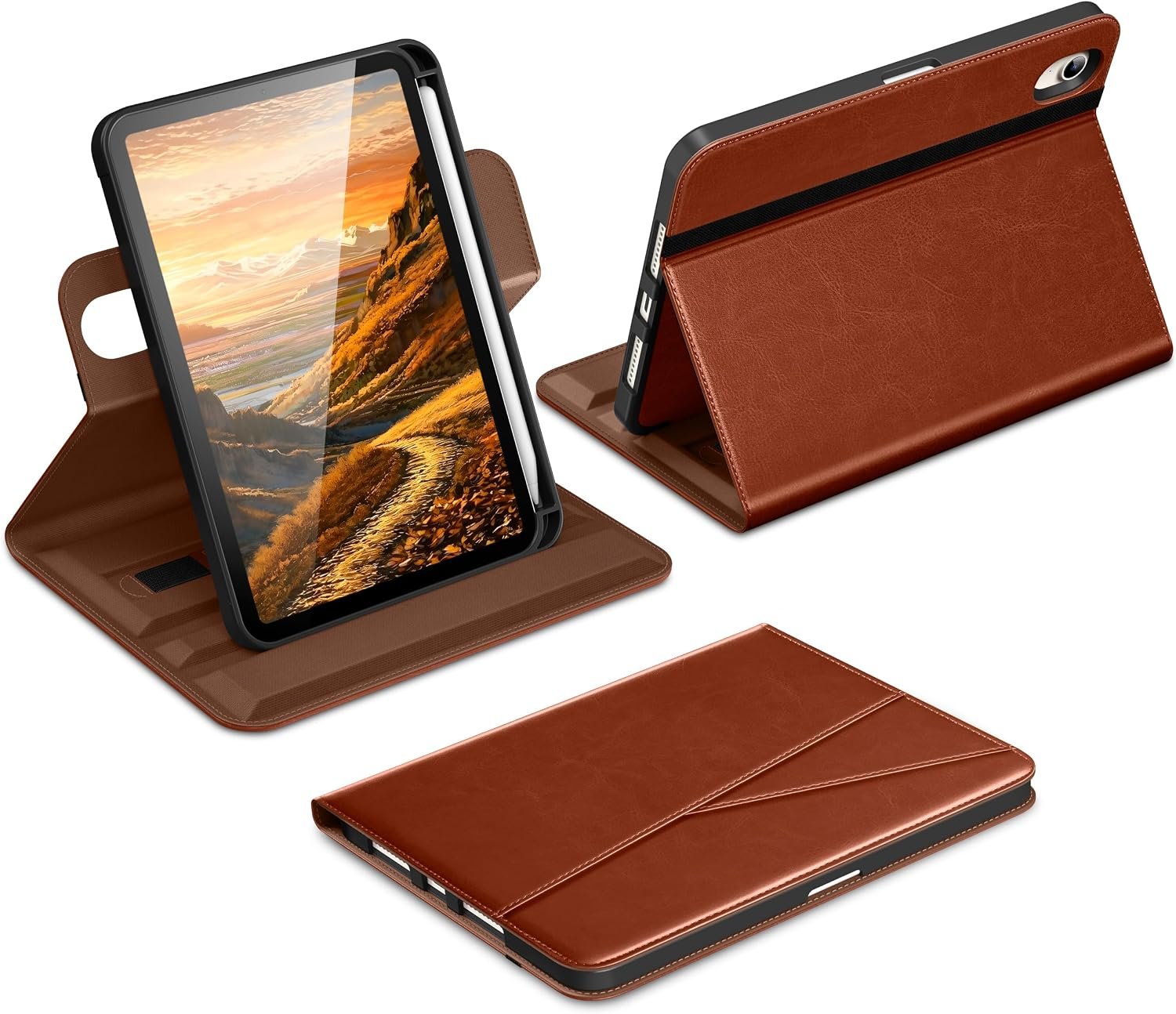
An iPad mini is the tablet most likely to go out of the house on its own, and DTTO has built for that. The exterior is premium synthetic leather lined with microfiber, and the front carries cross-lined double pockets for bills, cash and cards, which means the tablet can replace a notebook and a wallet on a short trip.
The stand is a flexible swivel rather than fixed grooves, so it adjusts continuously for reading, drawing, watching or a video call without snapping to presets. There is a pencil holder for the Pencil Pro or second generation, and automatic sleep and wake. It is the least protective case here and the only one that looks like a pocket notebook rather than a device accessory.
What it does well
- Double card and document pockets on the front.
- Flexible swivel stand rather than fixed grooves.
- Synthetic leather lined with microfiber.
- Pencil holder for Pencil Pro and 2nd generation.
What to know before buying
- Least protective case in this guide.
- Synthetic leather marks with use.
- No screen protection included.
Fitting, Weight and Everyday Use
An iPad mini case is a weight decision more than a protection one. These checks keep you from undoing the reason you bought the tablet.
- Check the model number from Settings, General, About before ordering.
- Compare published weights where sellers give them, because most do not.
- Confirm the Pencil still charges with the case on, not only that it fits.
- Count how many stand angles the case genuinely holds, not how many it claims.
- Decide between a built-in screen protector and a replaceable glass one.
- Pair a case and a screen protector from the same brand if you can, so neither lifts.
The mini is the iPad most often used one-handed while something else is happening, which is why the stand and the weight matter more here than the drop rating. If you also carry the tablet all day, our guide to the best power banks covers which packs charge it at a useful speed, and for the screen our guide to the best microfiber cleaning cloths explains which weave actually lifts fingerprints rather than moving them around.
Which iPad mini Case to Buy
For most people the PITAKA Folio2 is the right answer, because five ounces and four stable angles keeps the mini feeling like a mini. If you want protection with it, buy the SUPCASE: an aluminium hinge holding 9 to 60 degrees, a published MIL-STD-810H rating and 118 grams is a combination nothing else here matches.
Buy the ZUGU if you want the most adjustable magnetic stand and a warranty that pays for an iPad repair, the Spigen if you want corner impact protection without losing Pencil charging, and the Soke if a child uses the tablet and a built-in screen protector is worth the bulk. The Supveco is the one with the most durable stand arrangement, and the DTTO is for anyone who would rather carry cards than a drop rating.
Frequently Asked Questions
Which Apple Pencil does the iPad mini use?
The Apple Pencil Pro and the second generation Pencil, both of which attach and charge magnetically on the long edge. That is the opposite of the plain 11 inch iPad, which uses the first generation and USB-C Pencils and has no magnetic charging. It means a case for the mini has to leave that edge working rather than giving the Pencil a tube.
Will a case stop the Pencil charging?
A badly designed one will. Five of the seven cases here state explicitly that the Pencil charges with the case fitted, either through a groove or because the edge is left clear. One notes honestly that the USB-C Pencil attaches magnetically but does not charge through its case. Check the listing for that sentence rather than assuming.
How much weight does a case add to an iPad mini?
Enough to matter on a tablet this light, which is why the weight is worth hunting for. The two cases here that publish figures come in at 118 grams and 5.01 ounces, roughly 142 grams. A rugged case with a built-in screen protector will be considerably more than either. If one-handed use is the reason you own a mini, treat weight as the first specification rather than the last.
Do I need a drop rating on an iPad mini?
Less than on a larger iPad, because a small tablet is easier to hold and less likely to be dropped in the first place. The exception is a mini used by a child or carried in a bag with keys, where a built-in screen protector does more good than a drop rating does. Two cases here publish real standards rather than adjectives, and those are the ones to compare if you want one.
Related Articles
- Best iPad Cases: 7 Compared on Straps, Kickstands and Pencil Storage
- Best iPad Air Cases: 7 Compared on Stand Angles and Weight
- Best AirPods 5 Cases: 7 Compared on Locks, MagSafe and Water Sealing
As an Amazon Associate, CanyonWire earns from qualifying purchases.





