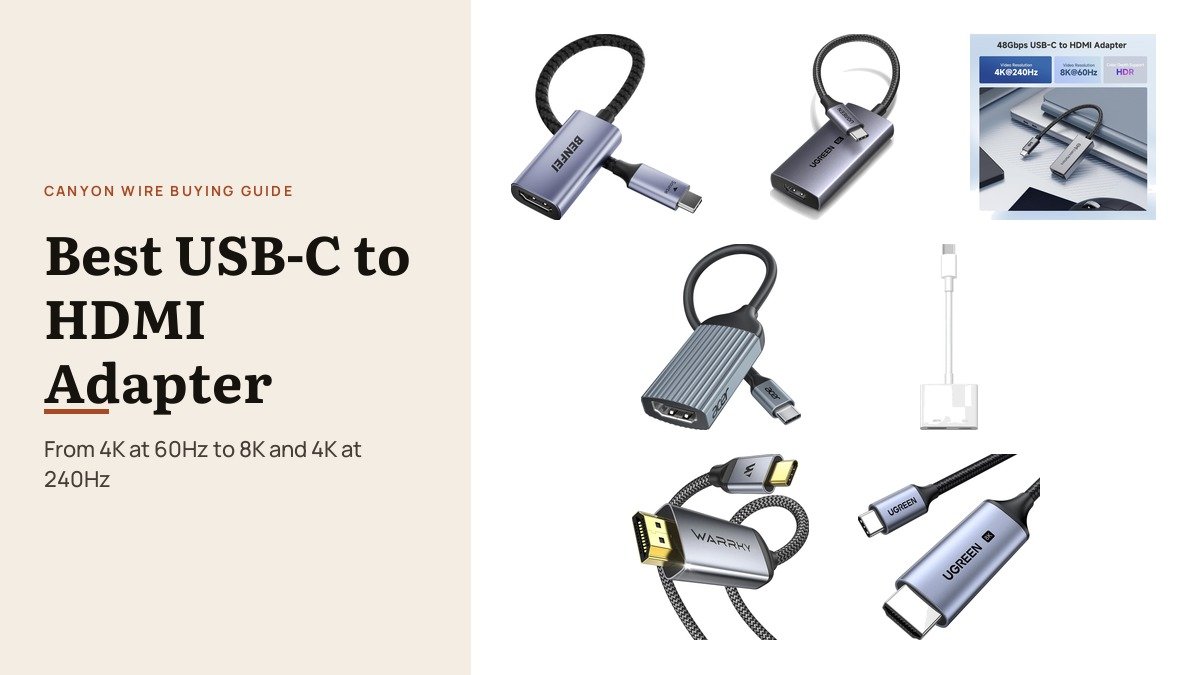
Picking a usb-c to hdmi adapter is mostly about your screen. A 1080p projector or an ordinary 4K TV needs nothing more than a 4K at 60Hz adapter, while a 120Hz or 240Hz gaming monitor needs an HDMI 2.1 adapter rated for 48Gbps, and a source device and display that can keep up with it.
The other choices are practical: a dongle you carry or a direct cable that lives behind the TV, and whether you need to charge a phone or tablet while it is connected. These seven cover each combination, with every resolution quoted as the maker’s maximum.
Best USB-C to HDMI Adapter Options by Resolution and Use
| # | Adapter or cable | Maximum output | Charging | Best for |
|---|---|---|---|---|
| 1 | BENFEI 4K | 4K at 60Hz, 2K at 144Hz | No | Everyday laptop to TV |
| 2 | UGREEN 48Gbps HDMI 2.1 | 8K at 60Hz, 4K at 240Hz | No | Gaming monitors and Samsung DeX |
| 3 | Cable Matters 48Gbps HDMI 2.1 | 8K at 60Hz, 4K at 240Hz | No | PC gaming setups |
| 4 | Acer 4K Adapter | 4K at 60Hz, 2K at 144Hz | No | Thunderbolt and USB4 laptops |
| 5 | Microwoo 4K with 100W PD | 4K | Yes, 100W | iPhone and iPad on a TV |
| 6 | Warrky 6 ft Cable | 4K at 60Hz, 1080p at 240Hz | No | A permanent desk or TV link |
| 7 | UGREEN HDMI 2.1 Cable | 8K at 60Hz, 4K at 240Hz | No | A permanent gaming link |
1. BENFEI 4K: The Dependable Everyday Adapter

BENFEI’s small adapter converts USB-C to HDMI with a built-in chip and supports up to 3840 by 2160 at 60Hz, plus 2K at 144Hz for a smoother picture on a QHD monitor. It works with Thunderbolt 3, 4 and 5 ports and any USB-C port with DP Alt Mode.
BENFEI lists MacBook Pro and Air, iMac, iPhone 15 Pro and many Windows laptops, and backs it with an 18-month unconditional warranty. It is light enough to forget in a laptop bag.
What it does well
- 4K at 60Hz and 2K at 144Hz
- Thunderbolt 3, 4 and 5 compatible
- Compact and light
- 18-month unconditional warranty
What to know before buying
- No charging pass-through
- Not for 4K above 60Hz
- Needs an HDMI cable
2. UGREEN 48Gbps HDMI 2.1: High Refresh and Samsung DeX

UGREEN’s HDMI 2.1 adapter carries 48Gbps for 8K at 60Hz or 4K at 240Hz, and UGREEN lists Samsung DeX support, which turns a compatible Galaxy phone into a desktop on a monitor. It also lists iPhone 16, 17 and 18 models among compatible devices.
UGREEN is clear about the conditions: 8K at 60Hz needs a USB-C port with DisplayPort 1.4 and a display that supports it. The aluminium case, nylon braid and four-layer shielding are built for daily use.
What it does well
- 48Gbps for 8K at 60Hz or 4K at 240Hz
- Samsung DeX and iPhone support listed
- Four-layer shielding
- Aluminium case and braided cable
What to know before buying
- Top modes need DisplayPort 1.4 and a capable display
- No charging
- More than a 1080p screen needs
3. Cable Matters 48Gbps HDMI 2.1: Built for PC Gaming

Cable Matters lists exactly what this adapter needs to reach its 8K at 60Hz and 4K at 240Hz ceilings: a graphics card such as Nvidia’s RTX 2060 or newer, AMD’s RX 6000 or 7000 series, or a recent Intel chip. That honesty is helpful in a category where many buyers expect the top numbers from any laptop.
It supports HDR and Auto Low Latency Mode, works with Thunderbolt 5, 4 and 3, and uses a braided cable with metal connectors in an aluminium enclosure.
What it does well
- 8K at 60Hz and 4K at 240Hz on a capable PC
- HDR and Auto Low Latency Mode
- Clear graphics requirements
- Braided cable and aluminium enclosure
What to know before buying
- Macs may need the separate macOS version
- No charging
- Top modes rarely reachable on basic laptops
4. Acer 4K Adapter: A Compact Choice for Thunderbolt Laptops

Acer’s adapter outputs up to 4K at 60Hz and 2K at 144Hz from Thunderbolt 4 and 3, USB4 and other USB-C ports with video. Acer stresses that it is one-way only, from the USB-C device to an HDMI screen.
It is short at 0.64 ft, so it sits close to the laptop without a dangling lead, and the aluminium case helps with heat during long sessions. It works across Windows, macOS and iPadOS.
What it does well
- 4K at 60Hz and 2K at 144Hz
- Short 0.64 ft body
- Aluminium case
- Works with Thunderbolt and USB4
What to know before buying
- One-way, USB-C to HDMI only
- No charging pass-through
- Needs a separate HDMI cable
5. Microwoo 4K With 100W PD: Charge the Phone While It Plays

Microwoo pairs a 4K HDMI output with a 100W USB-C charging port, so a phone or iPad can play a long film on a hotel TV without running flat. Microwoo lists iPhone 15, 16 and 17 models plus MacBook and iPad Pro and Air.
It needs no power supply, Wi-Fi or app, and connects in seconds. The ABS case and soft TPE cable are lighter than the aluminium adapters here.
What it does well
- 4K HDMI plus 100W USB-C charging
- Listed for iPhone 15 to 17 and iPads
- No app or Wi-Fi needed
- Hot swappable
What to know before buying
- Plastic rather than aluminium case
- No HDMI 2.1 modes
- Charging port does not carry data
6. Warrky 6 ft Cable: One Cable From Desk to Screen

Warrky’s 6 ft cable goes straight from USB-C to HDMI, carrying 4K at 60Hz, 2K at 144Hz and 1080p at 240Hz. For a laptop that always plugs into the same monitor or TV, one cable is neater than an adapter plus an HDMI lead.
It has gold-plated connectors, a nylon braided jacket and non-slip grips on the plugs, and works with Thunderbolt 3 and 4 ports and USB-C ports with DP Alt Mode, including iPhone 15 to 17.
What it does well
- Single 6 ft cable, no dongle
- 4K at 60Hz, 2K at 144Hz, 1080p at 240Hz
- Braided jacket and gold plugs
- Works with iPhone 15 to 17
What to know before buying
- Fixed length
- No charging
- Not HDMI 2.1
7. UGREEN HDMI 2.1 Cable: A Permanent Link for a Gaming Display

This is UGREEN’s 48Gbps HDMI 2.1 in cable form, 6.6 ft long, rated for 8K at 60Hz and 4K at 240Hz. It suits a gaming laptop or Mac mini that stays connected to one high refresh monitor.
UGREEN notes that MacBooks top out at 4K 240Hz with M3 and M4 chips and 4K 144Hz with M1 and M2, a useful guide for Mac owners. The braided cable has EMI protection for a stable signal.
What it does well
- 48Gbps HDMI 2.1 in a single cable
- 8K at 60Hz and 4K at 240Hz
- Clear Mac refresh limits listed
- Braided with EMI protection
What to know before buying
- Fixed 6.6 ft length
- Needs a DisplayPort 1.4 source for 8K
- No charging
HDMI 2.1, 48Gbps and the New HDMI 2.2
The HDMI 2.1 adapters here are rated for 48Gbps, the bandwidth of the Ultra High Speed cable introduced with HDMI 2.1, and that is what lets them carry 4K at 240Hz or 8K at 60Hz. HDMI Licensing now describes HDMI 2.2, with up to 96Gbps, as the latest version, but the USB-C source is the real limit for these adapters, not HDMI.
In practice, the source decides. UGREEN and Cable Matters both say their top modes need a DisplayPort 1.4 capable port and recent graphics, and a display that supports the mode. On a typical office laptop or a 4K TV at 60Hz, a 4K adapter like the BENFEI performs identically and costs less. A docking station adds more ports if you need them.
Connecting an iPhone or iPad to a TV With USB-C
iPhones with USB-C video send DisplayPort through the port. Apple says that iPhone 15, 16 (except the 16e), 17 (except the 17e) and 18 Pro models output up to 4K at 60Hz with HDR, and that HDMI 2.0 adapters and cables reach 4K at 60Hz.
For long viewing, an adapter with charging, such as the Microwoo, keeps the battery topped up. On a phone that cannot output video, AirPlay to a compatible TV is the fallback. For presentations a big TV can also stand in for a projector.
Which USB-C to HDMI Adapter to Choose
For most laptops and TVs, the BENFEI 4K adapter is the pick: 4K at 60Hz, 2K at 144Hz, small and backed for 18 months. For an iPhone or iPad on a hotel TV, choose the Microwoo so the device charges while it plays.
Gamers with a 120Hz or 240Hz display should choose an HDMI 2.1 adapter, the UGREEN 48Gbps for its DeX support or the Cable Matters for its clear PC requirements. If the screen never moves, the Warrky or UGREEN cables replace the adapter and HDMI lead with one cord.
Frequently Asked Questions
Will any USB-C to HDMI adapter work with my laptop?
Only if the laptop’s USB-C port outputs video through DisplayPort Alt Mode, Thunderbolt or USB4. Check the port symbols or your laptop’s specifications first.
Is a USB-C to HDMI cable better than an adapter?
Neither is better for picture quality. A cable is neater for a fixed setup, while an adapter works with any HDMI cable already connected to the screen.
Why can I not get 4K at 120Hz?
Every part has to support it: the device’s USB-C port, the adapter, the HDMI cable and the display. A 4K at 60Hz adapter or an older laptop will cap the refresh rate.
Can I use a USB-C to HDMI adapter to connect a Samsung phone?
Yes, on Galaxy models that support DeX or video out. UGREEN lists DeX support for its HDMI 2.1 adapter.
Related Articles
- Best Gaming Monitor
- Best Keyboards for Mac
- Best iPad Keyboards
- How to Fix Laptop Screen Issues: 6 Common Faults
As an Amazon Associate, CanyonWire earns from qualifying purchases.





