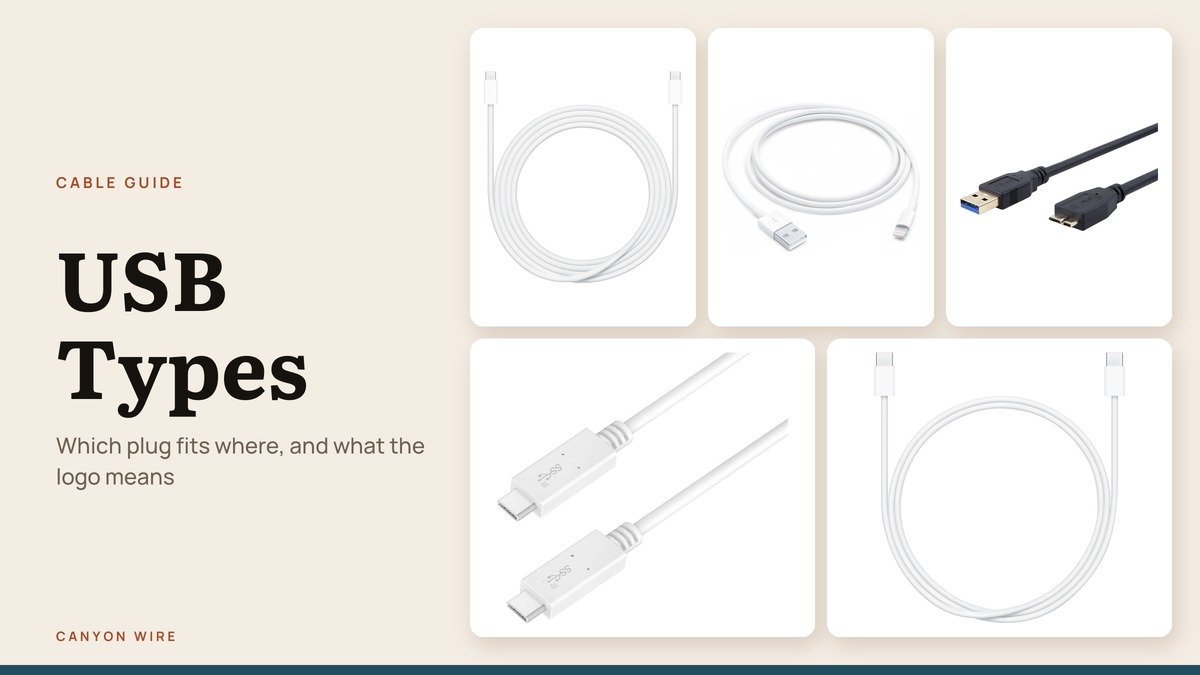
USB types come in two flavors that people often mix up: plug shapes, such as USB-A, Micro-USB and USB-C, and speed standards, such as USB 2.0, USB 3.2 and USB4. Knowing both is how you work out why a cable charges a phone but crawls when you copy photos, or why a new printer cable will not fit.
Below, every plug you are likely to find in a drawer in 2026 is shown on a real cable, with which ports it fits, followed by what the speed names mean in plain numbers, how to read the logo printed on a USB-C cable and how many watts each one can carry.
Shape vs Speed: The Two Ways USB Types Are Named
Short answer: the letter (A, B, C) or size (Mini, Micro) names the plug, while the number (2.0, 3.2, USB4) names the data standard. The USB-IF states it directly: USB Type-C is not USB 3.2 or USB4, and it is not USB Power Delivery. One plug shape can run many standards, and a link always falls back to the slowest part in the chain.
The 7 USB Plug Types You Will Find in a Cable Drawer
1. USB-A: Still on Most Chargers and PCs
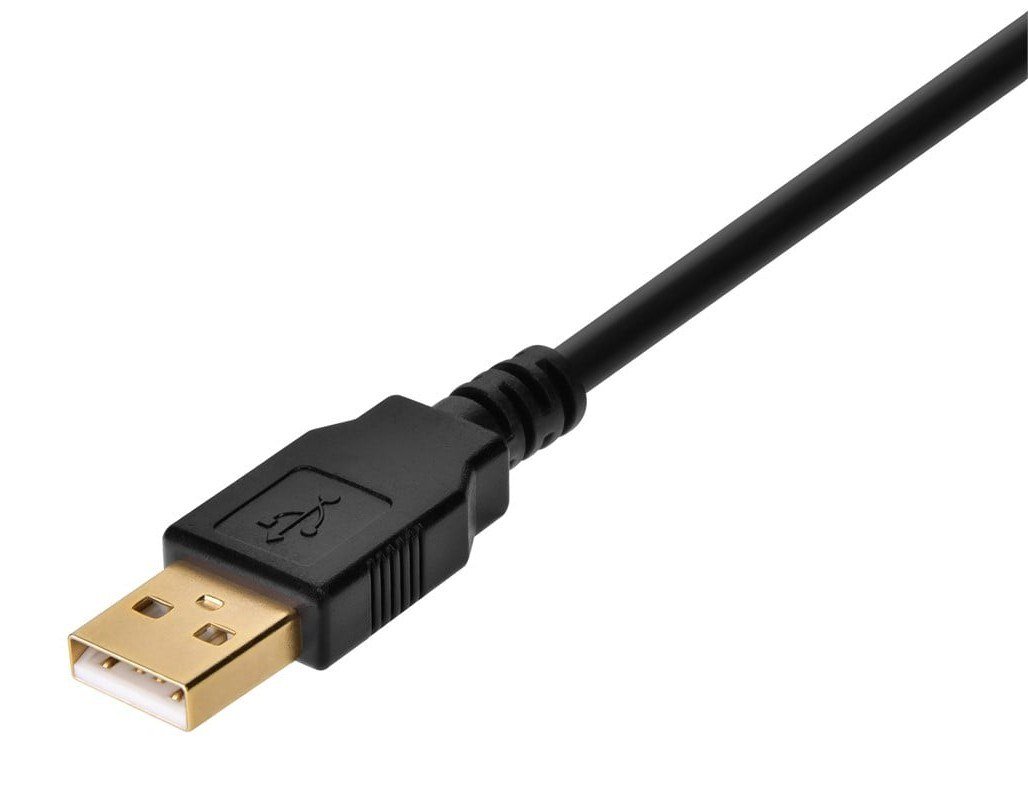
Shape: flat rectangle | First spec: USB 1.0, January 15, 1996 | Fits: any USB-A port, old or new
The flat rectangle is the original host plug and the one most wall chargers, desktop towers and car ports still use. It is keyed, so it only goes in one way, and the USB trident molded on top marks the side that faces up.
Old and new USB-A plugs fit each other. A USB 3.x version adds five extra contacts behind the four USB 2.0 ones, and makers often color the plastic tongue blue to flag it. Plug a USB 3 drive into a USB 2.0 port and it still works, just at 480 Mbps.
2. USB-B: The Plug on Printers and Desktop Drives
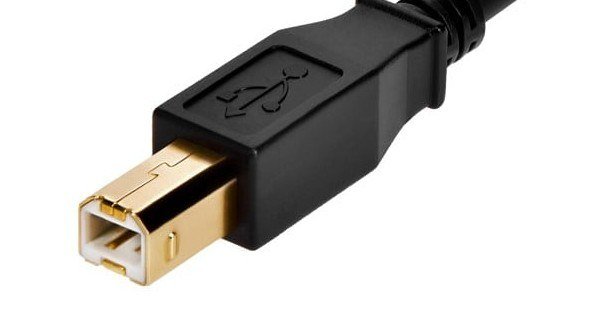
Shape: square with beveled corners | First spec: USB 1.0, January 15, 1996 | Fits: USB-B ports on peripherals
USB-B is the chunky square plug on the device end of a classic printer cable. Its shape was chosen so that it could never go into a computer, which kept the host and device ends of the cable from being mixed up.
There are two sizes. The USB 3.x Standard-B plug has a raised section with five SuperSpeed contacts and fits only USB 3 B ports, while the older flat USB 2.0 B plug fits both kinds of port. If a new printer cable will not seat, check which height of B port you have.
3. Mini-USB: The Camera Plug of the 2000s
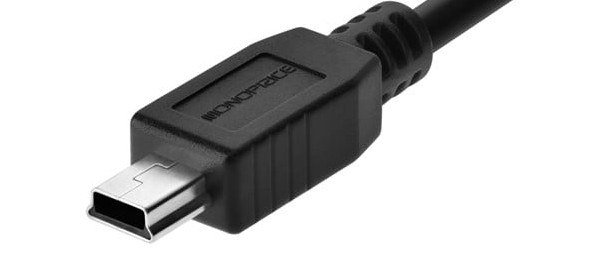
Shape: small trapezoid | First spec: USB 2.0 change notice, October 20, 2000 | Pins: 5
Mini-USB was added to USB 2.0 in October 2000 after the USB-IF decided Standard-B was too big for phones and handhelds. The Mini-B plug, a small trapezoid, became the standard on point-and-shoot cameras, music players and early game controllers.
It holds five pins, the usual four plus an ID pin that goes unused on the B plug, and runs no faster than USB 2.0. You mostly see it now on older electronics, which is why a spare Mini-USB cable is worth keeping in the drawer.
4. Micro-USB: The Flat Plug That Charged a Decade of Phones

Shape: thin, flat, tapered | First spec: Micro-USB 1.01, April 4, 2007 | Pins: 5
Micro-USB was written in 2007 for one reason: phones had become so thin that Mini-USB no longer fit them. The specification also set a durability target of more than 10,000 plug-in cycles, a big step up for a port people used several times a day.
The tapered edges let it go in only one way, a frequent source of fumbling in the dark. It carries USB 2.0 data and basic charging, and it is the plug USB-C replaced on phones, wireless earbuds cases and other small devices.
5. USB 3.0 Micro-B: Two Plugs Joined Side by Side

Shape: Micro-USB plus a second block | First spec: USB 3.0, November 12, 2008 | Pins: 10
This wide, split plug is the USB 3.0 version of Micro-B, found mostly on portable hard drives made before USB-C. The extra block on the side carries the SuperSpeed lanes that lift it from 480 Mbps to 5 Gbps.
Its socket takes a plain Micro-USB cable in the left half, so a lost drive cable can be replaced in a pinch, although the drive then runs at USB 2.0 speed. The wide plug itself will not fit a regular Micro-USB port.
6. USB-C: One Oval Plug for Phones, Laptops and Monitors
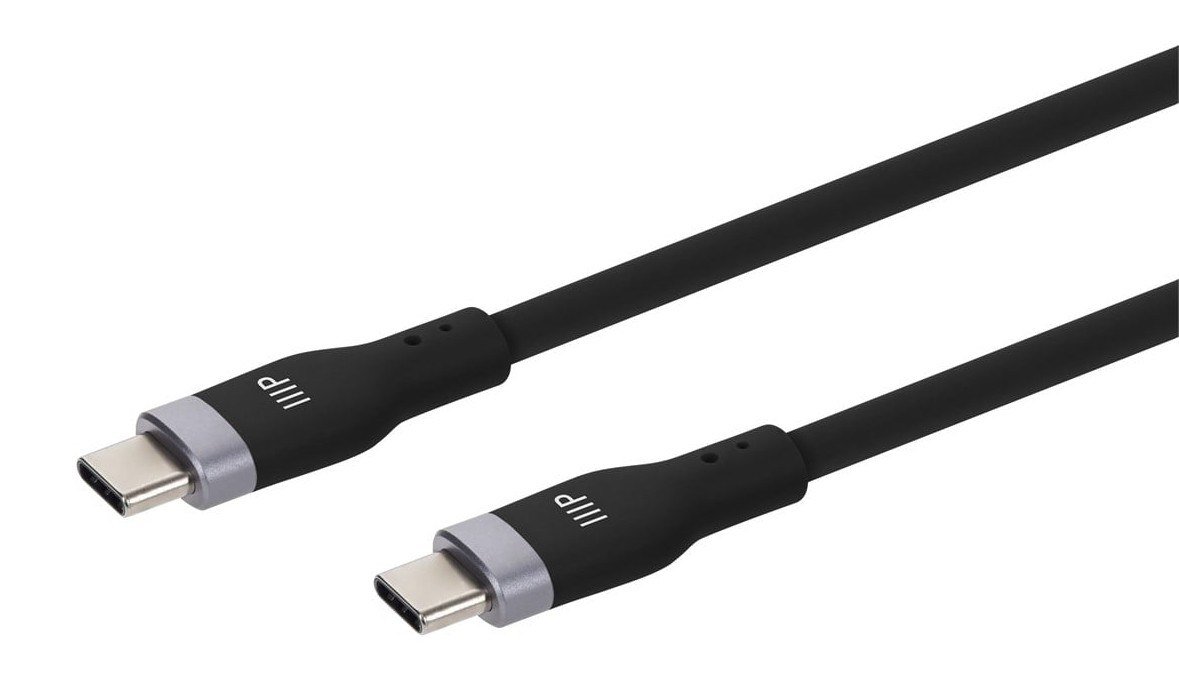
Shape: small rounded oval | First spec: USB Type-C 1.0, August 11, 2014 | Pins: 24 | Reversible: yes
USB-C is the small oval plug that goes in either way up, and the same plug sits at both ends of the cable. Its 24 pins carry USB 2.0 and high-speed data lanes side by side, plus power, ground, two configuration pins and two sideband pins used for video modes.
Because the ends are identical, the devices decide which one supplies power and which one is the host once they are connected. The catch is that every USB-C cable looks the same from the outside, even though some carry 480 Mbps and others 80 Gbps.
7. Lightning: Apple’s Plug Before USB-C

Shape: thin flat blade | Introduced: iPhone 5, September 12, 2012 | Reversible: yes | Standard: Apple only
Lightning is the thin, flat Apple blade that works either way up. It is not a USB connector, but it reaches a charger or computer through a USB-A or USB-C plug on the other end, so it shows up in every drawer of USB cables.
Apple switched iPhone to USB-C with iPhone 15 in September 2023, and a single USB-C cable can now charge an iPhone, iPad, Mac and AirPods Pro. Lightning cables still matter for older iPhones and accessories, and Apple’s USB-C to Lightning cable bridges the two.
USB Plug Compatibility Chart: What Fits Where
| # | Plug | First spec | Pins | Reversible | What it fits |
|---|---|---|---|---|---|
| 1 | USB-A | 1996 | 4 or 9 | No | Any USB-A port; USB 3 and USB 2.0 versions mix freely |
| 2 | USB-B | 1996 | 4 or 9 | No | USB 2.0 B plug fits both B ports; USB 3 B plug fits only USB 3 B ports |
| 3 | Mini-USB | 2000 | 5 | No | Mini-B ports only |
| 4 | Micro-USB | 2007 | 5 | No | Micro-USB ports and the narrow half of a USB 3.0 Micro-B port |
| 5 | USB 3.0 Micro-B | 2008 | 10 | No | USB 3.0 Micro-B ports only |
| 6 | USB-C | 2014 | 24 | Yes | Any USB-C or Thunderbolt 3, 4 or 5 port |
| 7 | Lightning | 2012 | Not published | Yes | Lightning ports on Apple devices only |
The rule of thumb is that newer USB 3 sockets accept older USB 2.0 plugs, but the bigger USB 3 plugs do not fit older sockets. USB-A is the exception, because its USB 3 contacts sit inside the same outline. Adapters fill the gaps, though no USB-C to legacy cable is defined for USB4 speeds.
USB Speed Names Decoded: Gen 1, Gen 2×2 and USB4
The version names have been renamed so often that the USB-IF now tells manufacturers to print the speed instead. Its guidelines list five consumer names, and they map onto the technical names like this:
- USB 5Gbps: USB 3.2 Gen 1, previously sold as USB 3.0 and USB 3.1 Gen 1 (first released November 12, 2008).
- USB 10Gbps: USB 3.2 Gen 2, previously USB 3.1 (July 26, 2013).
- USB 20Gbps: USB 3.2 Gen 2×2, two 10 Gbps lanes at once (September 22, 2017), or USB4 at its lowest tier.
- USB 40Gbps: USB4 version 1.0 (August 2019).
- USB 80Gbps: USB4 version 2.0 (October 2022), which can also send 120 Gbps in one direction.
Below those sit the older tiers: 480 Mbps for USB 2.0, released April 27, 2000, and 12 Mbps for USB 1.x. USB 3.2 is backward compatible with every earlier USB product, and a device always settles on the fastest rate both ends support.
Reading a USB-C Cable Logo: Speed, Watts and Length
Since USB-C cables all look alike, the certified ones carry a logo on the plug housing that shows the data rate and the wattage, for example 20Gbps/60W or 40Gbps/240W. A logo with only a wattage is normally a USB 2.0 Type-C cable, good for charging and 480 Mbps data but not for video or fast drives.
Length matters too. The USB Type-C cable specification sets the maximum passive cable length by speed:
- USB 2.0 speed: up to 4 m
- USB 5Gbps: up to 2 m
- USB 10Gbps: up to 1 m
- USB 40Gbps and 80Gbps: up to 0.8 m
Every full-featured cable, and every cable rated above 3A, contains an e-marker chip that reports its limits to the charger. That is how a 240W charger knows to hold back on a 60W cable.
How Many Watts Each USB Type Can Carry
| Connection | Voltage and current | Maximum power |
|---|---|---|
| USB 2.0 port | 5V, 500 mA | 2.5W |
| USB 3.x port, one lane | 5V, 900 mA | 4.5W |
| USB 3.x port, two lanes | 5V, 1,500 mA | 7.5W |
| USB-C at 3A, no Power Delivery | 5V, 3A | 15W |
| USB Power Delivery, standard range | Up to 20V, 5A | 100W |
| USB Power Delivery 3.1, extended range | 28V, 36V or 48V at 5A | 140W, 180W or 240W |
The jump to 240W came with USB Power Delivery 3.1, announced May 26, 2021, which added 28, 36 and 48 volt levels. That range is what lets a single USB-C charger run anything from earbuds to a large laptop, and it is why many portable power stations now list USB-C PD output ports.
Thunderbolt and USB-C: Same Port, Different Rules
Thunderbolt has used the USB-C connector since Thunderbolt 3 in 2015, and USB4 is built on the Thunderbolt protocol that Intel contributed to the USB-IF. So a Thunderbolt port is a USB-C port with higher guaranteed minimums.
- Thunderbolt 3 and Thunderbolt 4 run at 40 Gbps.
- Thunderbolt 5, announced September 12, 2023, runs at 80 Gbps and up to 120 Gbps in one direction.
- A port labeled only USB4 must reach 20 Gbps at minimum, so check the spec sheet before buying a dock.
- Thunderbolt certified passive cables reach up to 2 m at full speed.
Which USB Cable Do You Need?
- Charging a current phone or laptop: USB-C to USB-C with a wattage logo that matches the charger, 60W for phones and tablets, 240W for big laptops.
- A TV or monitor from a laptop: a full-featured USB-C cable, or a USB-C to HDMI adapter if the screen has no USB-C input.
- An external SSD: the shortest cable that carries a 10Gbps or faster logo.
- A printer: USB-A to USB-B, or USB-C to USB-B for a laptop with only USB-C ports.
- An older iPhone or iPad: USB-C to Lightning.
- Older cameras, controllers and drives: keep one Mini-USB, one Micro-USB and one USB 3.0 Micro-B cable on hand.
Frequently Asked Questions
What are the main USB types?
The main plug types are USB-A, USB-B, Mini-USB, Micro-USB, USB 3.0 Micro-B and USB-C, with Apple’s Lightning as a non-USB plug on many USB cables. The main speed standards are USB 2.0, USB 3.2 in three speeds, and USB4 at 40 or 80 Gbps.
Can I plug a USB-A cable into a USB-C port?
Not directly, because the shapes are different. A USB-A to USB-C cable or a small adapter connects them, and the link then runs at the speed of the slower side. USB-A ports cannot deliver USB Power Delivery charging, so expect slower charging through them.
What does USB 3.2 Gen 2×2 mean?
Gen 2 is the 10 Gbps signaling rate and x2 means two lanes running together, for 20 Gbps in total. The USB-IF now asks for it to be sold as USB 20Gbps. It needs USB-C, since that is the connector wired for two-lane operation.
Is Micro-USB still used?
Mostly on older and low-cost devices. In the European Union, phones, tablets, cameras, headphones, speakers and other small electronics have needed a USB-C port since December 28, 2024, and laptops since April 28, 2026, which has pushed Micro-USB out of new products.





