A Snapchat account locked for a day or two and one locked for good produce the same dead login screen, and the fixes have nothing in common. The message in the app tells you which you have, so read it before you touch anything: waiting out a permanent lock achieves nothing, and repeatedly retrying a temporary one can start the clock again.
Snapchat lists five reasons it locks accounts, and only two of them resolve themselves with time.
Why the account was locked
| Reason Snapchat gives | What kind of lock |
|---|---|
| Content or behaviour against the guidelines | Permanent, lesson or appeal |
| Suspicious activity, such as mass friend requests | Temporary |
| Snapchat thinks the account was compromised | Support Bot |
| Logged in from a banned device | Device ban, not just the account |
| A third-party app, tweak or plugin | Temporary, duration stated in the message |
The wording matters. A message about unauthorised third-party apps names a specific lock period. A message that cites the Community Guidelines or the Terms of Service is the serious one, and it is the only kind with an appeals process attached.
A temporary lock: wait, or use the portal
Where no specific reason is given, Snapchat’s instruction is to wait 48 hours and try again. The same 48 hours applies when access has been temporarily disabled after too many login attempts.
- Stop trying to log in. Further attempts are themselves a trigger for a fresh block.
- Open accounts.snapchat.com in a browser, sign in, and look for Unlock. That button only ever applies to a temporary lock.
- If Unlock is not there or does not work, wait the full 48 hours before the next attempt.
- Where the message blames a third-party app, check the in-app text and the email on your account for the stated end of the lock period.
Third-party apps are the usual cause
Snapchat names tools like Wicked and IOTA directly. These are the plugins that promise saved Snaps or hidden typing indicators, and using them is a lock in waiting.
- Remove every unauthorised app, tweak or plugin before the lock period ends, not after.
- Update Snapchat to the current store version.
- Then log back in. Signing in with the tooling still present is the fast way to a second lock.
- Expect no leniency. Snapchat treats repeat use as abuse, and repeated violations escalate to a device ban.
If the lock message mentions a possible compromise rather than a plugin, the route is the Snapchat Support Bot instead. Snapchat also warns that nobody from Snapchat will ever ask for your password, which is the same rule our guide to building a password worth keeping is built around.
A Community Guidelines lock: lesson or appeal
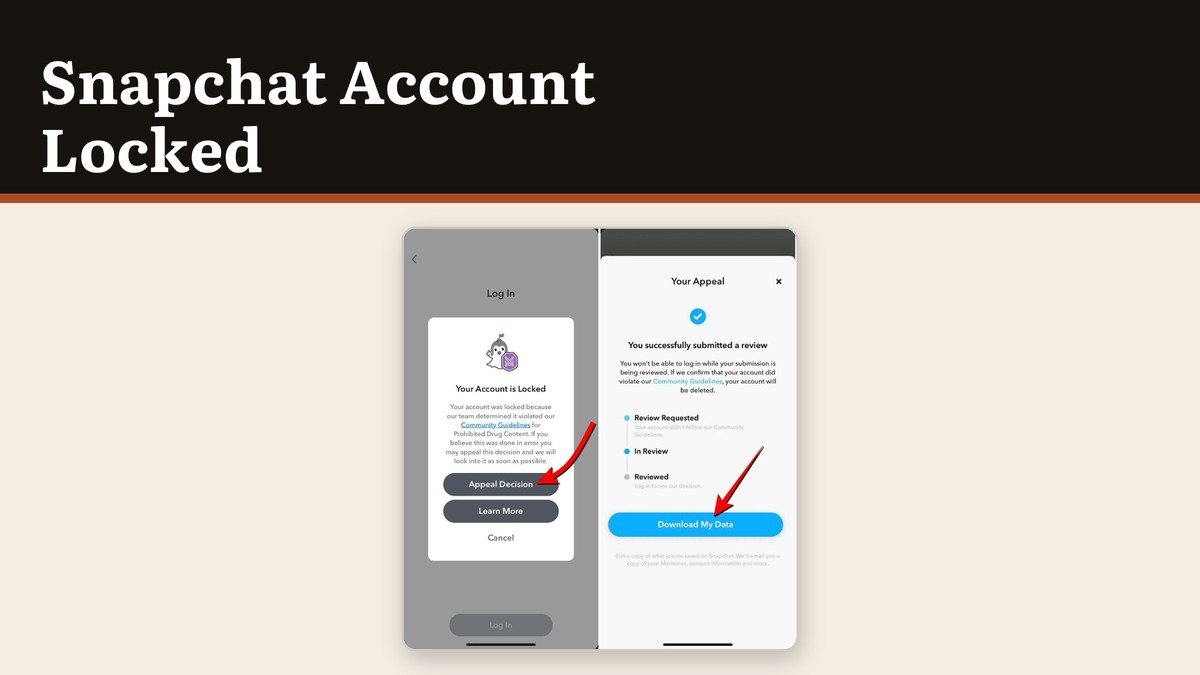
This lock does not expire. Snapchat offers two ways out and both are time-limited, so the first thing to check is which one the app is showing you.
- Start Lesson, where it appears, means a short quiz. Every answer has to be correct and it has to be done within 30 days of the lock. You can retake it as often as you need inside that window.
- Missing the 30 days makes the lock permanent, and an appeal becomes the only remaining route.
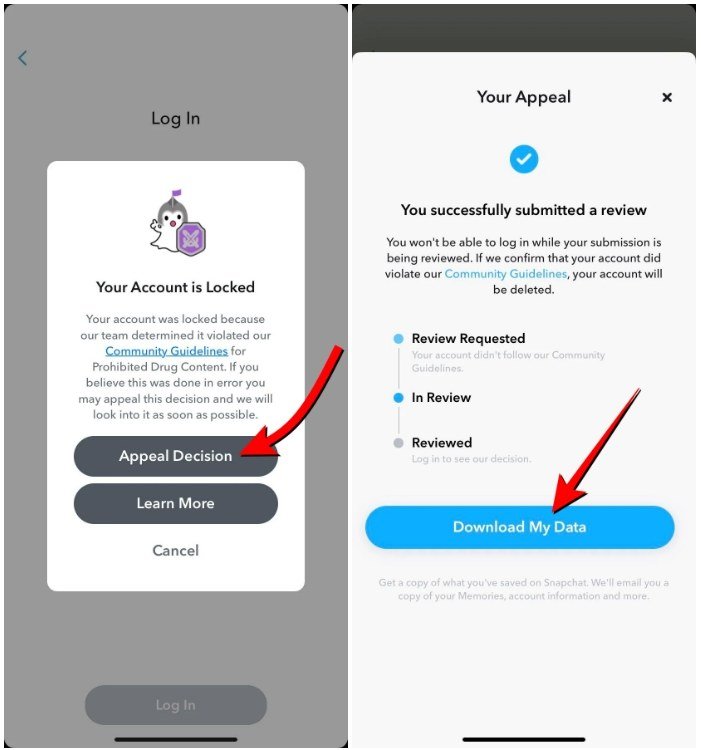
- Appeal Decision on the login pop-up starts the appeal. If there is no pop-up offering it, the lock is not eligible.
- You get one appeal. A denied appeal cannot be submitted again.
An appeal can be filed within six months of being told about the decision, and the review can run up to 30 days, with the original enforcement generally staying in place meanwhile. Snapchat is explicit that the in-app process is the only legitimate one, that outside support tickets will not speed it up, and that anyone claiming they can unlock an account for you is a scammer.
When the device, not the account, is banned
Some lock screens carry an error code, and those point at the hardware rather than the login.
- SS18 or SS06 means the device has been banned for abuse or repeated guideline violations.
- SS07 means too many accounts have been associated with that device.
- A banned device cannot create new accounts, so starting fresh on the same phone will not work.
- Snapchat prohibits new accounts for anyone whose account was terminated.
You can still pull your data out while an account is locked. Sign in at accounts.snapchat.com, choose My Data, select what you want and a date range, submit, then download from the emailed link. Some locked account types return less data than others. If the handset itself is misbehaving instead, recovery mode is the separate problem.
Frequently Asked Questions
How long does a Snapchat lock last?
48 hours where Snapchat gives no specific reason, and a stated period in the message or email where a third-party app caused it. A Community Guidelines lock has no duration at all; it ends with a passed lesson or a successful appeal, or not at all.
Will Snapchat support unlock my account if I ask?
No. Snapchat says the in-app lesson and the in-app appeal are the only legitimate routes, and that support tickets raised outside them will not change the outcome.
Can I just make a new account?
Snapchat prohibits new accounts for anyone whose account was terminated, and a banned device cannot create one regardless. On a temporary lock it is also unnecessary.
Does uninstalling the app clear a lock?
No. The lock sits on the account rather than the installation, so reinstalling changes nothing. Removing unauthorised plugins before the lock period ends does matter.