Working out an emoji meaning is a three-part job, and most people stop after the first part. The picture tells you what an artist drew. The official name tells you what the emoji is supposed to be. How people use it tells you what the sender probably meant, and that third answer is often a long way from the first.
This guide walks through all three checks on iPhone, Mac, Windows and Android. Expect to spend about a minute on each emoji, slightly longer the first time while you switch on one iPhone setting.
Emoji Meaning in 60 Seconds: The Short Version
Quick method: find the emoji's official name on your device (Speak Selection on iPhone, the Character Viewer on Mac, a pasted web search on Windows or Android). Look that name up on Emojipedia to read how people use it. Finally, open its design gallery to see the version the sender saw.
What You Need
- The device the message arrived on, or any computer you can copy the emoji to.
- For iPhone and iPad: iOS 27 or iPadOS 27 for the menu names used here. Earlier versions call the same setting Spoken Content.
- For Mac: any recent macOS, including macOS 27 Golden Gate.
- For Windows: Windows 11 or Windows 10, both of which include the emoji panel.
- A web browser for the usage check.
Step 1: Get the Emoji's Official Name
Every emoji has a name assigned through the Unicode Standard, the system that lets a phone and a laptop agree that a particular code is, say, Folded Hands. The first emoji sets came from Japanese device makers in the late 1980s and 1990s, and Unicode began encoding them in 2010, which is why some meanings still follow Japanese custom. Your device already stores every name. These are the quickest ways to make it show you one.
On iPhone or iPad: Let Speak Selection Read It
- Open Settings, tap Accessibility, then tap Read & Speak under Vision.
- Tap Speak Selection and switch it on. The screen confirms that a Speak button will now appear when you select text.
- Copy the emoji from the conversation: touch and hold the message, then tap Copy.
- Paste it into a note or an unsent message, and double-tap the emoji to select only that character.
- Tap Speak. If the menu is short on space, tap its arrow to reveal the option. You will hear the emoji's name.
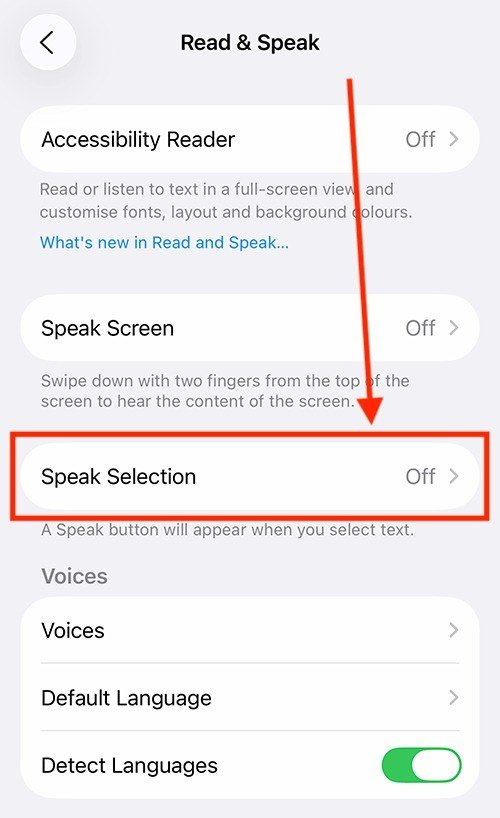
You will know it worked when the voice says a name rather than nothing. If you hear silence, the selection probably caught a space as well as the emoji, so double-tap again.
On a Mac: Open the Character Viewer
- Click inside any text box.
- Press Fn/Globe-E or pick Edit > Emoji & Symbols.
- Click the expand button at the top right of the small viewer to open the full window.
- Choose Emoji in the sidebar and click the emoji you want. Its name appears in the panel on the right, with a large preview above it.

In the compact viewer, resting the pointer on an emoji for a moment shows the same name as a tooltip, which is faster when you only need one.
On Windows: Use the Emoji Panel and a Search
- Click into a text field and press the Windows key and the period key at the same time.
- Type a word that describes the emoji. The panel filters to emoji tagged with that word, which confirms or rules out a guess.
- For an emoji you received, copy it and paste it into a browser search instead. The results name it.

Microsoft lists the shortcut among its Windows keyboard tips, and the same panel also holds kaomoji and symbols.
On Android: Paste It Into a Search
Touch and hold the message, copy it, and paste the emoji alone into the Google app or Chrome. The results name the emoji, and the top link is typically its Emojipedia page. Gboard's Search emoji box, inside the emoji panel, works the other way round: type a word and see which emoji Google files under it.
Step 2: Check How People Actually Use It
The name is a description, not a definition. Emojipedia catalogues every emoji with a written meaning that reflects real use, and its entries are where a name turns into an answer.
- Go to emojipedia.org and paste the emoji into the search bar.
- Open the result whose title matches the name you found in step 1.
- Read the meaning at the top. It covers the literal picture first, then the common figurative uses.

The Skull entry is a good example. It describes a cartoon skull, then notes that the emoji commonly expresses figurative death, as in dying of laughter. That second sentence is the one that explains the message you got.
Step 3: See the Emoji the Way the Sender Saw It
Unicode names each emoji, but every company draws its own. On the same Emojipedia page, open the Emoji Designs tab to see the Apple, Google, Samsung and Microsoft versions in a row. If your friend has a Samsung phone and you have an iPhone, the Samsung drawing is the one that carried their meaning.
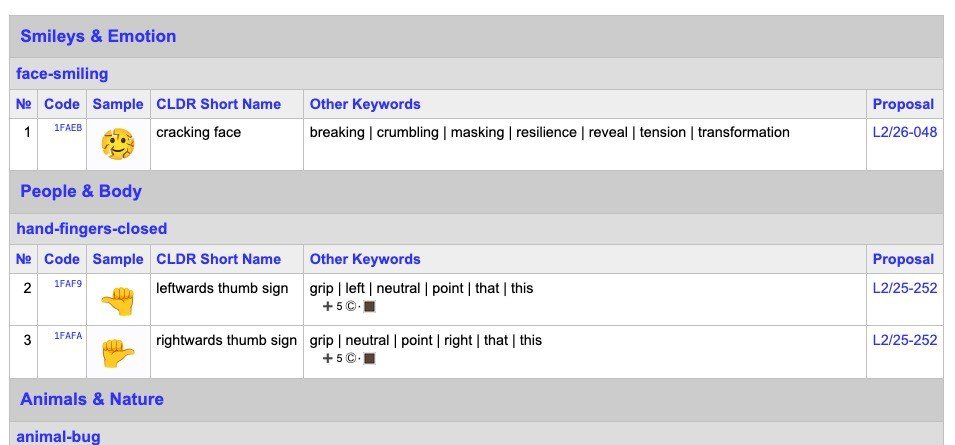
New emoji add a wrinkle. Unicode 18.0 arrived on 16 September 2026 with nine new emoji, and the Unicode chart of recently added emoji lists each one with its CLDR short name, the official English label. A phone that has not received those designs shows a blank box in their place.
Optional: Check the Emoji's Age and Code Point
One more tab on the Emojipedia page answers a question the meaning cannot: will the other person even see this emoji? Technical Information lists the code point, the Unicode version that added the emoji and the year it was approved.
- Open the emoji's Emojipedia page and select Technical Information.
- Note the Unicode version. Skull dates from Unicode 6.0 in 2010, so every phone in use today shows it.
- Compare it with the recipient's phone. Melting Face and Saluting Face arrived with Unicode 14.0 in 2021, and a phone that has not been updated since then shows a box where they should be.
- Use the code point, written like U+1F480 for Skull, when you need to search for an emoji that will not paste cleanly, such as in a support ticket or a spreadsheet.
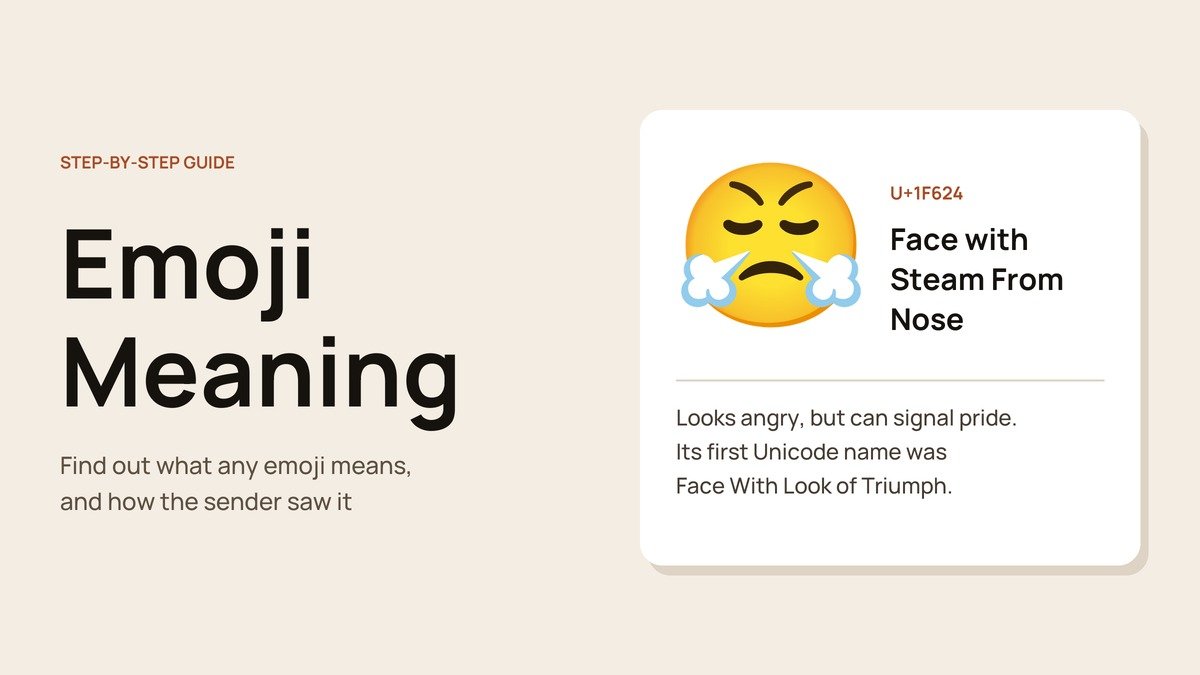
This is also how to settle an argument about renamed emoji. Face with Steam From Nose was approved under the name Face with Look of Triumph, which explains why some people still read it as a victory face.
Emoji That Mean Something Other Than They Look
These are the emoji most likely to be read one way and meant another. The name in bold is the one your device will give you.
- 😭 Loudly Crying Face: used far more for overwhelming laughter, joy or affection than for real sadness. It was briefly the most used emoji on Twitter in 2021.
- 💀 Skull: “I am dead”, usually from laughing.
- 🙏 Folded Hands: please, thank you or a prayer. The high-five reading is rare.
- 😤 Face with Steam From Nose: it looks furious, but it can also mean pride or triumph.
- 🙃 Upside-Down Face: irony, sarcasm or “oh well”.
- 🫠 Melting Face: embarrassment, dread or sarcasm, added to Unicode in 2021.
- 👀 Eyes: looking at something, from admiring a photo to “shifty eyes” about something suspicious.
- 💅 Nail Polish: confidence and nonchalance more than manicures.
- 😂 Face with Tears of Joy: plain laughter. Oxford Dictionaries named it its 2015 Word of the Year.
Meanings also shift by app. Snapchat, for instance, uses its own markers, and our explainers on the Snapchat green dot and Snapchat planets cover two of them. If you are choosing emoji for a card rather than decoding them, our list of birthday wishes shows where they fit.
Common Mistakes When Decoding Emoji
- Taking a keyboard suggestion as a definition. Keyboards match emoji to loose keywords. Keyboard search often offers Folded Hands for “high five”, even though that is rarely what people mean by it.
- Judging by your own screen. Flushed Face and Grimacing Face have varied widely between platforms. Check the sender's version in step 3 before reacting.
- Selecting more than the emoji on iPhone. Speak Selection reads everything highlighted, so a stray word turns the name into a sentence.
Frequently Asked Questions
How do I find out what an emoji means without an app?
Use what is already on your device. Speak Selection reads an emoji's name on iPhone, the Character Viewer shows it on Mac, and a pasted web search names it on Windows and Android. No download is needed for any of them.
Who decides what an emoji means?
Unicode decides which emoji exist and gives each a name. Everyday meaning is set by the people who use them, which is why the Loudly Crying Face now signals laughter as often as tears.
Can an emoji mean different things in different countries?
Yes. Folded Hands means please or thank you in Japan, while elsewhere it is read as prayer. Pinched Fingers is an Italian gesture of disbelief that other users often treat as a joke about Italians.
Why does my phone show a box instead of an emoji?
The emoji is newer than your phone's software. Installing the latest system update adds the new designs once your phone maker has drawn them.





