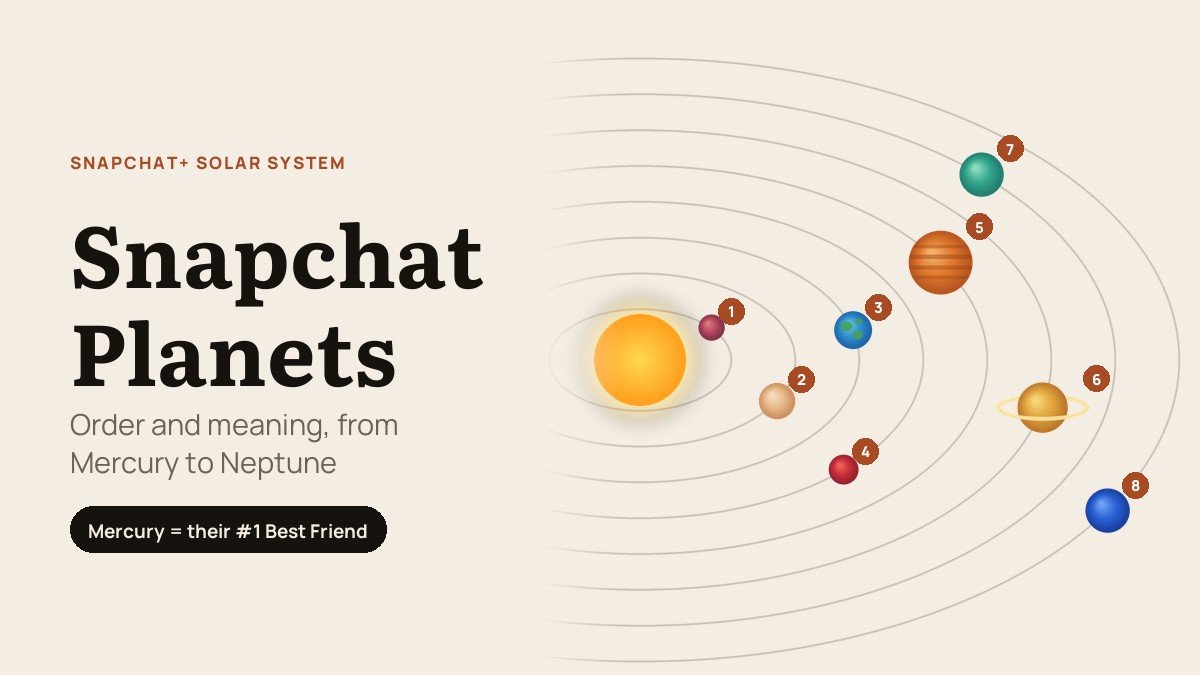
Snapchat planets are the Friend Solar System, a Snapchat+ feature that tells you where you sit among a friend’s eight Best Friends. Each position is a planet, and the order copies the real solar system: Mercury means you are the person they Snap and Chat with most, and Neptune means you are eighth.
Two details trip people up. The planet describes your place in their list, not theirs in yours, and the feature has been switched off by default since April 2024, so a new subscriber sees nothing until they turn it on. Both are covered below, along with the full order and what to check when a planet refuses to appear.
The Snapchat Planets Order, From Mercury to Neptune
The Sun in the middle is always your friend. The closer your planet sits to it, the higher you are on their Best Friends list:
| # | Planet | Your place in their Best Friends list | How the planet looks |
|---|---|---|---|
| 1 | Mercury | First, the person they Snap and Chat with most | Small deep-red planet surrounded by hearts |
| 2 | Venus | Second | Pale peach planet with pink and yellow hearts |
| 3 | Earth | Third | Blue and green globe with hearts and a small grey moon |
| 4 | Mars | Fourth | Red planet with purple and blue hearts |
| 5 | Jupiter | Fifth | Large orange planet with bands and sparkles |
| 6 | Saturn | Sixth | Gold planet with a glowing ring |
| 7 | Uranus | Seventh | Teal-green planet with sparkles |
| 8 | Neptune | Eighth, the last Best Friends spot | Deep blue planet with sparkles |
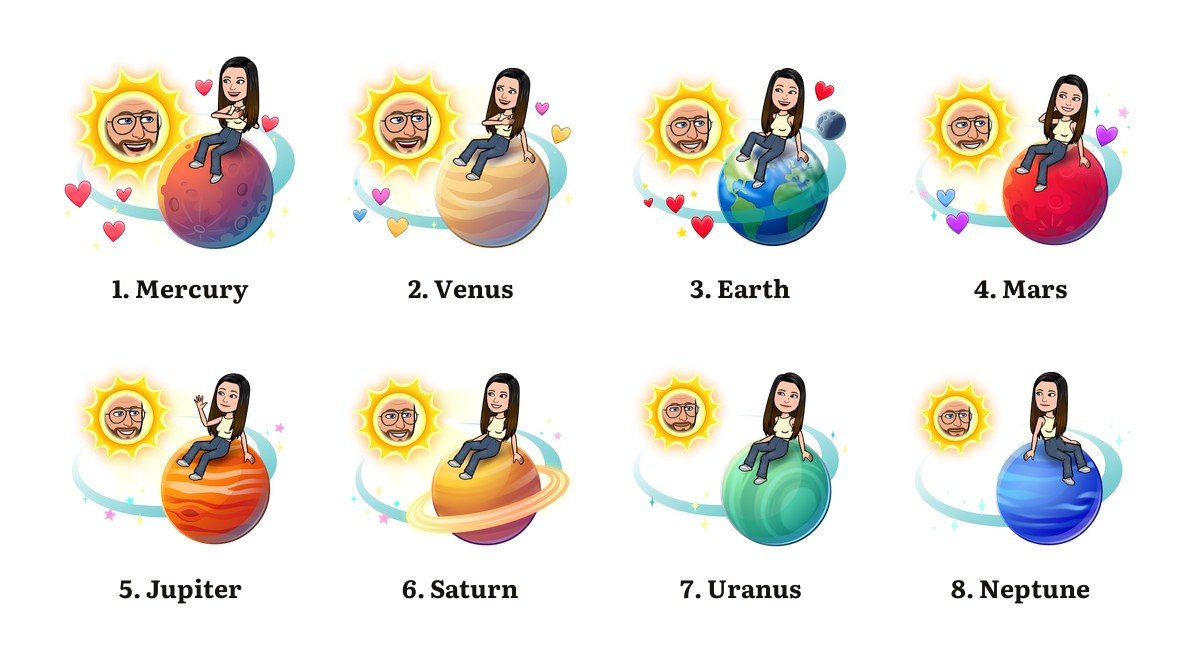
There is a pattern in Snapchat’s artwork worth knowing. The four inner planets, Mercury to Mars, are drawn with hearts around them, while the four outer planets get sparkles instead. A heart-covered planet therefore puts you somewhere in that person’s top four.
Your Snapchat Planet Shows Their Ranking, Not Yours
This is the part most people get backwards. When you open a friend’s profile and see Earth, it means you are third on their list. It says nothing about where they sit on yours. Snapchat builds each person’s Best Friends list separately, from the people that person Snaps and Chats with most, and updates it regularly, so the two sides of a friendship rarely line up exactly.
Snapchat originally used two labels to make the direction clear: Best Friends when you are in each other’s top eight, and Friends when you are in their top eight but they are not in yours. It now documents only the gold-ringed Best Friends badge, so the one-sided Friends label may not appear in current versions of the app. If you are outside their top eight altogether, there is no badge and no planet, and nothing tells you how far outside you are.
One quirk is easy to miss. My AI can take a Best Friends spot if someone Snaps and Chats with the chatbot as much as with their friends, which bumps everyone below it down a planet. Like the green dot on Snapchat, which only means someone opened the app recently, a planet measures activity in the app rather than how close two people really are.
How to Turn On Snapchat Planets
You need Snapchat+ to see any planet. The pricier Lens+ and Platinum plans include every Snapchat+ feature, so they unlock it too. Once you subscribe:
- Tap your profile icon in the top-left corner of the camera screen.
- Tap the Snapchat+ membership card on your profile to open the list of subscriber features.
- Find Solar System and switch the toggle on. It starts off for first-time subscribers, so this step is the one most people miss.
- Go to Chat and tap a friend’s name to open their Friendship Profile.
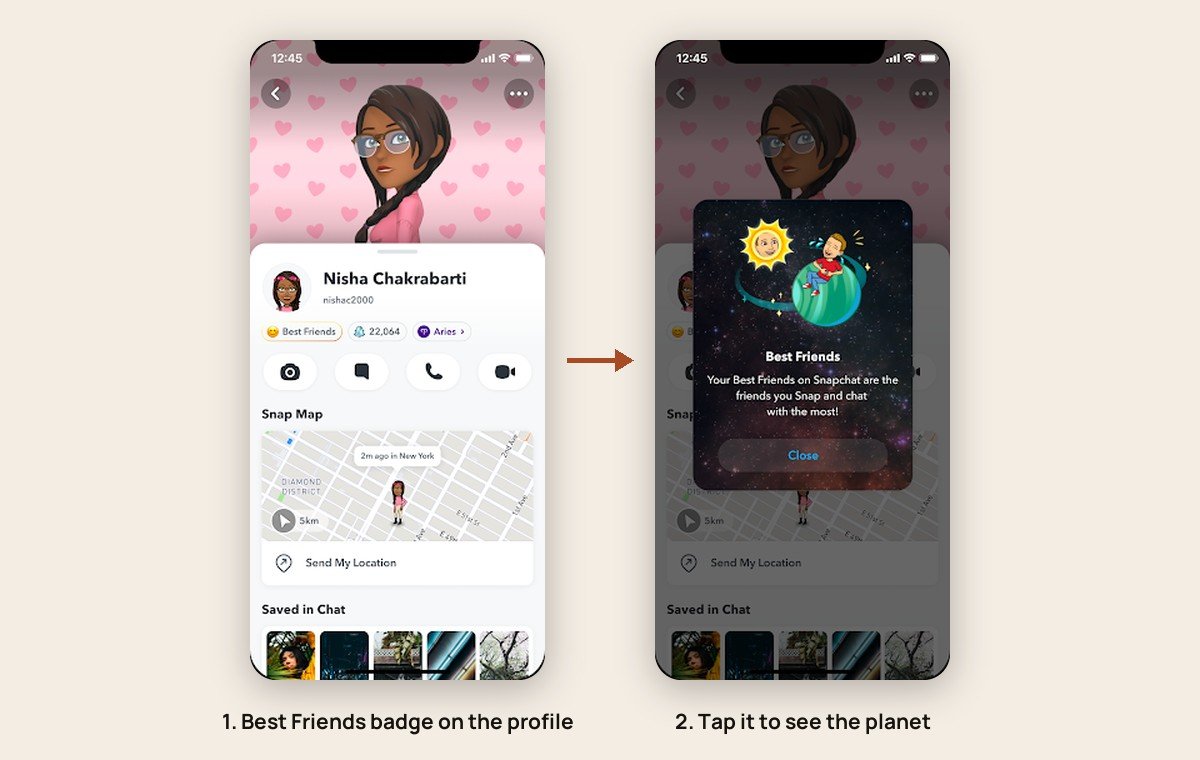
- Tap the Best Friends badge with the gold ring. The pop-up shows your friend as the Sun and the planet you occupy in their Solar System.
The same toggle turns the planets off again whenever you want, and the rest of your subscription carries on unchanged. The steps are identical on iPhone and Android.
Which Snapchat Plans Include the Planets
Snapchat launched its paid tier in 2022 and now sells it in several forms. Solar System sits in the base Snapchat+ feature list next to Extended Best Friends List, #1 Best Friend, Story Rewatch and more than thirty other extras, and every higher plan carries all of them:
- Snapchat+. The base subscription, and the cheapest way to get planets.
- Lens+. Adds a large library of exclusive Lenses on top of everything in Snapchat+.
- Platinum. Snapchat+ with no Sponsored Snaps and no Story or Lens ads.
- Friends & Family Plan. Snapchat+ for the account holder plus up to two friends who are not already subscribed.
You can subscribe inside the app or at snapchat.com/plus. A subscription bought on a phone is billed and cancelled through the App Store on iPhone or Google Play on Android; one bought on the web is managed at snapchat.com under Accounts, then My Subscription. Deleting the app does not stop the payments either way.
Why Snapchat Switched Solar System Off by Default
The change followed criticism rather than a redesign. In early April 2024 The Wall Street Journal reported that the ranking was adding to teenagers’ anxiety, with discoveries of not being someone’s number one leading to hard conversations and even breakups. Less than a week later, Snap made Solar System opt-in instead of removing it.
Snap’s own post acknowledged the problem in plain terms: “We’ve heard and understand that the Solar System can make that feeling worse.” It also said fewer than 0.25% of its community used the feature, a small share that partly reflects the fact that only paying subscribers can see it at all.
Why You Can’t See a Friend’s Planet
When the badge or the planet is missing, the cause is almost always one of these:
- No active Snapchat+. Planets are a subscriber feature, and a lapsed subscription removes them.
- Solar System is still off. Subscribing does not switch it on; the toggle in the Snapchat+ feature list does.
- You are not in their top eight. Only eight Best Friends get planets, and there is no ninth.
- Their list has moved. Snapchat refreshes Best Friends regularly, so a quiet week can drop you out of it.
- My AI has taken a spot. Heavy use of the chatbot can put it on someone’s Best Friends list.
- The app has not caught up. Snapchat says a restart may be needed after subscribing before Snapchat+ options appear.
Snapchat Planets vs Friend Emojis and the Extended Best Friends List
Snapchat runs three ranking signals that overlap, and each answers a different question. Planets show your place in someone else’s list. The other two describe your own:
- Friend Emojis. Free for everyone. A yellow heart means you are each other’s number one Best Friend, a red heart means that has lasted two weeks, and pink hearts mean two months in a row. A smiley means they are one of your Best Friends but not your top one. Snapchat’s Friend Emoji guide lists the rest.
- Extended Best Friends List. A Snapchat+ option that shows your current eight Best Friends, your next eight Upcoming Best Friends, and who has moved up or down since you last looked.
- #1 Best Friend pin. Also Snapchat+. Press and hold a friend in Chat or on the Send To screen to pin them as your number one, and only you can see who you pinned.
None of these rankings are shown to people outside the friendship. If you want to be found by people who are not on your friends list yet, that is a separate setting, covered in our guide to making a public profile on Snapchat.
Frequently Asked Questions
What is the order of the Snapchat planets?
Mercury, Venus, Earth, Mars, Jupiter, Saturn, Uranus and Neptune, the same order as the real solar system. Mercury is someone’s number one Best Friend and Neptune is their number eight.
Does Mercury on Snapchat mean I am their best friend?
It means you are the person they Snap and Chat with most right now, which puts you first on their Best Friends list. It measures app activity, so it changes whenever their messaging habits change.
Can my friend see what planet they are to me?
Only if they also subscribe to Snapchat+ and have Solar System switched on. Tapping the badge on your profile then shows them their own position in your Best Friends list.
How much does Snapchat+ cost?
The US App Store lists the Snapchat+ monthly plan at $4.99. Snapchat says pricing varies by country and device, and the price shown under Settings, then Snapchat+, is the one you will be charged.
Can I see my own Snapchat Solar System?
No. Planets only ever show your position in other people’s lists. Your own Best Friends appear at the top of the Send To screen and in the Chat section of your profile, and the Extended Best Friends List shows who is close to joining them.