iOS 27 supported devices start at the iPhone 11 and the iPhone SE (2nd generation), and include every iPhone Apple has released since. Apple released iOS 27 on 14 September 2026, and its compatibility list names 33 iPhone models: the same set that could run iOS 26, so no iPhone lost support this year.
Running iOS 27 is not the same as getting all of it. Siri AI and Apple Intelligence need an iPhone 15 Pro or newer, and Apple’s most capable on-device model is reserved for its latest Pro phones and the iPhone Air. Below is the full list, what each model gets, and the iPads that run iPadOS 27.
iOS 27 Supported Devices: Full iPhone List
Every iPhone in this table runs iOS 27. The two right-hand columns show which ones also get the headline features.
| # | iPhone models | Apple Intelligence and Siri AI | Most powerful on-device model |
|---|---|---|---|
| 1 | iPhone 18 Pro, iPhone 18 Pro Max | Yes | Yes |
| 2 | iPhone 17 Pro, iPhone 17 Pro Max | Yes | Yes |
| 3 | iPhone Air | Yes | Yes |
| 4 | iPhone 17, iPhone 17e | Yes | No |
| 5 | iPhone 16, 16 Plus, 16 Pro, 16 Pro Max, 16e | Yes | No |
| 6 | iPhone 15 Pro, iPhone 15 Pro Max | Yes | No |
| 7 | iPhone 15, iPhone 15 Plus | No | No |
| 8 | iPhone 14, 14 Plus, 14 Pro, 14 Pro Max | No | No |
| 9 | iPhone 13 mini, 13, 13 Pro, 13 Pro Max | No | No |
| 10 | iPhone 12 mini, 12, 12 Pro, 12 Pro Max | No | No |
| 11 | iPhone 11, 11 Pro, 11 Pro Max | No | No |
| 12 | iPhone SE (2nd and 3rd generation) | No | No |
Add the iPhone Duo to the top group when it goes on sale on 23 October. Apple lists it with iOS 27, Apple Intelligence and Siri AI, and it is covered in our iPhone Duo specs guide.
Which iPhones Get Apple Intelligence and Siri AI in iOS 27
Apple’s requirements split iOS 27 into three tiers by hardware. Every supported iPhone gets the update itself, but the new Siri and the Apple Intelligence features depend on the chip:
- Full feature set: iPhone 18 Pro, iPhone 18 Pro Max, iPhone 17 Pro, iPhone 17 Pro Max and iPhone Air, plus iPhone Duo from 23 October.
- Apple Intelligence and Siri AI: all iPhone 16 models and later, iPhone 15 Pro and iPhone 15 Pro Max.
- iOS 27 without Apple Intelligence: iPhone 15 and 15 Plus, the iPhone 14, 13, 12 and 11 families, and both iPhone SE models.
Apple’s release announcement describes Siri AI as an entirely new version of Siri with personal context, onscreen awareness and broad world knowledge. It launched as a beta in English, with French, Japanese, Korean, Portuguese and Spanish due in October, and it is not available to users under 13.
Storage is the other requirement people miss. Apple Intelligence needs up to 14 GB of free space on the iPhone 17 Pro, 17 Pro Max and iPhone Air, and up to 8 GB on the other supported models, according to Apple’s Apple Intelligence support page.
On those models, iOS 27 adds a long list of Apple Intelligence features. The ones you will notice first:
- A dedicated Siri app that keeps past conversations and syncs them across your Apple devices through iCloud.
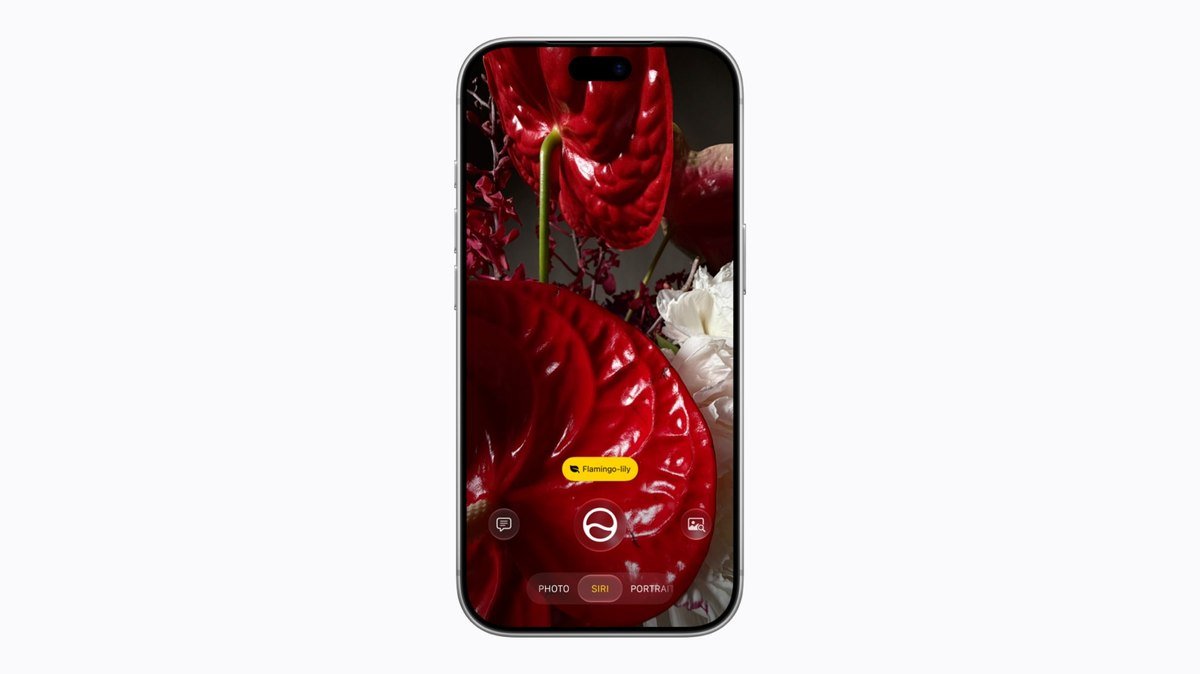
- Siri mode in the Camera app, which answers questions about what the camera sees, like splitting a bill.
- Write with Siri, for drafting and editing almost anywhere you type.
- Photos tools including Spatial Reframing, an Extend tool that fills in beyond the frame, and a stronger Clean Up.
- Safari tab grouping by topic, and Notify Me, which watches a webpage for price or stock changes.
iPhones With the Full iOS 27 Feature Set
The top tier gets Apple’s most powerful on-device model, which runs features that stay on the phone instead of going to Apple’s servers. Apple lists two of them by name:
- A new Siri voice experience with more expressive, natural-sounding voices, where you can adjust expressivity and pace.
- More accurate dictation using the on-device model.
If those features are the reason you are upgrading, the dividing line is the iPhone 17 Pro, not the iPhone 17. The standard iPhone 17 and 17e get Siri AI and Apple Intelligence, but not this model. Our iPhone 18 Pro Max vs iPhone 17 Pro Max comparison covers the hardware differences between the two newest Pro generations.
iPhones That Cannot Run iOS 27
The cut-off is the A13 Bionic chip, which arrived with the iPhone 11. Anything older stays behind:
- iPhone XS, iPhone XS Max and iPhone XR, which lost support with iOS 26 in September 2025.
- Every older iPhone, from the iPhone X back.
Because iOS 27 dropped nothing new, anyone whose iPhone ran iOS 26 can install iOS 27. The XS and XR remain on iOS 18, the last version Apple released for them.
iPadOS 27 Supported iPads

iPadOS 27 arrived the same day and runs on 23 iPad models. Here is Apple’s iPad list, grouped by line:
iPad Pro: iPad Pro 13-inch (M5); iPad Pro 13-inch (M4); iPad Pro 11-inch (M5); iPad Pro 11-inch (M4); iPad Pro 12.9-inch (4th, 5th and 6th generation); iPad Pro 11-inch (2nd, 3rd and 4th generation).
iPad Air: iPad Air 13-inch (M2, M3 and M4); iPad Air 11-inch (M2, M3 and M4); iPad Air (4th and 5th generation).
iPad: iPad (A16); iPad (10th generation); iPad (9th generation).
iPad mini: iPad mini (A17 Pro); iPad mini (6th generation).
On iPad, Apple Intelligence needs an iPad with an M1 chip or later, or the iPad mini (A17 Pro). The most powerful on-device model needs an iPad with M4 or later and at least 12GB of unified memory.
What Every iOS 27 Supported Device Gets
Apple attaches model requirements only to the Apple Intelligence features in its release notes. The rest of iOS 27 reaches every supported iPhone, including the iPhone 11. The parental controls are the biggest group:
- A new setup for child accounts that lets parents pick exactly which apps a child can use.
- Ask to Browse, which makes a child request approval for each new website.
- Time Allowances for Entertainment, Games and Social Media apps, and Schedules for weekdays and weekends.
- Wider Communication Safety protections and a redesigned Screen Time.
System changes include a slider for Liquid Glass that runs from ultra-clear to fully tinted, better search in Spotlight, Photos and Mail, Connectivity Assist for smoother switching between Wi-Fi and cellular, and separate volume settings for alarms and timers.
Apple Watch Models That Work With iOS 27
watchOS 27 came out alongside iOS 27 and runs on the Apple Watch Series 9 and later, Apple Watch Ultra 2 and later, and Apple Watch SE 3. To install it, the watch must be paired with an iPhone 11 or later, or an iPhone SE (2nd generation) or later, running iOS 27.
Siri AI also reaches the watch on those models, but only when it is paired with an iPhone that supports Apple Intelligence. An Apple Watch Series 10 paired with an iPhone 13, for example, can install watchOS 27 without getting Siri AI.
How to Check Your iPhone Model and Install iOS 27
- Open Settings, tap General, then tap About to see your model name and current iOS version.
- Match the model against the table above.
- Back up to iCloud or a computer before a major update.
- Go to Settings, General, Software Update, and install iOS 27.
If Apple Intelligence does not appear after updating, check your free storage and make sure your device and Siri language are set to a supported language.
Is iOS 27 Worth Installing on an Older iPhone?
Apple says apps launch up to 30 percent faster on iPhone and iPad with iOS 27 and iPadOS 27, photos load up to 70 percent faster after being taken, and AirDrop transfers are up to 80 percent faster. The app-launch figure comes from Apple’s own testing on an iPhone 11 Pro Max, comparing iOS 26.6 with prerelease iOS 27, so the oldest supported phone is the one Apple chose to measure.
That makes iOS 27 worth installing even on phones that will never run Siri AI. If an older iPhone already feels slow, check the battery first, since a worn battery is a common cause; our guide to checking iPhone battery cycle count shows where to look.
Frequently Asked Questions
Does the iPhone 11 get iOS 27?
Yes. The iPhone 11, 11 Pro and 11 Pro Max are the oldest iPhones on Apple’s iOS 27 list, together with the iPhone SE (2nd generation).
Does the iPhone 12 or 13 get Apple Intelligence in iOS 27?
No. Both run iOS 27, but Apple Intelligence and Siri AI need an iPhone 15 Pro, 15 Pro Max or any iPhone 16 model or later.
Can the iPhone XR or XS install iOS 27?
No. Apple ended support for the iPhone XS, XS Max and XR with iOS 26, and iOS 27 keeps the same cut-off.
When was iOS 27 released?
Apple released iOS 27 on 14 September 2026, after announcing it at WWDC in June.





