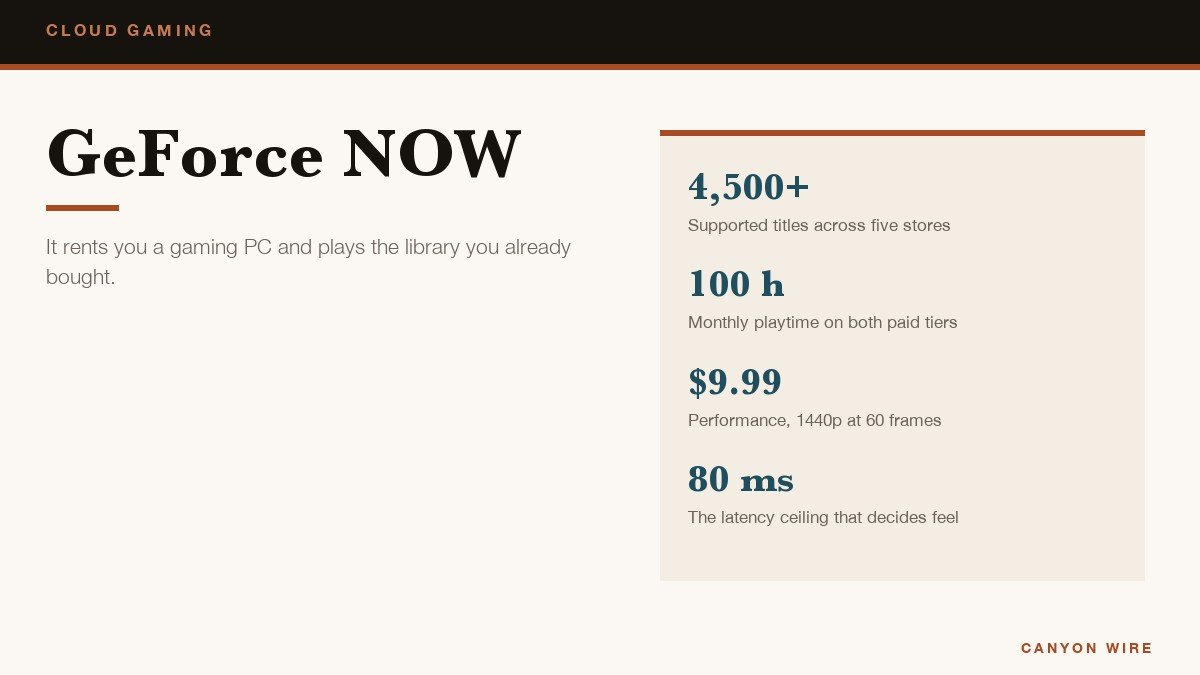
Every other streaming service sells a catalogue. GeForce NOW does not, and that single difference decides whether it is the best value in cloud gaming or a waste of ten dollars a month. What you rent is a gaming PC in a data centre. What you play on it are the games already sitting in your Steam, Epic, GOG, Ubisoft Connect or PC Game Pass accounts.
NVIDIA puts the supported catalogue above 4,500 titles, and every one of them is a game you buy or already own. Somebody with a decade of Steam purchases and a laptop that cannot run any of them gets enormous value. Somebody starting from nothing is paying for horsepower with no games to point it at.
The Three GeForce NOW Tiers
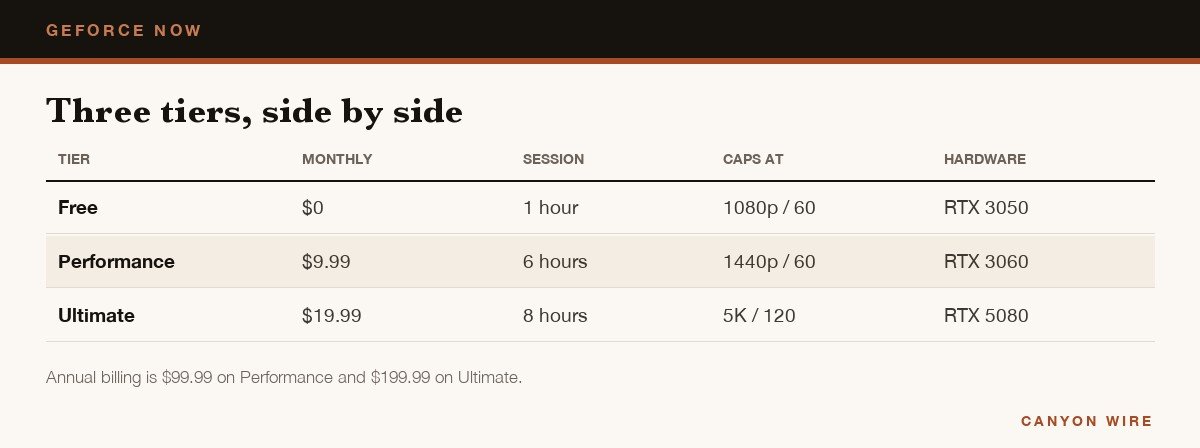
Four things separate them: how long one session lasts before it ends, how long you queue for a server, the resolution ceiling, and which class of graphics card you are borrowing for the hour.
| Tier | Monthly | Session | Caps at | Hardware |
|---|---|---|---|---|
| Free | $0 | 1 hour | 1080p at 60 | RTX 3050 class |
| Performance | $9.99 | 6 hours | 1440p at 60 | RTX 3060 class |
| Ultimate | $19.99 | 8 hours | 5K at 120 | RTX 5080 class |
The free tier is a demonstration. Sessions stop after an hour, you queue behind paying members and the wait carries advertising. It is still the sensible place to start, because it tests the only thing that actually matters before any money changes hands, which is whether your connection can hold a stream.
Performance is the tier most people should weigh up. Six-hour sessions, priority queueing, no advertising, 1440p at 60 frames with ray tracing on RTX 3060-class hardware is more than most laptops in the average house can manage. Ultimate doubles the price for an RTX 5080-class machine, eight-hour sessions and streams up to 5K at 120 frames, which only pays back on a large high-refresh display and an excellent line. Annual billing on either works out at ten months of cost.
The 100-Hour Month
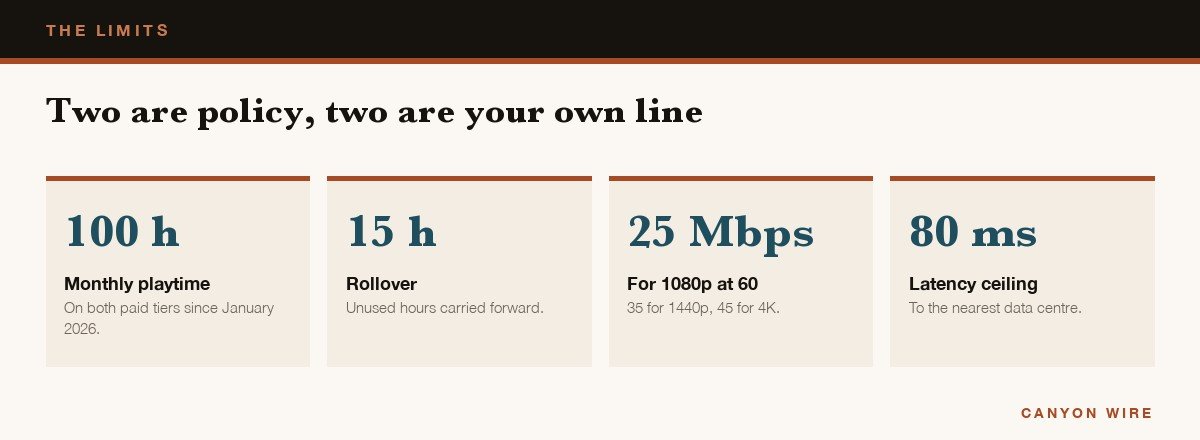
Both paid tiers have carried a monthly playtime allowance of 100 hours since the start of 2026. Up to fifteen unused hours roll into the following month, and once the allowance is gone you buy more in fifteen-hour blocks from the account portal, at $2.99 on Performance and $5.99 on Ultimate.
A hundred hours is three and a quarter hours every single day of the month, so for most people the cap may as well not exist. The group it does catch is households sharing one membership, because the hours belong to the account and not to the person holding the controller. Two heavy players on one login will find it by the third week.
What the Connection Has to Manage
NVIDIA publishes a figure per resolution rather than one blanket number, and its system requirements set them out plainly.
| Target | Recommended speed |
|---|---|
| 720p at 60 frames | 15 Mbps |
| 1080p at 60 frames | 25 Mbps |
| 1440p at 120 frames | 35 Mbps |
| 4K at 120 frames | 45 Mbps |
Ethernet is preferred and 5 GHz Wi-Fi is fine. The 2.4 GHz band is the usual reason a stream looks soft and hitches on a line that tests fast, and a dual-band router will hand a phone the wrong network without mentioning it.
Latency to the nearest data centre matters more than any of those numbers and should sit under 80 milliseconds. Bandwidth decides how it looks, latency decides how it feels, and no amount of the first fixes a shortage of the second. The overlay reports both during play, which makes it the first place to look when something is wrong. Dropping the bandwidth cap usually improves things, because a clean 1080p stream beats a 1440p one that keeps rebuffering.
Instant Play, Install-to-Play and the Real Library
The supported list is really two lists. A large share of the catalogue is instantly playable, kept patched and ready on NVIDIA servers so you are in the game within seconds. Everything else supported falls under Install-to-Play, where the title installs to cache storage attached to your session before it launches.
Paid members get 100 GB of that cache for Steam titles, which holds a handful of modern games at a time, and persistent storage can be added monthly if you would rather nothing was evicted. A game that drops out simply reinstalls next time, costing minutes rather than progress, because saves live in your Steam account and not on the server.
Publishers opt in title by title and a few large ones have stayed out, so owning a game on Steam is not a guarantee it streams. Search the specific games you care about in the supported games list before subscribing and treat the 4,500 figure as a ceiling rather than your personal library. Anti-cheat is the other common blocker, and a few competitive titles refuse cloud sessions outright at that layer.
Playing on a Phone, a Mac or a Television
Android, Windows, macOS and Shield TV get native apps. iPhone, iPad and most browsers go through play.geforcenow.com, a web app you add to the home screen, and once a controller is paired the experience is the same. Samsung and LG televisions carry the app directly, and the Steam Deck and recent headsets including Meta Quest and Apple Vision Pro are supported.
- Sign in at play.geforcenow.com, or install the app where one exists.
- Link your stores under Settings, then Connections, so your own purchases appear.
- Pair a controller before launching anything, because the browser binds it on first input.
- Set a bandwidth limit that matches your line instead of leaving it on automatic.
- Check your specific games are supported, since library size is not the same as everything you own being playable.
An hour of streaming works a phone as hard as an hour of a native game, so the handset warms and eventually throttles. A clip-on fan is the standard answer and our comparison of the best phone coolers for gaming covers how much difference one makes. If the plan is to play at a desk instead, a dedicated handheld removes the connection from the equation entirely.
What Streaming a PC Game Feels Like in Practice
The experience divides sharply by genre, and the division is more useful than any benchmark. Slower games are indistinguishable from local play once the stream is stable. Strategy, management, role-playing, card games and almost everything turn-based lose nothing at all, because a quarter of a second between a click and a response is invisible when nothing is chasing you.
Third-person action and driving games sit in the middle. They remain thoroughly playable and you adapt within ten minutes, but a difficult boss fight or a hairpin taken at speed will occasionally punish the delay in a way it would not locally. First-person shooters against other people are where it stops being worth arguing about, because the opponents playing locally have an advantage you cannot train away.
The other thing nobody mentions is what happens when the line wobbles. A local game stutters and recovers. A stream degrades the picture instead, dropping sharpness to protect the frame rate, so the failure mode looks like somebody smeared the screen rather than like lag. Once you recognise that, the fix is immediate: lower the bandwidth cap and the picture settles.
Where It Makes Sense
It is excellent at one job: making games you already own playable on hardware that cannot run them. It is poor value if you own nothing on PC, if you play competitively enough for input delay to cost you rounds, or if your home line is metered. For background on how the service and its tier structure developed, the reference entry tracks the changes year by year.
The comparison worth making is against a one-off purchase rather than against another subscription. Ten dollars a month for two years buys a competent used gaming laptop, and the laptop does not stop working when the data centre is busy. What it also does not do is fit in a pocket, which is the trade GeForce NOW is really selling.
Frequently Asked Questions
Does GeForce NOW include games?
No. It supplies the hardware and streams games you already own on Steam, Epic, GOG, Ubisoft Connect or PC Game Pass. A handful of free-to-play titles are open to everyone, but there is no included catalogue in the way other subscriptions work.
Is the free tier worth using?
As a test, yes. As a way to play, not really. One-hour sessions, a queue behind paying members and advertising during the wait make it a trial rather than a tier, which is exactly what it is for.
What happens at 100 hours?
Streaming stops until you buy more time or the month resets. Extra playtime comes in fifteen-hour blocks, and up to fifteen unused hours carry forward automatically, so a quiet month subsidises a busy one a little.
Can you use GeForce NOW on an iPhone?
Yes, through Safari at play.geforcenow.com rather than an App Store download. Add the page to the home screen and it behaves like an app. A controller is close to essential, because very little of a PC library was designed for touch.





