A WhatsApp chat backup is a single file, not a version history. The run that happens tonight overwrites the one from last night, and the only copy that can ever be restored is the most recent successful one. Everything else about the settings follows from that.
There are now three possible destinations rather than two. WhatsApp has added storage of its own, encrypted end to end with no key held by WhatsApp or Meta, sitting alongside the familiar Google Account route on Android and iCloud on iPhone. The destination is chosen in the same place the backup itself is set up.
The five facts that shape the settings
| Question | Answer |
|---|---|
| Where it goes | WhatsApp cloud storage, Google Account or iCloud |
| How many kept | One. Each run replaces the previous file |
| Encrypted by default | Only on WhatsApp cloud storage |
| Restores to | The same phone number, same platform |
| Videos included | Only if the toggle was on before the run |
The second row is the one that catches people out. Someone who realises on Thursday that a conversation was deleted on Monday has already overwritten the file that held it three times. Recovery work has to start with stopping the backup, not running one.
Set up a backup on Android
Three decisions: destination, frequency, and what to include. The frequency menu has two entries that look like choices but switch automation off entirely, and picking either of them is the usual reason a phone turns out to have no backup at all.
- Go to Settings, then Chats, then Chat backup.
- Tap Cloud backup, pick WhatsApp or Google, and tap Turn on backups.
- For the Google route, tap Back up and choose a schedule that is not Never and not Only when I tap “Back up”.
- Pick the Google Account that should hold the file.
- Decide on Include videos in chats, Back up using cellular and Back up status archive.
Set to daily, the upload runs each night once the phone has finished its local copy. The Chat backup screen then reports a time and a size, and that line is the only proof the process is working.
Set up a backup on iPhone
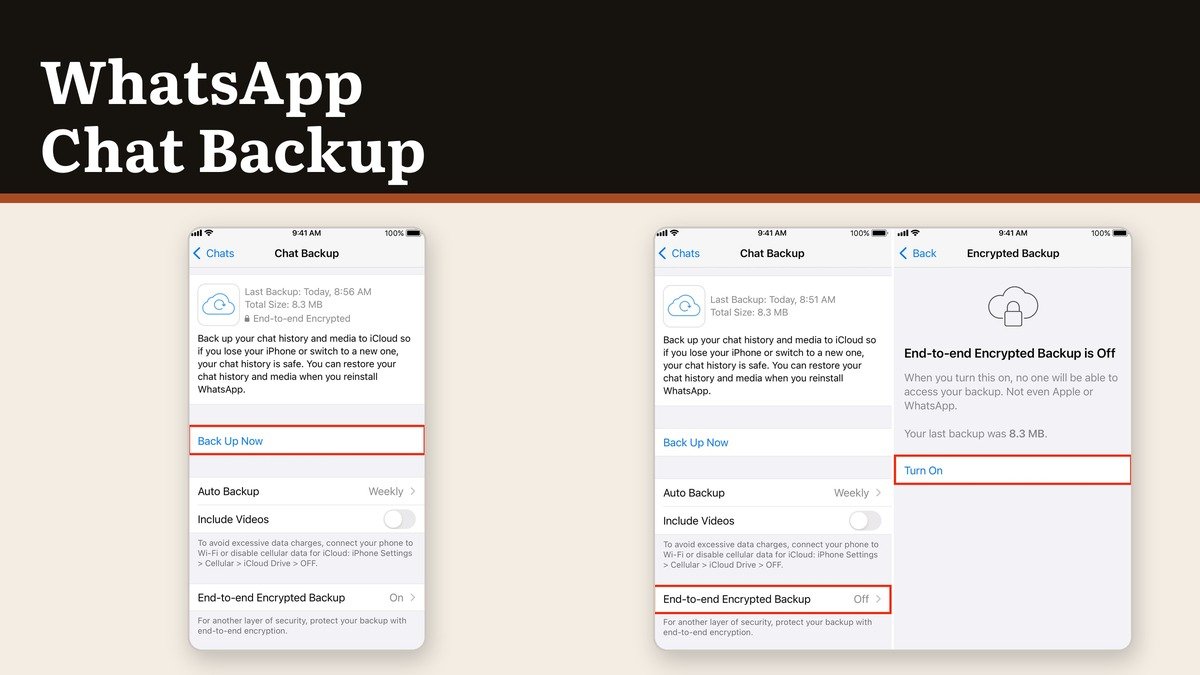
Apple’s side uses different wording for the same controls. Auto backup holds the schedule, Back up now runs one on demand, and there is no cellular toggle because iOS governs that at the system level.
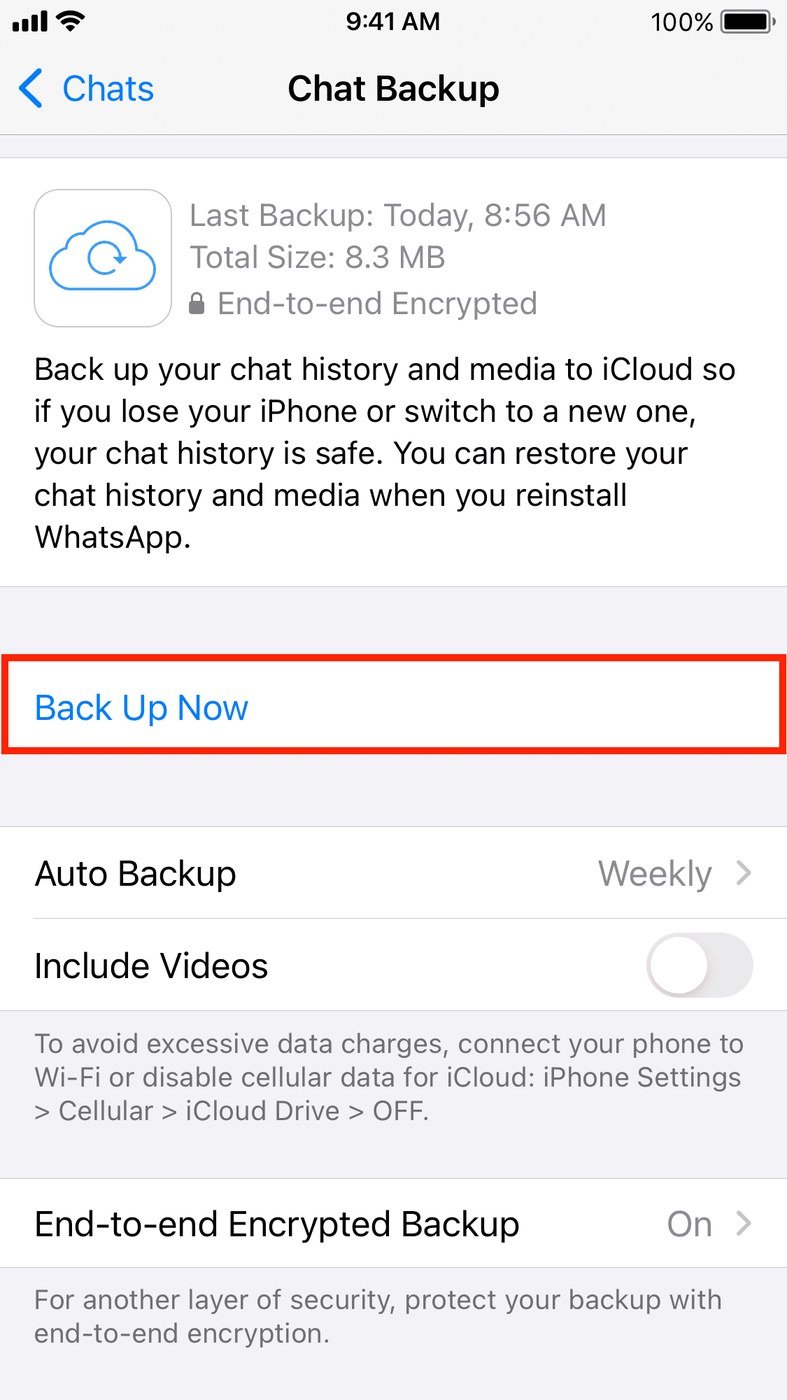
- Tap Settings or your profile picture, then Chats, then Chat backup.
- Tap Cloud backup and choose WhatsApp or iCloud.
- Tap Auto backup and set daily, weekly or monthly.
- Decide on Include videos in chats and Include status archive.
- Tap Back up now so the first file exists immediately.
Picking WhatsApp cloud storage on an iPhone means an iCloud copy of WhatsApp is no longer possible at the same time. Running both iCloud-side options instead needs enough iCloud space for two copies of the same chat history.
The encryption step that is off by default
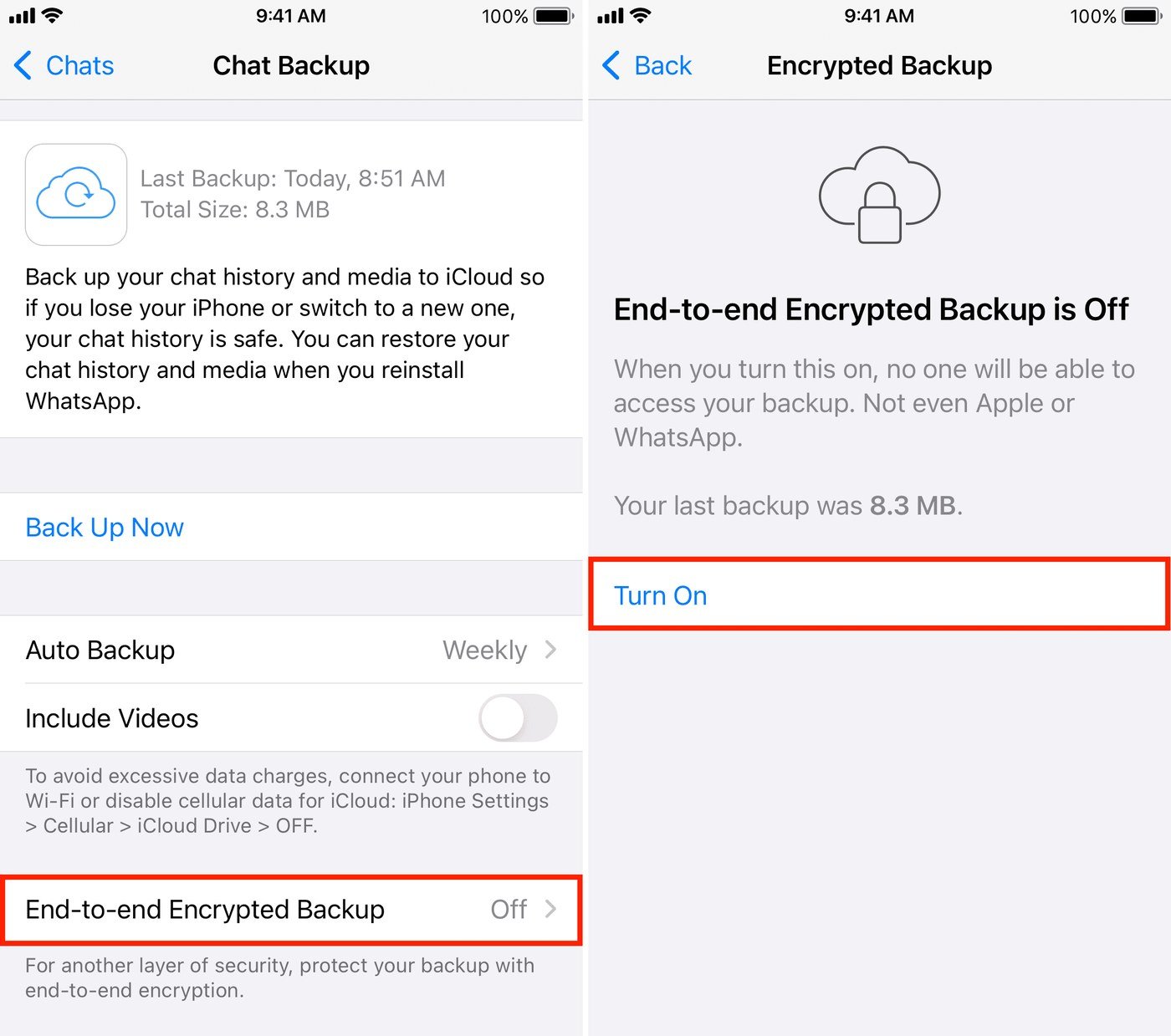
Messages are encrypted in transit regardless. A backup handed to Google or Apple is not, unless the encryption option is switched on, and it is not switched on for you.
- Open Settings, then Chats, then Chat backup, then End-to-end encrypted backup.
- Choose Use passkey, or More options for a password or a 64-digit key.
- Tap Create and leave the phone alone until it finishes.
Lose the key and the backup is unreadable by anyone, including WhatsApp. Store it outside the phone it protects. The reasoning is the same one behind our guide to building a password worth keeping, with the added catch that this one has no reset link.
What a backup costs in storage
Google counts WhatsApp backups on Android against the account quota, and the free tier is 15 GB shared between Gmail, Drive and Photos. A chat history with years of video in it will fill that on its own and the backup then stops without much of a warning.
- Turn off Include videos in chats for the single largest reduction.
- Clear forwarded files from the storage screen inside WhatsApp, which sorts chats by how much space they occupy.
- Check the backup size after the change, since the figure on the Chat backup screen only updates after a successful run.
- Community messages and media are included, and so are channel updates, though channel media only if you administer the channel.
If the phone itself is short of space rather than the cloud account, the backup will fail before it uploads, because the file is built locally first. Our explainer on the difference between RAM and storage covers which number actually needs to go up.
Frequently Asked Questions
How often should a WhatsApp chat backup run?
Daily, unless storage is tight. Because only the latest file survives, a weekly schedule means the worst case is losing six days of conversation rather than a few hours.
Does turning off backup delete the existing file?
No. Switching off the schedule stops new backups from being written, and the last file stays in the account until it is deleted there or replaced by a later run.
Can two phones share one WhatsApp backup?
Not simultaneously. The backup is tied to the account and restores onto one device during registration. Using WhatsApp on a second device is done through linked devices, which syncs live rather than restoring a file.
Is a backup needed if I use linked devices?
Yes. Linked devices mirror an active account. If the phone that holds the account is lost or wiped, the backup is the only route to the history.