
The best keyboards for Mac are separated from merely compatible ones by a detail that sounds trivial and is not: the layout. A Windows keyboard plugged into a Mac works, but Command and Option are in the wrong places, the function row does nothing useful, and the keycaps are printed wrong. Every keyboard below is laid out for macOS rather than adapted to it, and the table says which ones print Mac legends.
The second decision is switch type, and it is mostly about noise and desk sharing. Scissor switches are the flat, quiet mechanism in a MacBook and in Apple’s own keyboards. Mechanical switches travel further, feel better to most people who try them, and are louder, which matters in an open office or a shared room. Low-profile mechanical switches are the compromise, and two of the seven below use them.
Best Keyboards for Mac Compared on Layout, Switches and Pairing
Read the switch column against where the keyboard will live, and the pairing column against how many machines you use. Three-device switching is the single most useful feature for anyone with a Mac and an iPad on the same desk. If the machine in question is a tablet on a stand, our guide to the best iPad Pro cases covers holding it at the right angle.
| Keyboard | Layout | Switches | Devices | Power |
|---|---|---|---|---|
| Satechi Slim X1 | Full QWERTY with macOS function keys | Scissor, backlit at 10 levels | Three | Rechargeable over USB-C |
| NuPhy Air60 V2 | 60 percent, Mac legends | Low profile mechanical, hot swappable | Wireless and wired | 2500mAh, 30 to 150 hours |
| Lofree Flow Lite 84 | 75 percent | Low profile POM linear, 40gf | Wireless, rechargeable | Rechargeable |
| Macally Bluetooth Keyboard | 110 keys with number pad and 20 shortcuts | Scissor, 15 mm thick | Three | Rechargeable |
| Arteck Full Size | Matches the Apple Magic Keyboard layout | Low profile scissor | Three | Rechargeable |
| OMOTON Ultra-Slim | Compact, macOS 10.10 and later | Scissor | One | Two AAA, up to 400 hours |
| iClever BK10 | Full size with number pad | Quiet scissor | Three | Rechargeable |
Layout, Switches and the Function Row Nobody Checks
A Mac keyboard needs three things a generic QWERTY board does not have. Command has to sit beside the space bar where your thumb expects it, the Option and Control keys have to be in the macOS order, and the function row has to carry brightness, Mission Control, volume and media rather than F1 to F12 alone. A keyboard missing the third one still works, but you lose the shortcuts you use without thinking about them.
Switch technology is the second decision and it is largely about sound. Scissor switches have very little travel, which is why Apple uses them and why they are quiet enough for a shared office. Mechanical switches have a longer, more defined action that most people prefer to type on, at the cost of noise. Low-profile mechanical splits the difference, and the Lofree here is a good illustration: a 40 gram actuation force rather than the usual 50 reduces finger fatigue over a long day.
Finally, check the pairing count. Bluetooth keyboards that hold three devices let you switch between a Mac, an iPad and a phone with one key press, which removes the most annoying part of owning several Apple devices. Five of the seven here do three; one does one. Battery is the related question, and the range below is enormous: a rechargeable mechanical board might need charging weekly, while the OMOTON runs up to 400 hours on two AAA cells.
1. Satechi Slim X1: The Best Mac Keyboard That Is Not Apple

Satechi builds accessories specifically for Apple hardware and the Slim X1 is the clearest example. It is designed for macOS only, with a full QWERTY layout, proper macOS function keys and an aluminium finish that matches a Mac rather than approximating one.
Two features put it ahead of Apple’s own keyboard for some people. The keys are backlit with ten brightness levels, which the Magic Keyboard does not offer at all, and Bluetooth holds three devices with dedicated keys to switch between them. It recharges over USB-C rather than Lightning. The compact size suits a desk where the mouse needs room, and the trade is no number pad.
What it does well
- Backlit keys at ten levels, which Apple does not offer.
- Three-device Bluetooth with dedicated switching keys.
- Proper macOS function row rather than plain F keys.
- USB-C charging and an aluminium finish.
What to know before buying
- macOS only, so it is wasted on a dual-platform desk.
- No number pad.
- Scissor switches, if you wanted mechanical.
2. NuPhy Air60 V2: The Mechanical Keyboard Built for Mac

NuPhy makes low-profile mechanical keyboards aimed squarely at Mac users, and the Air60 V2 is the compact one. A 60 percent layout drops the function row and the number pad entirely, which frees a large amount of desk space and suits anyone who uses a trackpad or a mouse in the same hand position.
The battery is the specification that stands out: 2500mAh giving 30 to 90 hours with the backlight on and up to 150 hours with it off, which NuPhy quotes as a week of work. Wireless polling reaches 1000Hz, which is a gaming figure rather than an office one and means no perceptible lag. Switches are hot swappable, so the feel can be changed later without replacing the keyboard, which no other board here allows.
What it does well
- Hot swappable switches, so the feel can be changed later.
- 2500mAh battery giving up to 150 hours.
- 1000Hz wireless polling, so no perceptible lag.
- Low profile mechanical in a genuinely small footprint.
What to know before buying
- A 60 percent layout removes the function row entirely.
- Louder than any scissor keyboard here.
- Takes time to adjust to the missing keys.
3. Lofree Flow Lite 84: The Most Comfortable Mechanical Here

Lofree built the Flow Lite from its more expensive Flow by moving the case from aluminium to textured ABS and simplifying the development, which brought the price down without changing the part that matters. It is a 75 percent layout, so the function row survives while the number pad does not.
The switches are the reason to buy it. These are full POM low-profile linear switches developed with Kailh, and Lofree has lowered the actuation force from 50 grams to 40, which is a meaningful reduction over a day of typing. The case is also lower at the front than the standard Flow, which puts the wrists at a flatter angle. For anyone who wants mechanical feel but finds most mechanical keyboards tiring, this is the one to try.
What it does well
- 40 gram actuation rather than the usual 50.
- Lower front height for a flatter wrist angle.
- 75 percent layout keeps the function row.
- Hot swappable switches.
What to know before buying
- ABS case rather than the aluminium of the full Flow.
- Still louder than scissor switches.
- No number pad.
4. Macally Bluetooth Keyboard: Full Size With Twenty Shortcut Keys
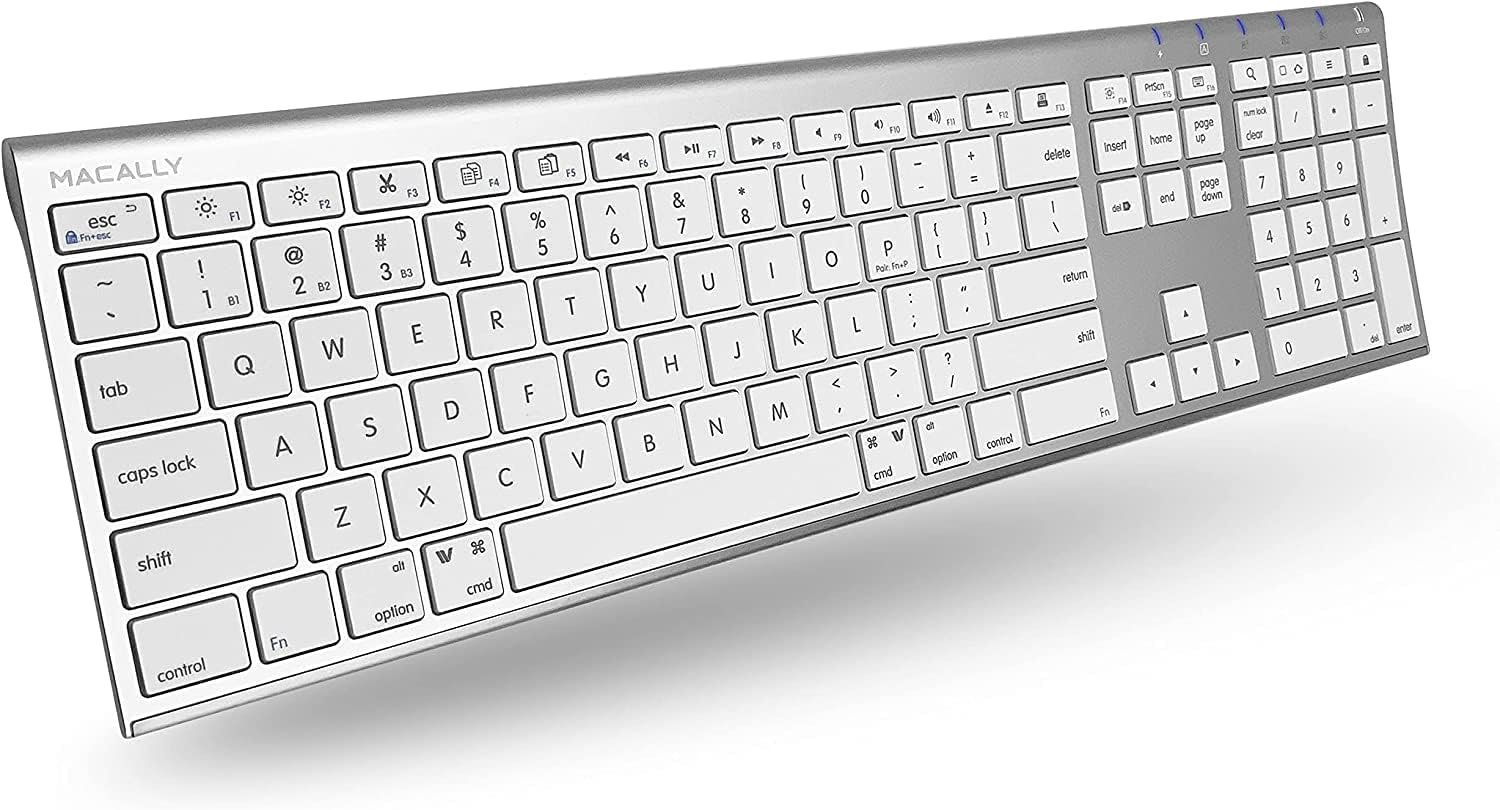
If you work in spreadsheets, a number pad is not optional, and this Macally is the full-size option here. It carries 110 keys including a number pad and twenty dedicated shortcut keys, and despite that it is only 15 millimetres thick, which is thinner than most compact keyboards.
Multisync holds three Bluetooth devices at once, so a Mac, an iPad and a phone can share one keyboard. It needs no drivers and pairs with almost anything, including smart TVs and games consoles, which makes it the most broadly useful keyboard in this guide rather than the most Mac-specific. The shortcut keys are the part that justifies the width: media, brightness and system controls are all one press rather than a modifier combination.
What it does well
- Full 110 keys with a number pad and 20 shortcut keys.
- Only 15 mm thick despite the full layout.
- Three-device Bluetooth with no drivers required.
- Pairs with TVs and consoles as well as computers.
What to know before buying
- A full-size board takes real desk width.
- Scissor switches with limited travel.
- Less Mac-specific than the Satechi.
5. Arteck Full Size: The Closest Layout to Apple’s Own

The strongest argument for this keyboard is that there is nothing to learn. Arteck has matched the Apple Magic Keyboard layout, so every key is where a Mac user already expects it, including on an iPhone or an iPad where the same muscle memory applies.
The build is stainless steel rather than plastic, which gives it weight that stops it sliding on a desk, and the keys are low profile and full size with arrow keys, a number pad and shortcut keys. Three devices pair at once with single-key switching and a long press on the blue key to pair initially. For someone replacing a failed Magic Keyboard who does not want to pay Apple prices, this is the direct substitute.
What it does well
- Layout matched to the Apple Magic Keyboard.
- Stainless steel body that stays put on a desk.
- Full size with number pad and arrow keys.
- Three-device switching with one key.
What to know before buying
- Heavier than the slim plastic keyboards here.
- No backlight.
- Styling is functional rather than attractive.
6. OMOTON Ultra-Slim: Four Hundred Hours on Two AAA Cells
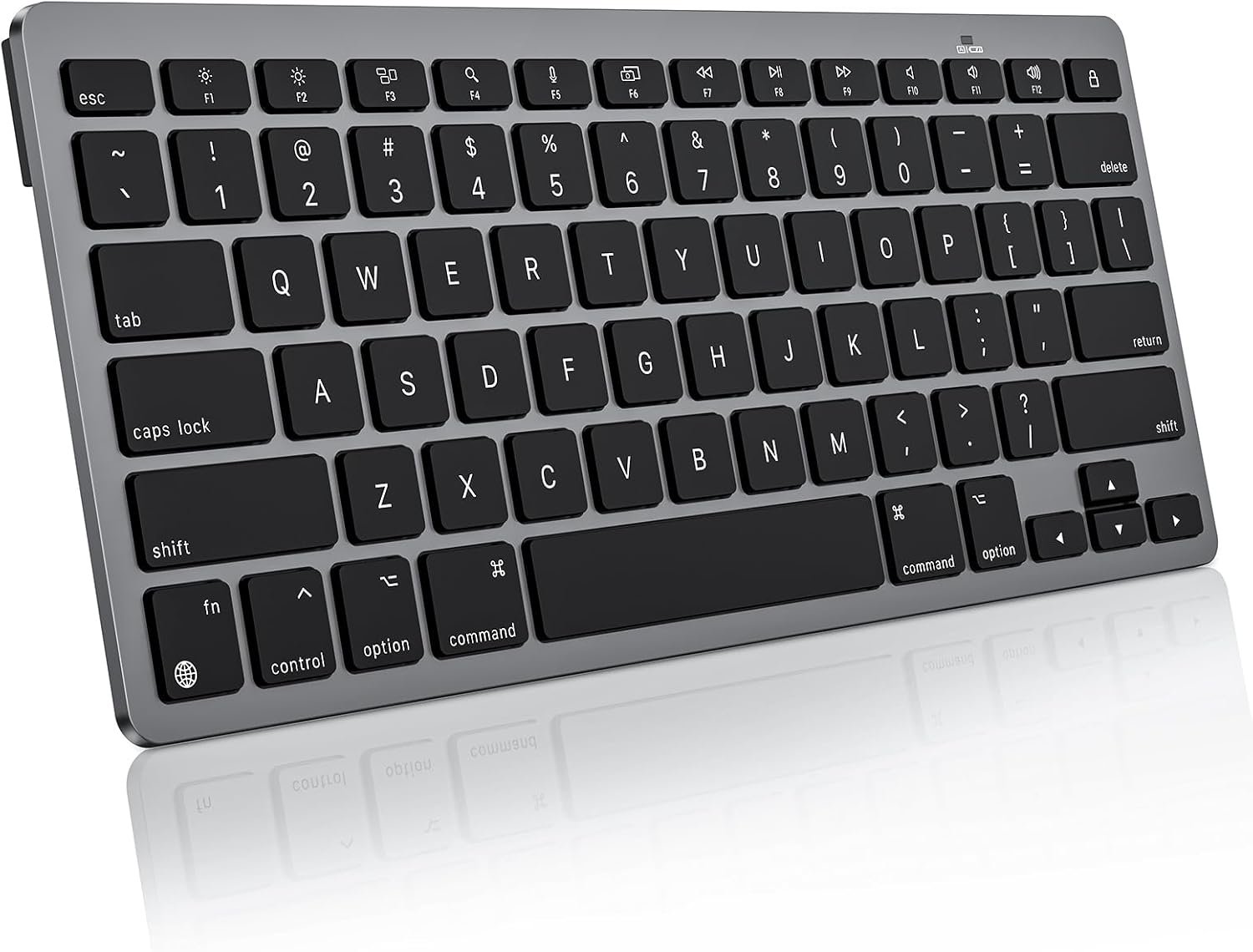
Rechargeable keyboards are convenient until the day the battery dies mid-document. The OMOTON runs on two AAA cells for up to 400 hours, which OMOTON works out as around 100 days at four hours of use a day, and when it finally stops you replace the cells in ten seconds rather than plugging it in.
It is built exclusively for macOS 10.10 and later and works across iMac, iMac Pro, MacBook, MacBook Air, MacBook Pro, Mac Pro and Mac mini, with the listing explicit that it is not fully functional on non-Mac devices. Bluetooth range is a stated 33 feet, which matters if the Mac is driving a television across a room. It is the cheapest keyboard here and the most single-purpose.
What it does well
- Up to 400 hours on two AAA cells.
- Battery replaced in seconds rather than recharged.
- 33 foot Bluetooth range for across-the-room use.
- The cheapest keyboard in this guide.
What to know before buying
- One device only, with no multi-device switching.
- Batteries are not included.
- Not fully functional on anything other than a Mac.
7. iClever BK10: The Quietest Full-Size Option

Noise is the reason people get asked to stop using mechanical keyboards in shared offices, and the BK10 is built around the opposite priority. Low noise scissor switches give a laptop-like action that iClever aims specifically at open offices and long typing sessions.
It is full size with a number pad, built from stainless steel and ABS with a 10 degree tilt that puts the wrists at a better angle than a flat board, and it pairs with up to three devices with a single tap to switch. Reconnection is instant, which is the detail that decides whether multi-device switching gets used or ignored. It works across Mac, Windows, iOS and Android rather than being Mac-only, which suits a mixed desk.
What it does well
- Low noise scissor switches for a shared office.
- Ten degree tilt built into the body.
- Three devices with instant reconnection.
- Works across Mac, Windows, iOS and Android.
What to know before buying
- Not a Mac-specific layout, so some legends differ.
- Full size, so it needs desk width.
- No backlight.
Choosing Between Scissor and Mechanical on a Mac
Most of this decision is about the room rather than the keyboard. Work out who else can hear it and how many machines it has to serve, and the shortlist narrows quickly.
- A shared office or a room with someone else working: scissor switches, and look for low noise.
- A private desk where typing feel matters: low profile mechanical.
- Spreadsheets and data entry: full size with a number pad, no exceptions.
- A Mac and an iPad on the same desk: three-device pairing.
- A keyboard you want to forget about: AAA cells rather than rechargeable.
- Any of them: check the function row carries macOS controls, not plain F keys.
Battery type is the quiet differentiator over years of ownership. A rechargeable board is one more thing on the charging rota, which is the same calculation our guide to the best magsafe chargers applies to everything else on a desk. If the second machine on the desk is an iPad, our guide to the best ipad keyboards covers the cases that turn it into a laptop.
The keyboard is usually bought alongside the rest of a desk setup, and the surface under it matters more than people expect for wrist comfort, which our guide to the best desk pad covers. If the Mac is also driving external monitors, our guide to the best docking station explains why Thunderbolt matters for running two displays independently.
Which Mac Keyboard to Buy
For most Mac users the Satechi Slim X1 is the best buy here: a genuine macOS layout, backlighting that Apple does not offer, three-device switching and USB-C charging. If you want mechanical feel, the Lofree Flow Lite 84 is the more comfortable of the two low-profile boards thanks to the lighter 40 gram switches, while the NuPhy Air60 V2 is the pick for the longest battery and hot swappable switches.
If you need a number pad, the Macally is the thinnest full-size option and the Arteck is the closest match to Apple’s own layout for anyone replacing a Magic Keyboard. The iClever BK10 is the quietest full-size board and the right answer for a shared office. And the OMOTON is the one to buy if you would rather change two AAA cells every few months than remember to charge anything.
Frequently Asked Questions
Can I use a Windows keyboard with a Mac?
Yes, and it will work, but Command and Option sit in the wrong places, the keycaps are printed wrong and the function row will not control brightness, volume or Mission Control. macOS lets you remap the modifier keys in settings, which fixes the positions but not the printing or the function row.
Are mechanical keyboards too loud for an office?
Standard mechanical switches usually are. Low-profile mechanical switches are quieter and the lighter actuation forces help, but nothing mechanical is as quiet as a scissor switch. If other people share the room, scissor is the considerate choice and the iClever here is built specifically around low noise.
How many devices should a keyboard pair with?
Three is the useful number and five of these offer it, because it covers a Mac, an iPad and a phone with one key press to switch. What matters as much as the count is reconnection speed: a keyboard that takes several seconds to reconnect will stop being switched and start being unplugged.
Do I need backlit keys?
Only if you work in low light, and it costs battery life. Apple’s own keyboards have never had it, which is why the Satechi offering ten brightness levels is a genuine point of difference. On a mechanical board the backlight is usually the difference between 30 hours and 150.
Related Articles
- Best AirPods 5 Cases: 7 Compared on Locks, MagSafe and Water Sealing
- Best Webcams: Resolution, Low Light and Field of View Compared
- Best Wireless Earbuds: 7 Compared on Noise Cancelling and Battery
- Best Lightning to USB-C Adapters
- How to Check Your Mac for Malware and Remove It
As an Amazon Associate, CanyonWire earns from qualifying purchases.





