Knowing how to clean a computer screen matters more than it sounds, because the most common household approach permanently damages the display. Window cleaner and a paper towel will strip the anti-glare coating off a modern panel, and no amount of careful polishing afterwards brings it back.
The safe method takes about two minutes and needs almost nothing. What follows is the manufacturers’ own guidance rather than general advice, including the one point where Apple and Samsung flatly disagree, and the screens that must only ever be touched with the cloth they came with.
What You Need
- A clean microfiber cloth, lint free and dry. This does almost all of the work.
- Distilled water, which leaves no mineral spots as it dries.
- A second dry cloth to remove any remaining moisture.
- Optionally a 70 percent isopropyl alcohol solution, but only on the screens listed further down.
That is genuinely the whole list. No branded screen spray is required for routine cleaning, and the cloth matters more than anything you put on it. If you do not own one, a general-purpose pack from our comparison of microfiber cleaning cloths is enough, though a low-pile glass cloth leaves fewer streaks.
How to Clean a Computer Screen, Step by Step
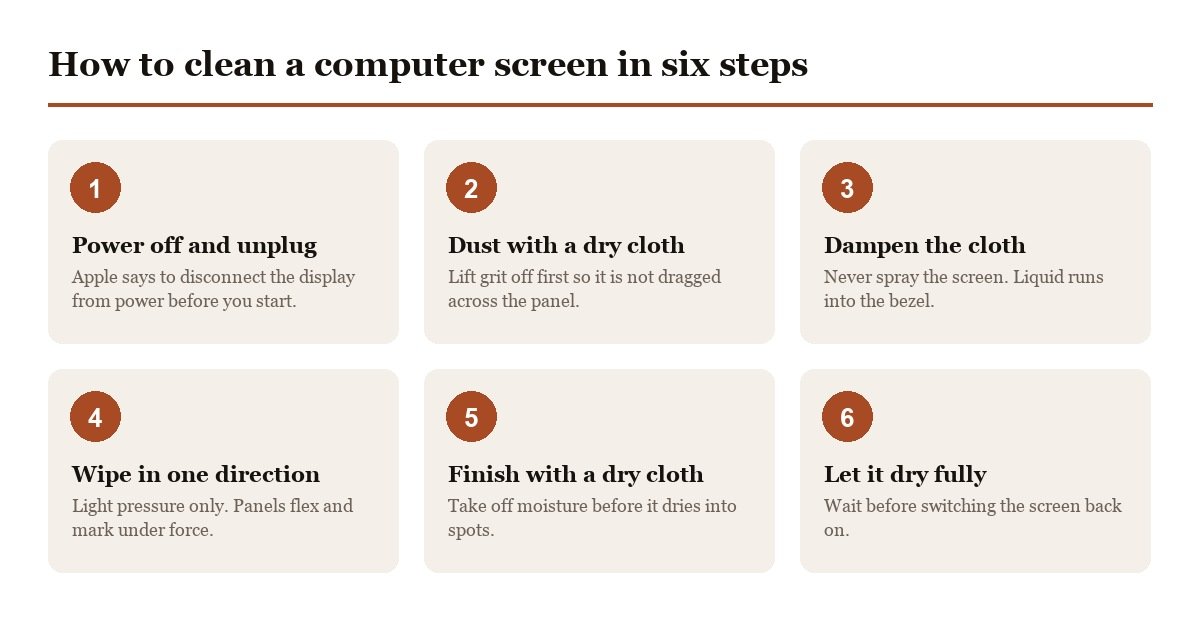
- Turn the screen off and unplug it. A dark screen shows every smudge, and Apple’s guidance is to unplug all external power sources, devices and cables first.
- Dust first with a dry cloth. Wiping grit around with a damp cloth is what puts fine scratches in a panel. Lift the dust off before any liquid is involved.
- Dampen the cloth, never the screen. Apple warns never to spray cleaner directly on the screen because it can drip inside the display and cause damage.
- Wipe gently in one direction. Light pressure only. Panels are flexible and pressing hard can leave lasting marks on an LCD.
- Finish with a dry cloth to lift any remaining moisture before it dries into spots.
- Leave it to dry fully before switching on, so no moisture is trapped near the bezel.
If a smudge survives that, repeat it rather than pressing harder. Almost every scratched screen is the result of force or grit, not of using the wrong liquid.
What You Should Never Use on a Screen
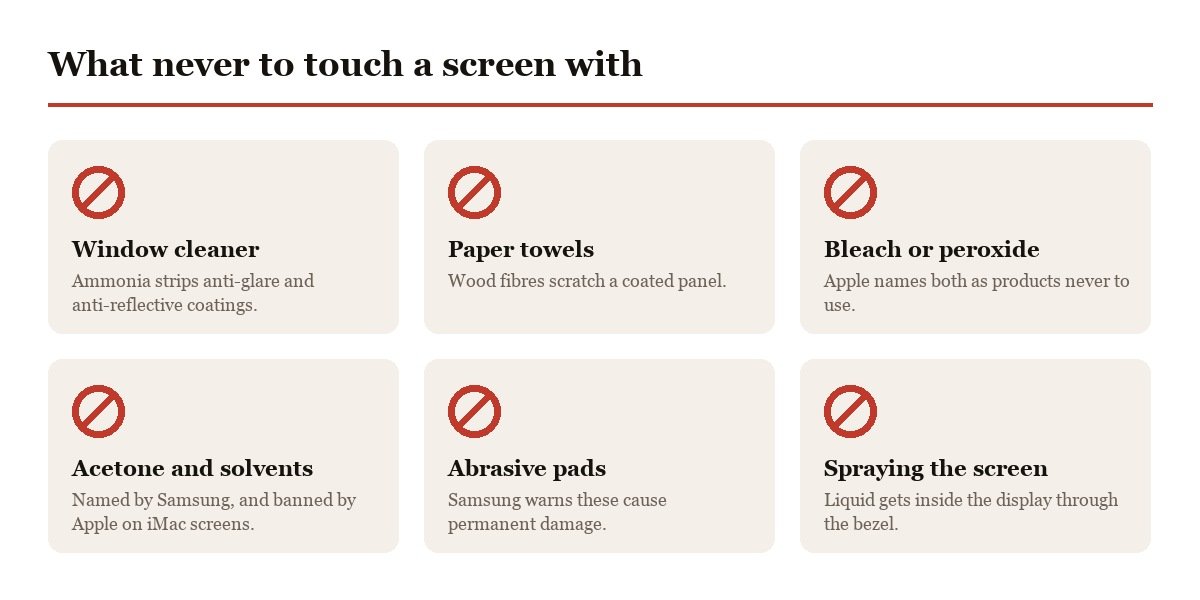
This is the part worth reading even if you skip everything else. Both Apple and Samsung publish explicit lists, and they overlap almost completely.
- Window cleaner and household sprays: ammonia strips anti-glare and anti-reflective coatings.
- Paper towels, tissues and kitchen roll: wood fibres are abrasive enough to scratch a coated panel.
- Bleach and hydrogen peroxide: Apple names both as products not to use.
- Acetone, benzene and other solvents: named by Samsung, and Apple separately says not to clean an iMac screen with a cleaner containing acetone.
- Abrasive pads or scouring powder: Samsung warns these cause permanent damage.
- Spraying anything directly at the screen: liquid runs into the bezel and gets inside.
Samsung puts the consequence plainly: using these can scratch the screen or strip the anti-glare coating and cause permanent damage. A stripped coating shows up as cloudy patches that no cleaning will remove, and it is not covered by a warranty.
The Alcohol Question, Where Apple and Samsung Disagree
Most advice gives one blanket rule about alcohol, and that is where it goes wrong. The manufacturers genuinely do not agree, because they are talking about different products.
- Apple allows it: a 70 percent isopropyl alcohol wipe, a 75 percent ethyl alcohol wipe or a Clorox Disinfecting Wipe may be used gently on hard, nonporous surfaces including the display.
- Samsung forbids it on TVs: never use any cleanser with solvents such as alcohol, benzene, ammonia or acetone.
- Both agree on the rest: no bleach, no hydrogen peroxide, no abrasives, and no spraying liquid at the panel.
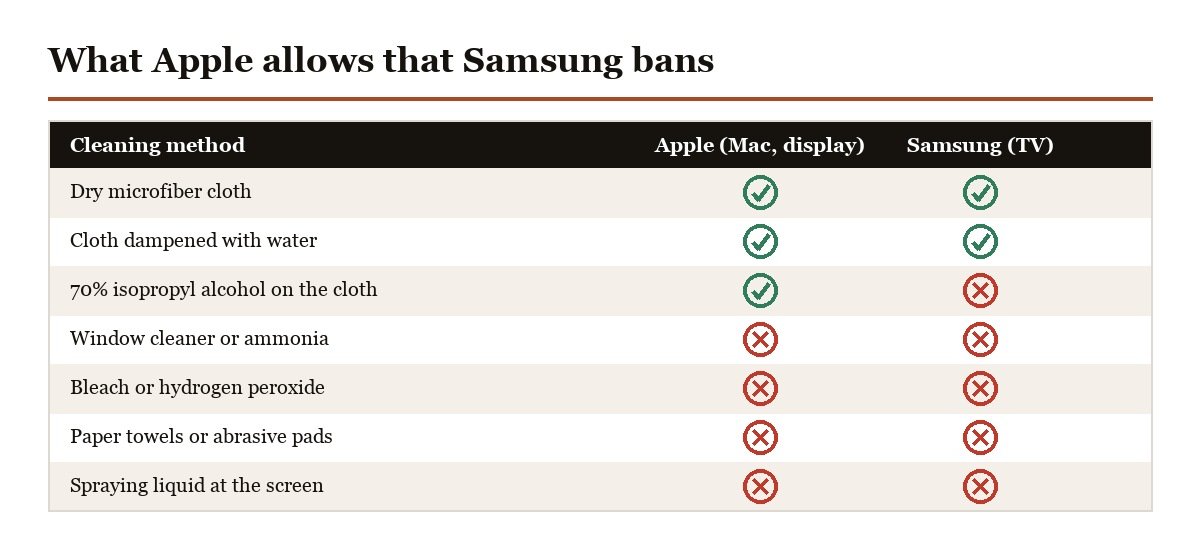
The practical rule is to follow the maker of the screen in front of you rather than a general article. For a Mac or an Apple display, 70 percent IPA on the cloth is sanctioned by Apple itself. For a television, it is not. When you have no guidance at all, distilled water on a microfiber cloth is always safe.
Cleaning a MacBook Screen, Touch Bar and Case
Apple publishes a separate routine for laptops, and it is stricter about the screen than most people expect. For the display, Apple says to shut the computer down, unplug the power adapter, then dampen a soft lint-free cloth with water only. Not a cleaner, not alcohol, water.
- Routine cleaning: water only on the cloth, with the machine shut down and unplugged.
- Hard-to-remove smudges: a cloth moistened with a 70 percent IPA solution may be used on the display or the enclosure.
- Touch Bar and Touch ID: clean these exactly as you clean the display, with a cloth dampened with water only.
- The outside of the machine: a damp soft cloth, avoiding moisture in any opening.
The distinction between the two liquids is the part worth keeping. Water is the default for every clean, and alcohol is reserved for marks that water will not lift, which keeps a solvent off the panel almost all of the time. For the case and keyboard Apple rules out aerosol sprays, solvents, abrasives and anything containing hydrogen peroxide, because those attack the finish rather than the glass.
Two habits cause most laptop screen damage and neither involves a cleaning product. The first is closing the lid on something left on the keyboard, which presses it into the panel. The second is excessive wiping, which Apple warns about directly. If a mark is not coming off, stop and come back to it with a fresh damp cloth rather than scrubbing at it.
Matte, Glossy and Nano-Texture Screens
Screen finishes are not equally robust, and one of them has rules of its own that are easy to break expensively.
- Glossy glass: the most forgiving. Water on a cloth handles nearly everything.
- Matte and anti-glare: the coating is the fragile part. Water only, light pressure, no solvents.
- Nano-texture glass: etched rather than coated, and Apple says to clean it only with the polishing cloth supplied with the device.
Apple’s nano-texture instructions go further: for infrequent hard-to-remove smudges the supplied cloth may be moistened with a 70 percent IPA solution, and the cloth itself should be hand-washed with dish soap, rinsed thoroughly and left to air dry for at least 24 hours. Using an ordinary cloth on nano-texture glass can damage the etched surface permanently.
How Often to Clean a Screen
Less often than you would think, and more gently. Every clean carries a small risk, so the aim is to keep dust off rather than to polish constantly. Keeping airborne dust down reduces how often it settles there at all, which our guide to the best air purifiers covers.
- Dust weekly with a dry cloth, which prevents the buildup that needs scrubbing later.
- Wet clean monthly, or when fingerprints become distracting.
- Clean immediately after anything wet lands on it, before it dries on.
- Wash the cloth itself without fabric softener, which coats the fibres and ruins them.
A desk that collects less dust needs less cleaning, which is part of the case for a desk mat that can be wiped down rather than a bare wooden top that sheds and holds dust around the monitor stand. Keeping the floor under it clear helps as well, and our guide to the best robot vacuums covers the machines that do it unattended. A wipe-clean mat is the practical fix, which our guide to the best desk pad compares by material.
Frequently Asked Questions
Can you use Windex on a computer screen?
No. Window cleaners contain ammonia, and Samsung states that cleansers with solvents such as alcohol, benzene, ammonia or acetone can strip the anti-glare coating and cause permanent damage. Apple similarly says not to use window cleaners on its displays. Use water on a microfiber cloth instead.
Is it safe to use alcohol wipes on a screen?
On Apple products, yes. Apple says a 70 percent isopropyl alcohol wipe or a 75 percent ethyl alcohol wipe may be used gently on hard, nonporous surfaces including the display. Samsung says not to use alcohol on its TVs. Check the maker of your screen rather than applying one rule to everything.
Why does my screen have streaks after cleaning?
Usually too much liquid, tap water, or a cloth that has been washed with fabric softener. Use distilled water so minerals do not dry on the glass, dampen the cloth rather than the screen, and finish with a dry low-pile cloth. Softener coats microfiber fibres and stops them absorbing anything.
Can you clean a screen with a baby wipe?
It is not worth the risk. Most baby wipes contain mild detergents and preservatives that are not meant for optical coatings, and Apple lists only 70 percent isopropyl alcohol wipes, 75 percent ethyl alcohol wipes and Clorox Disinfecting Wipes as acceptable on its hardware. A damp microfiber cloth does the same job with nothing left behind.
Can you use a screen cleaning spray?
Yes, if it is intended for displays, which Apple explicitly recommends for iMac screens. The important part is never spraying it at the screen. Apply it to the cloth, because liquid sprayed at a panel runs down into the bezel and can get inside the display.





